
Apple announced macOS Golden Gate 27 today at WWDC 2026, and this year’s Mac update looks less like a flashy rebuild and more like a cleanup release with several important AI, search, Safari, and usability upgrades. That is not a bad thing. After macOS Tahoe 26 introduced the big Liquid Glass design change, Golden Gate appears to be focused on making the Mac feel more consistent, faster, easier to search, and more useful with Apple Intelligence.
For home users and small businesses in Port Saint Lucie, Jensen Beach, Fort Pierce, Vero Beach, and the surrounding area, the practical takeaway is simple: Golden Gate looks promising, but the first beta is not something to install on a work Mac. Wait for the public release unless you are testing software, have a spare Mac, or know exactly how to roll back.
Quick Summary
- Name and version: macOS 27 is called macOS Golden Gate.
- Main theme: refinement, performance work, Liquid Glass polish, Search improvements, and Apple Intelligence features.
- Big customer benefit: a smarter Spotlight/Search experience, a more capable Siri AI interface, better Safari organization, and clearer control over the Mac’s glassy interface effects.
- Big caution: early reporting says Golden Gate drops Intel Mac support. Intel Mac owners should plan around macOS Tahoe 26 unless Apple’s final compatibility list says otherwise.
- Upgrade advice: do not put the developer beta on a production Mac. Back up first, check app compatibility, and wait for the fall public release for normal daily-use machines.
Liquid Glass Gets A Cleanup
macOS Tahoe 26 brought Apple’s Liquid Glass design language to the Mac, but not everyone loved the first pass. Some people found parts of the interface too translucent, too inconsistent, or harder to read than older macOS versions. Golden Gate 27 appears to be Apple’s answer to those complaints.
According to WWDC coverage from 9to5Mac, Apple is refining Liquid Glass across the system and adding more control over how intense the effect feels. That matters because readability is not a cosmetic issue on a work computer. If a transparent sidebar or toolbar makes text harder to scan, it slows people down.
Apple is also tightening the visual consistency of windows and apps. 9to5Mac reports that Golden Gate brings a fixed corner radius across system windows and apps, including apps that have not been updated yet. MacRumors also notes a unified top toolbar and sidebars that expand to the edge of the window. Those sound small, but they can make the system feel less patchy after a major redesign.
Search, Spotlight, And Siri AI
The most useful change for many Mac owners may be search. Apple reportedly rebuilt the foundation that powers search across Spotlight, Photos, Mail, and related system experiences. TechCrunch reported that Apple described this as a foundation rebuild for Search across iOS, iPadOS, and macOS.
That is a big deal because unreliable search is one of those computer problems that quietly wastes time. If a customer invoice, scanned PDF, downloaded form, or email attachment does not show up when you search for it, the Mac feels broken even when the file is technically still there.
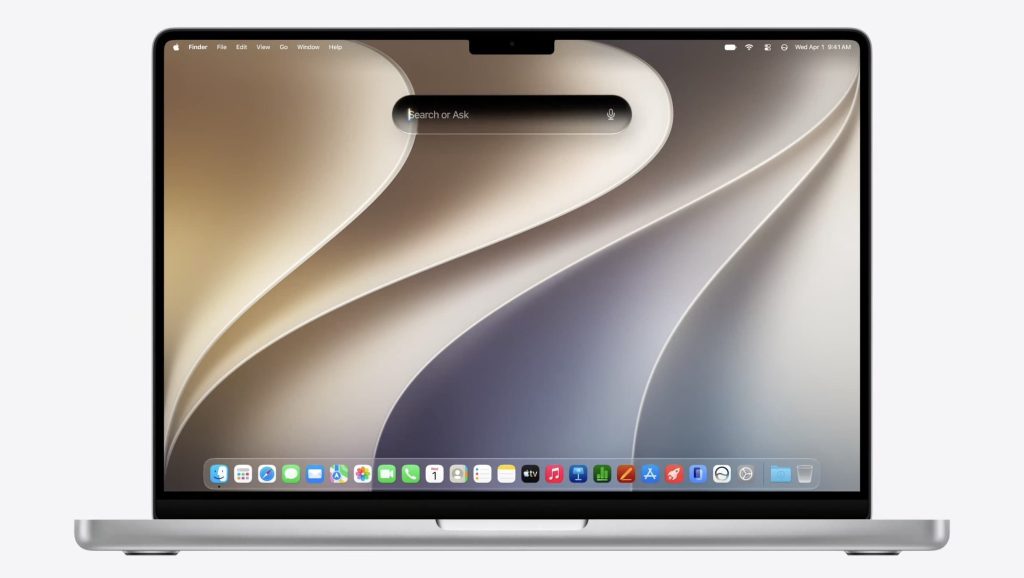
Golden Gate also introduces a new Search or Ask interface in Spotlight. MacRumors says this is powered by the revamped Siri, while 9to5Mac reports that the system can detect when a typed Spotlight question should be routed to Siri AI. From there, users can continue the conversation in a dedicated window and drag in files or attachments for context.
Apple’s larger Siri AI story is that Siri becomes more conversational, more aware of personal context, and more capable of acting across apps. AppleInsider reports that Siri AI can work through Spotlight prompts, access a user’s own data while preserving privacy, and use broader world knowledge for answers. For regular users, the promise is less “ask a voice assistant a trivia question” and more “help me find, summarize, draft, or act on the work already on my Mac.”
There is one caveat: AI availability can vary by region, language, hardware, and Apple’s rollout schedule. Treat any AI feature list as “available if your Mac and region qualify,” not as a guarantee that every Mac in the office will get every feature on day one.
Safari Adds Smarter Tabs And Notify Me
Safari is getting several Apple Intelligence features in Golden Gate. 9to5Mac reports that Safari can automatically group tabs based on context. That could be useful for people who routinely end up with a messy set of browser windows for bills, vendors, shipping, banking, research, and support tickets.
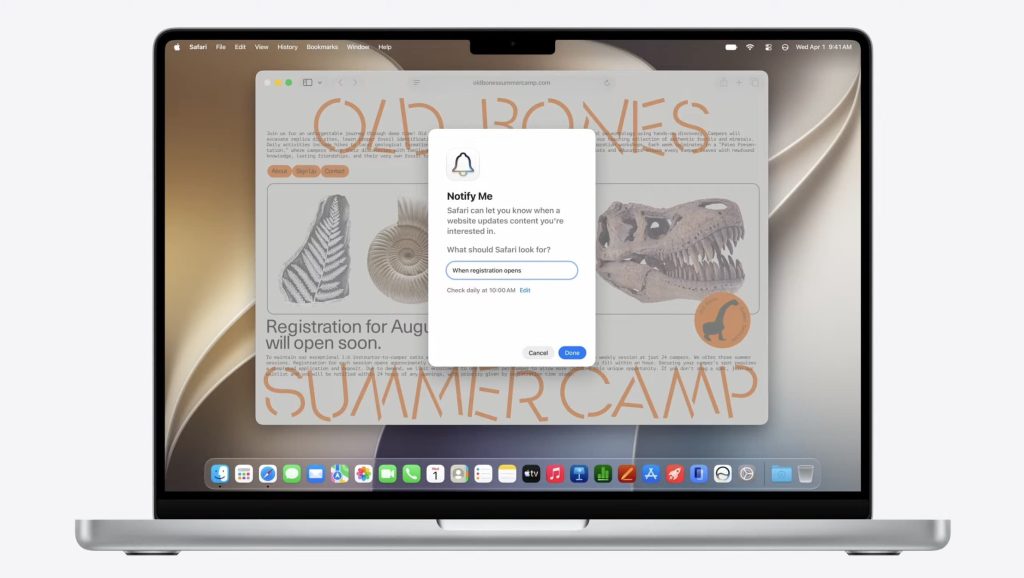
The more interesting practical feature is Notify Me. AppleInsider describes it as a way for Safari to notify users when a selected website has been updated. Apple’s demo screenshot shows it watching for registration opening on a summer camp page. For real-world use, this could help with appointment pages, registration windows, stock notices, event signups, permit portals, school pages, and vendor announcements.
Safari is also reportedly getting an AI-powered extension creation feature where a user can describe what they want in plain language and Safari creates an extension. That sounds powerful, but businesses should be careful with it. Browser extensions can see sensitive page data depending on permissions. If Apple ships this broadly, companies should still have a policy for which extensions are allowed on work Macs.
Writing Tools, Visual Intelligence, And Image Playground
Writing Tools are getting more capable in Golden Gate. 9to5Mac reports that the updated tools can help draft email, adjust language based on how you communicate with a contact, and give feedback on writing. That could be useful for customer emails, vendor messages, estimates, and internal documentation, but it should not replace review. Anything involving pricing, legal terms, medical details, financial information, or customer commitments still needs a human check before sending.
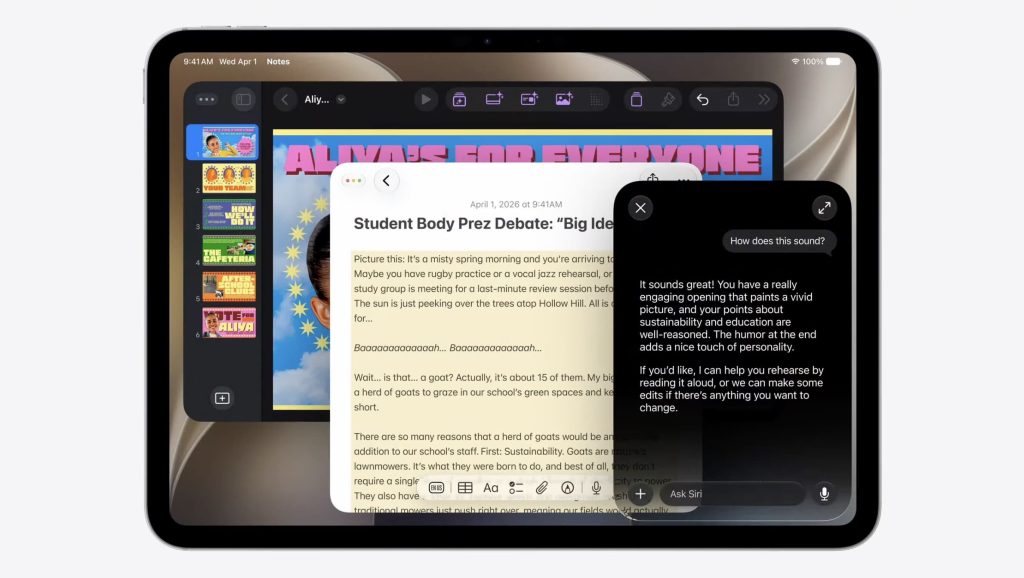
Visual Intelligence is also expanding on the Mac. The reported workflow is similar to a screenshot tool: select part of the screen, ask for context, and continue in Siri. 9to5Mac says users can take action from what is on screen, including adding multiple calendar events from visible information. This is exactly the kind of feature that can save time if it works reliably, but it also means users should pay attention to privacy prompts and what content they are asking the assistant to inspect.
Image Playground is getting a refresh too, with more flexible styles, image editing tools, contact posters, wallpapers, and APIs for developers. For home users, that mostly means more creative options. For businesses, the useful part may be faster internal visuals, but brand-sensitive work should still use approved images and reviewed copy.
Compatibility And Intel Mac Warning
The compatibility story is the biggest upgrade-planning issue. AppleInsider reports that macOS Golden Gate 27 will not support Intel-based Macs. If that holds in Apple’s final compatibility list, Golden Gate becomes the first macOS release that is Apple silicon only.
In plain English: Macs with M1, M2, M3, M4, M5, or newer Apple silicon chips are the expected Golden Gate path. Intel MacBook Pro, Intel MacBook Air, Intel iMac, Intel Mac mini, Intel Mac Pro, and Intel iMac Pro models should be treated as staying on macOS Tahoe 26 unless Apple posts a different final support matrix.
That does not automatically mean Intel Macs become useless. It does mean owners should plan ahead. If an Intel Mac is used for payroll, accounting, design, point-of-sale administration, remote work, or customer records, the smart move is to decide whether it will remain a supported secondary machine, be replaced with an Apple silicon Mac, or be retired from sensitive work.
What Businesses Should Do Before Upgrading
- Do not install the developer beta on a work Mac. Early macOS betas can break printers, VPN tools, accounting software, security tools, browser extensions, and line-of-business apps.
- Make a full backup first. Time Machine, cloud file sync, and a tested recovery plan are not optional before a major OS upgrade.
- Check your critical apps. Confirm compatibility for QuickBooks, Adobe apps, Microsoft 365, VPN clients, remote desktop tools, label printers, scanners, and any industry-specific software.
- Inventory Intel Macs now. If a Mac cannot move past Tahoe, decide whether it can safely remain in service and for how long.
- Review AI and extension policies. Siri AI, Visual Intelligence, Writing Tools, and AI-created Safari extensions may be useful, but businesses should define what customer or company data is allowed in those workflows.
- Schedule upgrades instead of winging it. A planned upgrade window is better than losing half a workday to an unexpected app or printer issue. We recently covered that same idea in our monthly update window tech tip.
My recommendation for most customers: watch the beta cycle, let developers update their apps, and plan Golden Gate testing on one non-critical Mac first. If the public release lands in September or October, that is when regular users should start thinking about upgrading, not today.
FAQ
When will macOS Golden Gate 27 be available?
Apple announced Golden Gate at WWDC on June 8, 2026. Developer betas are expected first, public beta access usually follows later, and the public release is expected in the fall if Apple follows its normal macOS schedule.
Should I install the macOS Golden Gate beta?
Not on your main Mac. Betas are for testing. If you depend on the Mac for work, school, billing, customer communication, or business operations, wait for the public release and make a full backup before upgrading.
Will Intel Macs get macOS Golden Gate 27?
Early WWDC reporting says Golden Gate drops Intel Mac support and moves macOS fully to Apple silicon. Until Apple’s final compatibility page is posted, Intel Mac owners should assume macOS Tahoe 26 may be their last major macOS version.
What is the most useful Golden Gate feature?
For most people, the Search and Spotlight rebuild may matter more than the visual changes. If Apple makes local search more reliable and connects it cleanly with Siri AI, that could save real time every day.
Sources
- Apple Developer: WWDC26
- Apple Newsroom: WWDC26 kicks off June 8
- 9to5Mac: Apple announces macOS Golden Gate 27
- MacRumors: Apple Announces macOS Golden Gate
- AppleInsider: macOS 27 Golden Gate delivers more Liquid Glass and updated Siri
- TechCrunch: WWDC 2026 announcements