Short version: Apple has officially previewed iOS 27. The final release is scheduled for fall 2026, the developer beta is already available, and the public beta is listed as coming soon. The biggest changes are Siri AI, smarter Apple Intelligence features, better Photos tools, Passwords upgrades, child safety improvements, Safari updates, and more privacy-focused on-device AI.
If you rely on your iPhone for work, banking, business calls, two-factor authentication, or family management, this is not a “install the first beta on your main phone” update. It looks useful, but the safe path is to wait for the public beta on a spare device or wait for the finished fall release.
In this article
- Release date and beta timing
- Quick bullet points: the biggest changes
- Siri AI and personal context
- Apple Intelligence changes
- Photos, Camera, and Visual Intelligence
- Child safety and family controls
- Security and business cautions
- Should you install it?
iOS 27 release date and beta timing
- Developer beta: Apple Developer lists iOS 27 beta build 24A5355q as released on June 8, 2026.
- Public beta: Apple’s beta page says the iOS 27 public beta is coming soon.
- Final release: Apple’s iOS preview page says iOS 27 is coming this fall.
- Likely timing: Apple has not posted an exact final release day yet. Based on normal Apple timing, the finished update will likely land around the fall iPhone release window, but the only official wording right now is “this fall.”
- Siri AI timing: Apple says Siri AI is coming in English later this year, so not every iOS 27 feature should be expected on day one for every user and language.
Quick bullet points: the biggest iOS 27 changes
- Siri AI becomes the headline feature: Apple is positioning Siri AI as more conversational, more aware of personal context, and better integrated into apps.
- Visual Intelligence gets deeper: iOS 27 adds more ways to ask questions about what the camera or screen is seeing.
- Messages gets smarter suggestions: Apple shows contextual suggestions and photo suggestions inside conversations.
- Photos gets new AI tools: Apple’s preview highlights reframing and smarter image-related assistance.
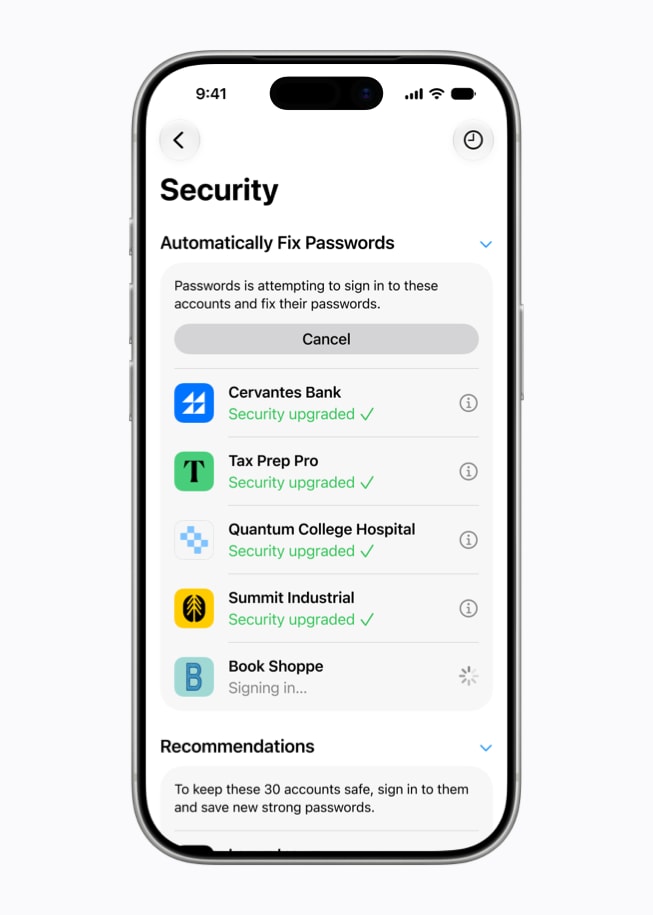
- Passwords gets an important security upgrade: Apple Intelligence can help automatically upgrade certain saved logins toward passkeys when supported.
- Safari gets more helpful alerts: Apple Intelligence can notify users about pages or availability when it makes sense.
- Child accounts get stronger controls: Apple is adding more child safety, communication safety, Screen Time, and browsing controls.
- Privacy remains a core pitch: Apple continues to emphasize on-device processing and Private Cloud Compute for more complex requests.
- Not every feature works on every iPhone: Apple Intelligence features usually require newer hardware, so older supported iPhones may get iOS 27 without getting every AI feature.
Siri AI and personal context
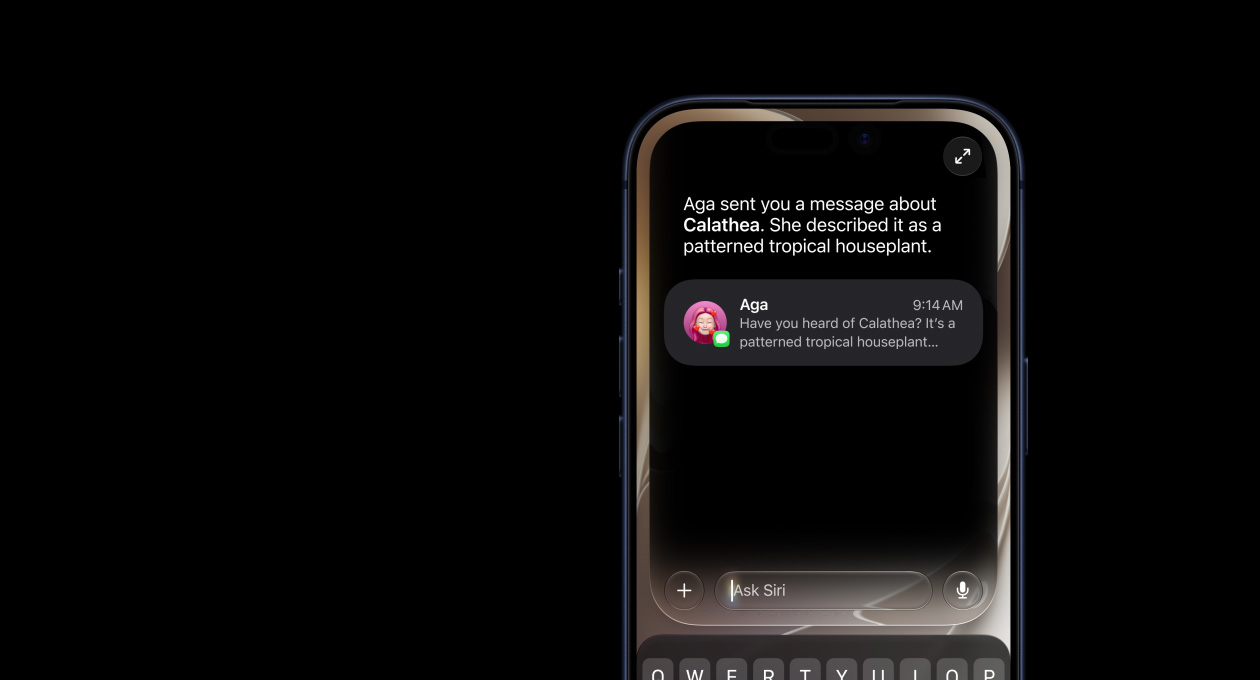
The biggest iOS 27 story is Siri AI. Apple describes it as a more capable and personal assistant that can understand context, help across apps, answer questions based on what is on screen, and use personal information with privacy protections.
- More natural conversations: Siri AI should be better at follow-up questions and context instead of treating every request like a separate command.
- Personal context: Apple shows examples where Siri understands information from messages, photos, and other personal content.
- Onscreen awareness: Siri AI can reason about what is currently visible on the iPhone screen.
- In-app action: Apple is showing Siri AI as something that can help inside apps, not just set timers or answer generic questions.
- Language rollout matters: Apple says Siri AI is coming in English later this year, so businesses should not assume every user, device, or region gets the same experience immediately.

Apple Intelligence changes people will notice
Apple Intelligence is becoming more practical in iOS 27. The useful part is not just “AI is in the phone.” The useful part is where it can save time without sending every small task through a random third-party app.
- Passwords: Apple says Apple Intelligence can help automatically upgrade eligible accounts toward passkeys. That is useful because passkeys reduce password reuse, phishing risk, and stolen-password problems.
- Safari: Apple is showing Notify Me-style features and page assistance that can reduce manual checking.
- Messages and Mail: Apple is adding more suggestions that can help with replies, photos, and context.
- Calendar and Phone: Apple Intelligence examples include event creation and call context, which could be useful for busy small-business owners.
- Home: Apple is showing smarter descriptions and search for home video clips.
Photos, Camera, and Visual Intelligence
For everyday users, the photo and camera changes may be some of the most visible parts of iOS 27. Apple is showing more AI-assisted help for understanding images, asking questions about what the camera sees, and reframing photos.
- Visual questions: Siri mode in Camera can answer questions about real-world objects in view.
- Photo reframing: Apple’s screenshots show a Reframe option that can help adjust a photo composition.
- Image Playground improvements: Apple continues expanding generated-image and creative tools across the ecosystem.
- Practical caution: AI photo tools are useful, but businesses should avoid using edited images in ways that mislead customers, insurers, clients, or vendors.

Child safety and family controls
Apple is also previewing stronger child safety and family controls. These are worth paying attention to because many families and small businesses use the same Apple IDs, iPads, iPhones, and Screen Time settings across children, employees, and shared devices.
- Child account setup: Apple is making child-account management more visible and easier to configure.
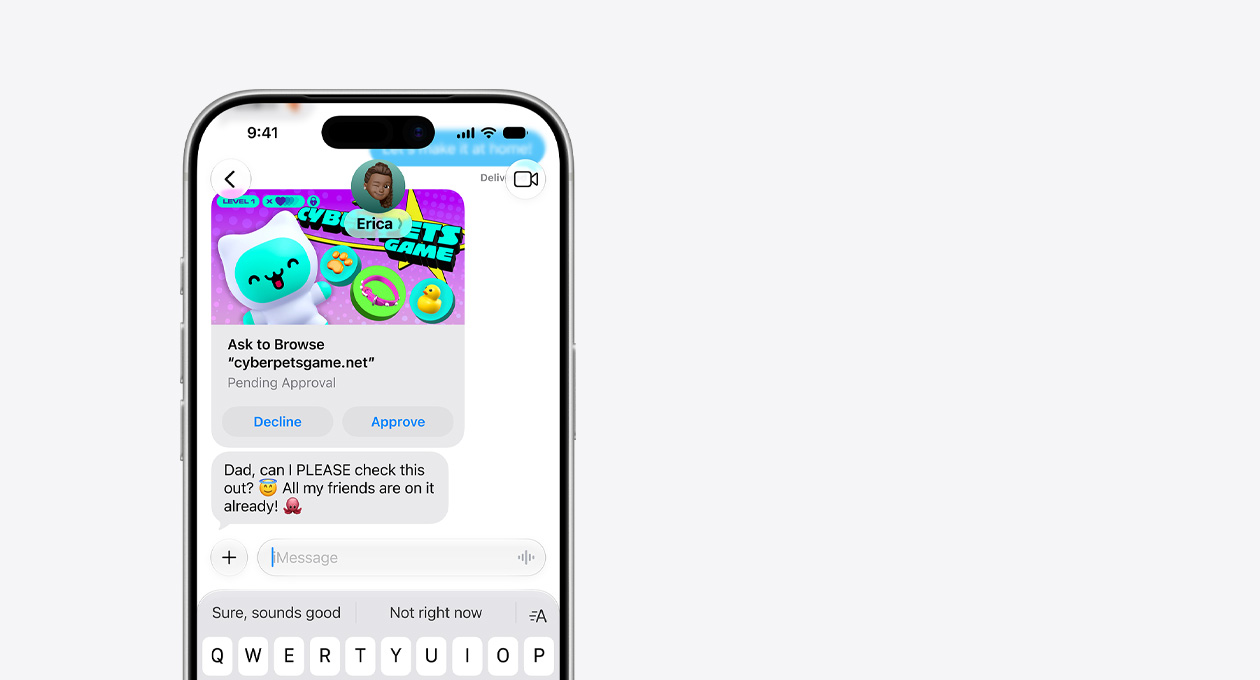
- Ask to Browse: Apple is showing new approval flows for child browsing requests.
- Communication Safety: Apple continues improving warnings and protections around sensitive content.
- Screen Time schedules: Apple is adding more scheduling and allowance controls.
- Business note: Family controls are not a replacement for proper device management. Businesses should still use managed Apple IDs, MDM, and clear policies when iPhones or iPads are used for work.
Security and business cautions before updating
- Do not install beta software on a work-critical phone: Beta releases can break banking apps, authentication apps, Bluetooth devices, car integrations, VPNs, and business apps.
- Back up first: Use iCloud backup or a trusted computer backup before any major iOS upgrade.
- Check your MFA apps: If your phone handles Microsoft 365, Google Workspace, banking, or vendor logins, make sure recovery codes and backup methods are in place before upgrading.
- Review Apple Intelligence settings: Businesses should understand what features are enabled, what data can be used for context, and which devices are eligible.
- Test before company-wide rollout: If your team uses iPhones for field work, payments, photos, remote access, or customer communication, test iOS 27 on one spare device first.
For local businesses around Port Saint Lucie, Jensen Beach, Fort Pierce, and Vero Beach, the best upgrade plan is simple: wait for the finished fall release unless you have a real reason to test early. If you do test early, use a spare phone and document what breaks.
Should you install iOS 27 right away?
- Install the developer beta: Only if you are a developer or testing on a spare device.
- Install the public beta: Reasonable for curious users on a non-critical device once Apple opens it, but still risky for your main phone.
- Wait for the fall release: Best choice for most people and nearly every business phone.
- Wait for the first bug-fix update: Best choice for businesses that depend heavily on iPhone apps, MFA, payments, or Bluetooth accessories.
Need help checking whether your iPhones, iPads, backups, Apple IDs, MFA apps, and business apps are ready for a major iOS upgrade? The IT Guys can help you plan the update before it becomes a workday problem.
Sources
- Apple iOS 27 Preview
- Apple Beta Software Program
- Apple Developer Releases
- Apple Newsroom: next-generation Apple Intelligence, Siri AI, and OS updates
- Apple Newsroom: Siri AI
- Apple Newsroom: Apple Intelligence everyday experiences