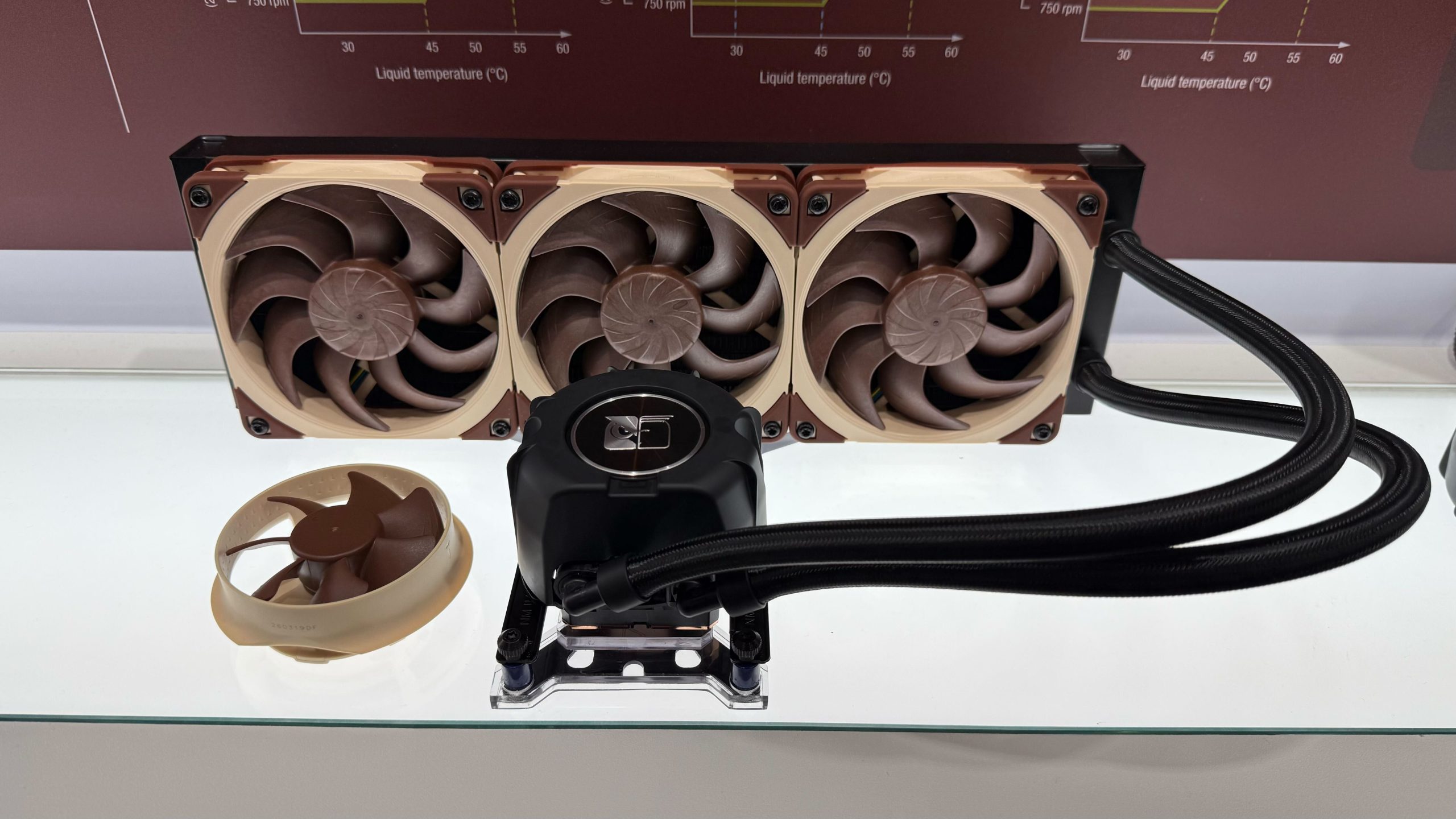
Noctua has finally stepped into the all-in-one liquid cooler market. On June 16, 2026, the company introduced the NL-LC1 family, a premium AIO cooler lineup built around Asetek’s Emma V2 pump platform, Noctua’s G2-series fans, and a new pump-noise absorber meant to reduce one of the biggest complaints people have with liquid coolers: pump vibration and hum.
This is a notable release because Noctua has spent years being known for quiet, high-end air coolers and fans. The NL-LC1 series is not a cheap RGB cooler meant to fill a case with lights. It is Noctua’s attempt to build a liquid cooler for people who care about cooling performance, acoustic behavior, serviceable mounting hardware, and long-term support.
Quick Take
- Good: Noctua is pairing proven Asetek liquid-cooling hardware with its own fan tuning, acoustic accessories, SecuFirm2+ mounting, and a six-year warranty.
- Good: The socket support is broad for a new cooler: AMD AM5 and AM4, plus Intel LGA1851, LGA1700, and upcoming LGA1954 support.
- Good: Noctua is offering 240 mm, 360 mm, and 420 mm sizes, so buyers can match the cooler to small-form-factor builds, mainstream towers, and large high-airflow cases.
- Caution: Pricing is premium. Current launch pricing sits around the $220-$325 range depending on size and retailer, so this is not the budget AIO pick.
- Caution: The 420 mm model requires a large case with real 420 mm radiator clearance. Many mid-towers that fit 360 mm radiators will not fit 420 mm cleanly.
The Three NL-LC1 Models
The lineup is simple: a 240 mm model, a 360 mm model, and a 420 mm model. The difference is not just radiator length. The smaller two models use Noctua’s 120 mm NF-A12x25 G2 PWM fans, while the 420 mm model moves to 140 mm NF-A14x25 G2 PWM fans. That matters because fan diameter changes airflow, radiator fit, noise profile, and case compatibility.
| Model | Radiator class | Fans | Noctua rating | Best fit |
|---|---|---|---|---|
| NL-LC1-24 | 240 mm | 2 x NF-A12x25 G2 PWM, 120 mm | NSPR 210 | Quiet compact and small-form-factor builds that still have 240 mm radiator support |
| NL-LC1-36 | 360 mm | 3 x NF-A12x25 G2 PWM, 120 mm | NSPR 248 | Mainstream gaming, workstation, and high-performance desktop builds |
| NL-LC1-42 | 420 mm | 3 x NF-A14x25 G2 PWM, 140 mm | NSPR 276 | Large towers, lower fan speeds, and high-end CPUs where case clearance is available |
Noctua’s own product pages list the 240 mm cooler at a radiator size of roughly 279.5 x 120 x 30 mm. The 360 mm and 420 mm versions scale up around the same 30 mm radiator thickness, with the 420 mm model using the wider 140 mm fan format. The practical takeaway is straightforward: check radiator length, radiator width, fan thickness, motherboard heatsink clearance, top-panel clearance, front-panel clearance, and hose routing before ordering.
More Detailed Specs To Check
| Spec | NL-LC1-24 | NL-LC1-36 | NL-LC1-42 |
|---|---|---|---|
| Radiator size | 279.5 x 120 x 30 mm | 399.5 x 120 x 30 mm | 459.5 x 143.7 x 30 mm |
| Radiator materials | Aluminum fins/tubes, steel frame | Aluminum fins/tubes, steel frame | Aluminum fins/tubes, steel frame |
| Fins per inch | 20 FPI | 20 FPI | 20 FPI |
| Fan format | 2 x 120 x 120 x 25 mm | 3 x 120 x 120 x 25 mm | 3 x 140 x 140 x 25 mm |
| Fan model | NF-A12x25 G2 PWM | NF-A12x25 G2 PWM | NF-A14x25 G2 PWM |
| Noctua NSPR rating | 210 | 248 | 268 |
| Tube length | 400 mm | 410 mm | 450 mm |
| Screw threads | UNC 6-32 | UNC 6-32 | UNC 6-32 |
The pump-side specs are shared across the family. Noctua lists an Asetek Emma V2 pump block with a 70 mm block height, three-phase motor, closed centrifugal impeller, ceramic sleeve and shaft bearing, 12 V rated voltage, 9.5 V starting voltage, 13.2 V maximum operating voltage, 500 mm cable, and 4-pin PWM connector. Power draw is listed at 2 W typical and 6 W maximum.
The pump has three selectable profiles: Quiet mode up to 2100 rpm, Balanced mode up to 2600 rpm, and Manual mode up to 3400 rpm. Noctua also lists 750 rpm at both 0% and 20% PWM. The rated maximum pump-noise numbers are <5 dB(A) in Quiet mode, 7.8 dB(A) in Balanced mode, and 14.9 dB(A) in Manual mode. That is why the pump profile matters: for most normal users, Balanced or Quiet is likely where this cooler makes the most acoustic sense.
Socket Support: AMD And Intel Fitment
The NL-LC1 family uses Noctua’s SecuFirm2+ mounting system. According to Noctua’s launch and product information, the supported desktop sockets are:
- AMD: AM5 and AM4
- Intel: LGA1851, LGA1700, and LGA1954
That covers current AMD Ryzen platforms, the recent Intel LGA1700 generation, Intel’s newer LGA1851 platform, and Intel’s next high-end/desktop direction with LGA1954. For customers, the important point is not just whether the bracket exists. It is whether the cooler fits the case and whether the motherboard area has room around VRM heatsinks, memory, top-mounted radiators, and EPS power cables.
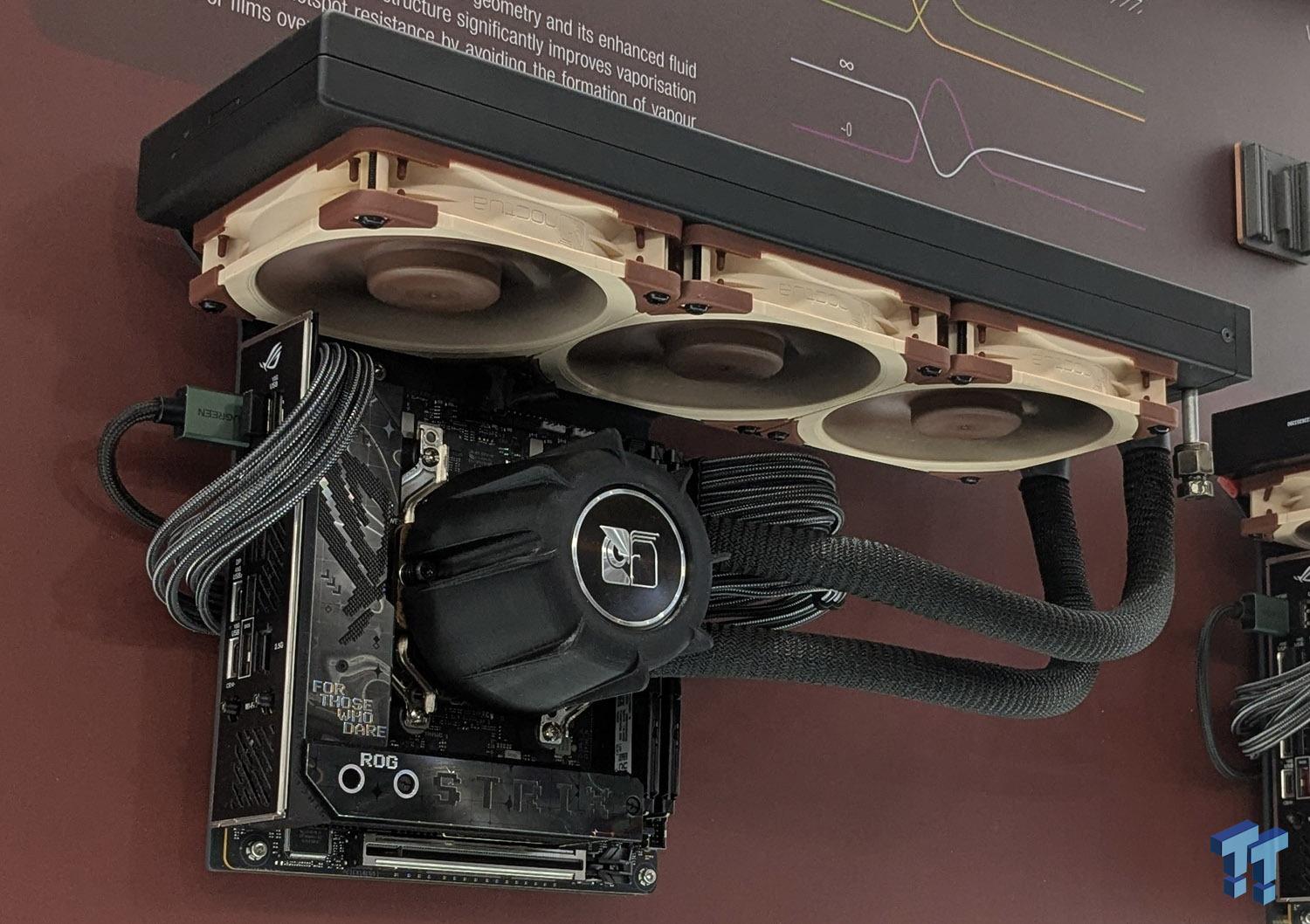
Noctua also highlights offset mounting support for newer AMD CPUs, using its NM-AMB12 offset bars. That can help position the cold plate better over AMD chiplet hotspot behavior. It is the kind of small mounting detail that matters more on high-core-count CPUs than most buyers expect.
What Makes This AIO Different
Most AIO coolers are built from the same broad recipe: pump block, cold plate, radiator, tubing, fans, and mounting kit. Noctua’s difference is in the acoustic and mounting details around that recipe.
Asetek Emma V2 Pump Platform
Noctua is using Asetek’s Emma V2 closed-loop liquid-cooling platform. Asetek is one of the best-known OEMs behind many premium AIO coolers, so this is not Noctua starting from an unproven pump design. That is a sensible move. The risk with any first-generation product is not just cooling performance; it is pump reliability, firmware behavior, mounting pressure, warranty handling, and long-term consistency. Starting with a mature liquid-cooling platform reduces that risk.
Pump Noise Absorber
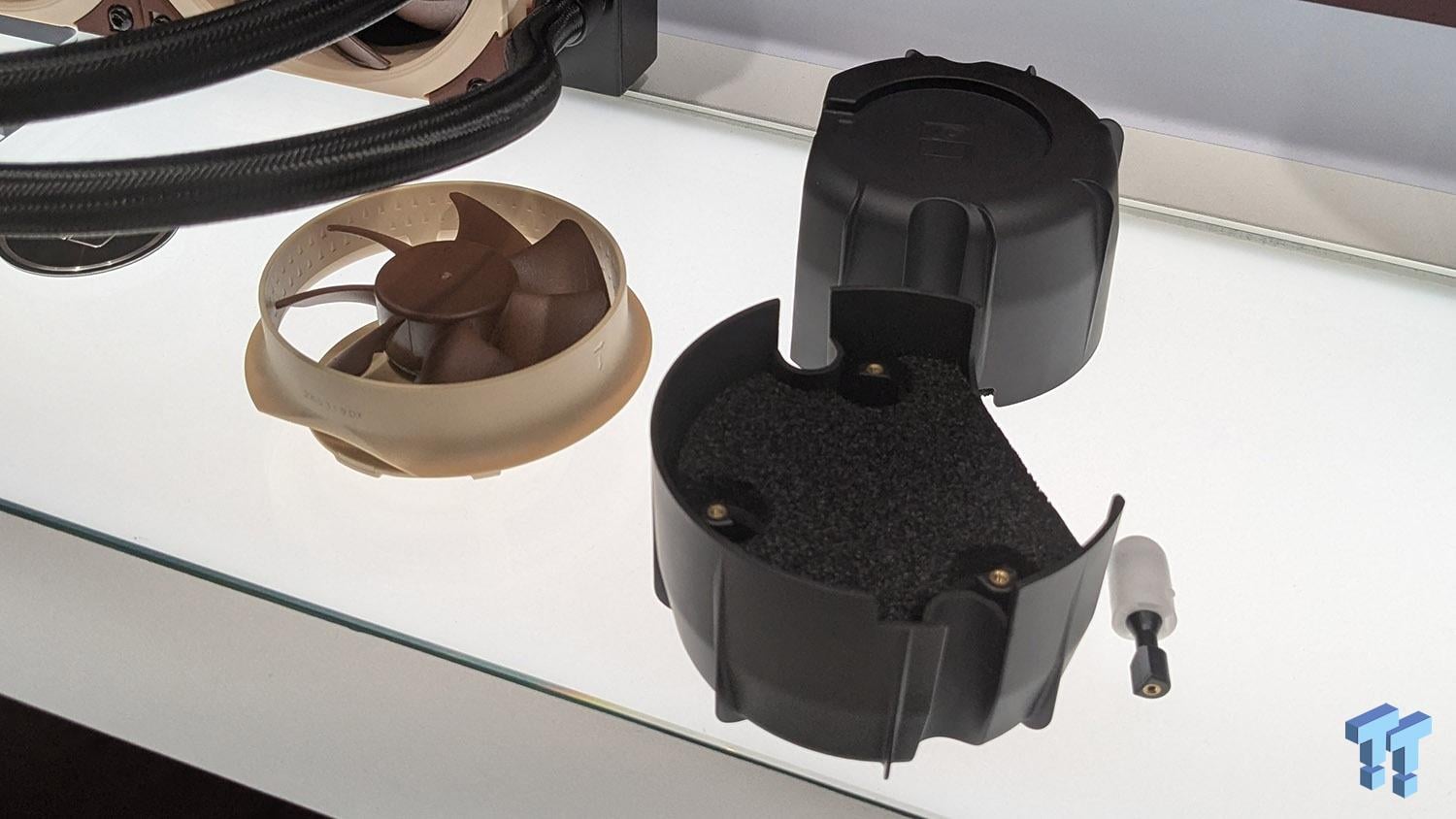
The most interesting piece is Noctua’s NL-PNA1 pump noise absorber. Noctua describes it as a three-layer acoustic soundproofing structure with a tuned-mass damper effect. In plain English: instead of only trying to make the pump quieter electronically, Noctua is adding a physical cover/absorber around the pump area to reduce the higher-pitched whine and vibration that can make AIOs annoying in quiet rooms.
That is useful because pump noise is different from fan noise. Fan noise can often be lowered with a curve. Pump noise can be more tonal, and tonal noise is easier for people to notice even when a meter says the system is not technically loud. For office PCs, recording rooms, quiet gaming setups, and living-room computers, that matters.
G2 Fans And Speed Offset Tuning
The 240 mm and 360 mm models use Noctua’s NF-A12x25 G2 PWM 120 mm fans. The 420 mm model uses NF-A14x25 G2 PWM 140 mm fans. These are pressure-focused radiator fans, not generic case fans. Noctua also mentions fan speed offsetting, where fans run at slightly different speeds to reduce acoustic interaction between them. That is a small but practical detail on multi-fan radiators because three identical fans spinning at the exact same speed can create a more noticeable combined tone.
The brown-and-beige Noctua look is still here. Some builders love it. Some builders want all-black hardware. Noctua’s choice makes the cooler instantly recognizable, but it also means this AIO is best for people who care more about acoustics and engineering than matching an all-black or RGB-heavy case theme.
Which Size Should You Buy?
Choose the 240 mm NL-LC1-24 if the case is compact, the CPU is not extreme, and the goal is a quiet premium build without forcing a huge radiator into a small chassis. This is the most practical model for many smaller builds, but it is also the one where expectations need to be realistic: a 240 mm radiator has less heat-dissipation area than the bigger models.
Choose the 360 mm NL-LC1-36 for most high-performance desktops. A good 360 mm AIO is often the sweet spot because case support is common, cooling capacity is strong, and the fans can usually run at lower speeds than a 240 mm cooler under the same load.
Choose the 420 mm NL-LC1-42 only if the case really supports it. A 420 mm radiator can be excellent for cooling and acoustics because three 140 mm fans can move air efficiently, but it is physically large. Before buying, check the case manual, not just the product listing. Confirm radiator support with fans installed, motherboard clearance, front-panel clearance, top clearance, and whether the radiator will interfere with memory or motherboard power cables.
Customer Cautions Before Ordering
- Measure twice: radiator support on a case spec sheet does not always mean a thick radiator plus fans will clear every motherboard and memory kit.
- Plan the fan direction: top exhaust and front intake behave differently. Front intake can feed the CPU cooler cooler air but may warm the GPU area.
- Do not ignore pump wiring: plug the pump and fans into the correct motherboard headers and check the BIOS/software fan-control behavior after installation.
- Keep the receipt and warranty info: Noctua lists a six-year warranty, which is important for a liquid cooler because pump life matters.
- Think about serviceability: an AIO can be quieter and cleaner than a huge tower cooler, but if the pump fails years later, the entire unit is normally replaced.
The IT Guys Takeaway
The Noctua NL-LC1 looks like a serious AIO for customers who want high-end cooling without turning the computer into a light show. The technology story is not just “liquid cooling is cooler.” The interesting part is Noctua’s focus on pump acoustics, fan speed offsetting, better mounting, and a product stack that supports current and upcoming desktop sockets.
For a gaming PC, workstation, or upgrade build, this cooler is worth considering if the case has the room and the budget makes sense. For a regular office PC or basic home computer, it is probably more cooler than needed. For a high-end CPU in a quiet room, the NL-LC1-36 and NL-LC1-42 are the models that make the most sense.
If you are in Port Saint Lucie, Jensen Beach, Fort Pierce, or Vero Beach and want help choosing or installing a CPU cooler, The IT Guys can help check case fit, socket support, BIOS fan settings, thermal paste, pump wiring, and post-install temperature behavior before the computer goes back into daily use.
FAQ
Is the Noctua NL-LC1 an air cooler or liquid cooler?
It is an all-in-one liquid cooler. It uses a pump block, liquid loop, radiator, and Noctua fans. Unlike a custom liquid loop, it is sold as a sealed cooler for normal PC installation.
Does it fit AMD AM5?
Yes. Noctua lists AMD AM5 and AM4 support for the NL-LC1 series.
Does it fit Intel LGA1851?
Yes. Noctua lists Intel LGA1851 support along with LGA1700 and LGA1954.
Is the 420 mm version automatically the best choice?
Not automatically. It has the most cooling headroom in the lineup, but it needs a large case with proper 420 mm radiator clearance. A 360 mm model is often the easier high-performance choice for normal tower builds.
Sources
- Noctua: NL-LC1 all-in-one liquid cooler launch announcement
- Noctua: NL-LC1-24 product page
- Noctua: NL-LC1-36 product page
- Noctua: NL-LC1-42 product page
- Noctua: NL-PNA1 pump noise absorber
- Tom’s Hardware launch coverage and pricing context
- TweakTown Computex photos and launch coverage
- PCGamesHardware NL-LC1 test coverage