

Short version: RAM and hard drive prices are not just having a normal bad sale week. Public price trackers, hardware reporting, and memory-industry forecasts all point to a broader supply squeeze tied heavily to AI server demand, data-center storage demand, and manufacturers shifting capacity toward higher-margin enterprise parts. If you need memory or storage for a business PC, NAS, backup system, or gaming build, the old habit of waiting for the next cheap deal may not work as well in 2026.
In This Article
- What is happening to RAM and hard drive prices
- The price examples worth watching
- Why AI demand can affect normal PCs
- The good and bad points
- What home users and small businesses should buy now
- What can probably wait
- Small-business buying checklist
- FAQ
What Is Happening To RAM And Hard Drive Prices
For the last few years, many PC buyers got used to cheap memory and storage. A 32GB RAM kit could be treated as a routine upgrade. Large hard drives were often purchased during sales for backups, media libraries, NAS boxes, surveillance systems, and small-office file storage. In 2026, that assumption is weaker.
The pressure is showing up in several places at the same time:
- DRAM pricing: Industry analyst TrendForce said conventional DRAM contract prices were expected to rise 58% to 63% quarter over quarter in Q2 2026, after a record-setting Q1 where PC DRAM pricing was projected to rise sharply.
- NAND flash pricing: The same TrendForce report projected NAND Flash contract prices up 70% to 75% quarter over quarter in Q2 2026, which matters for SSDs, USB drives, memory cards, and some business storage purchases.
- Hard drive pricing: Tom’s Hardware reported that hard drive prices in a tracked set of mainstream models rose by an average of 46% over a recent four-month window, with some popular lines up much more.
- Consumer RAM examples: RAMPriceHistory showed a U.S. DDR5-6000 CL30 32GB market average of $559.29 on May 29, 2026, with a current minimum of $390 for that category at the time it updated.
Those are not all the same kind of number. Contract pricing, retail pricing, sale pricing, and tracker averages measure different parts of the market. But they all point in the same direction: memory and storage are under unusual pressure, and normal buyers are feeling it.
The Price Examples Worth Watching
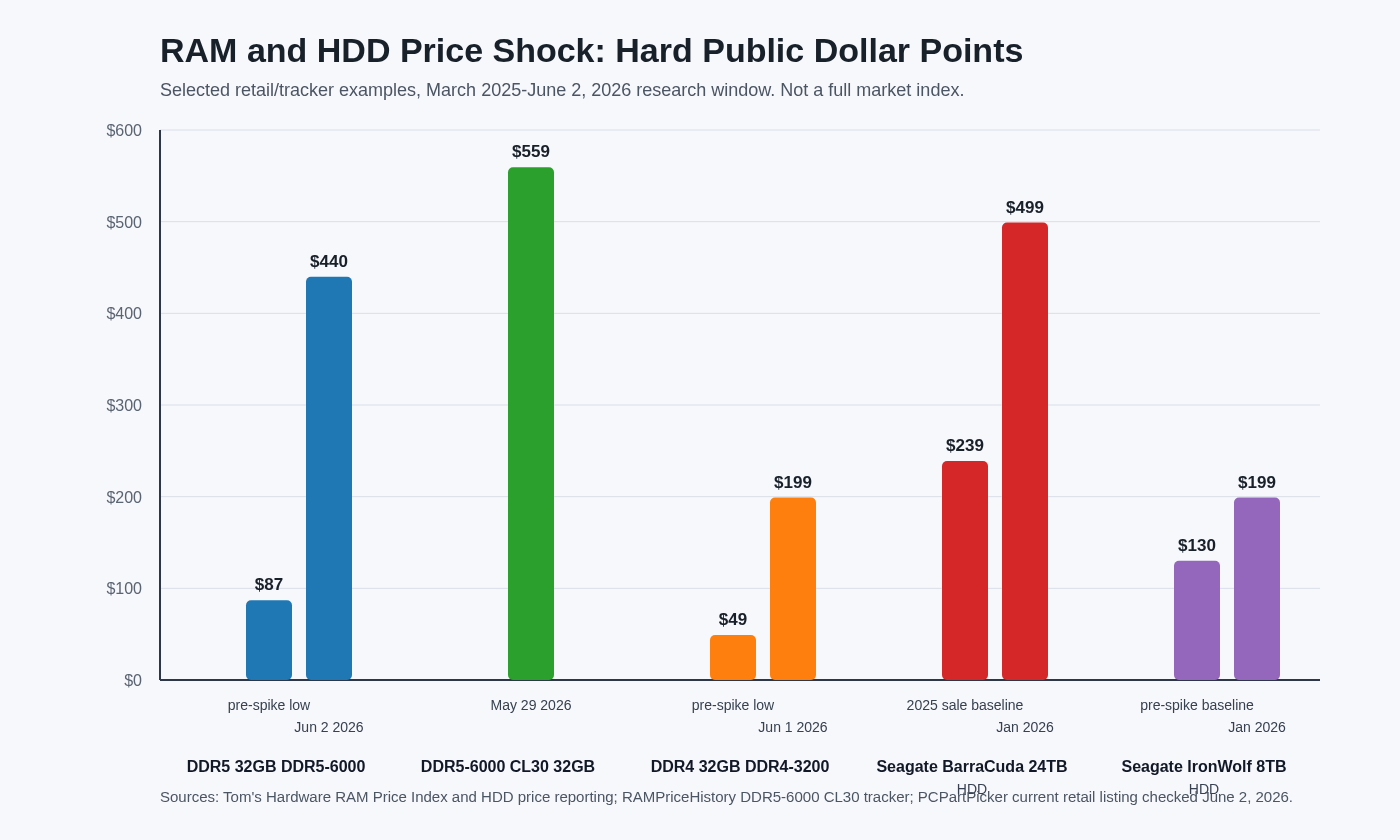
The clearest way to explain the problem is to look at normal upgrades people actually buy.
DDR5 32GB Kits
DDR5-6000 has been a popular sweet spot for newer AMD and Intel desktop builds. In a calmer market, many buyers would wait for a 32GB kit to fall near the low hundreds. In the current market, some trackers and retailer listings show far higher prices, especially for better-latency kits like DDR5-6000 CL30.
RAMPriceHistory’s U.S. DDR5-6000 CL30 32GB page showed a $390 current minimum and a $559.29 market average when updated on May 29, 2026. That does not mean every DDR5 kit costs that much; slower timings, different brands, open-box units, and short-lived sales can be lower. But it does show how expensive a once-routine 32GB upgrade can become when supply tightens.
DDR4 Upgrades
DDR4 is still important because millions of useful business and home PCs use it. The frustrating part is that older memory is not automatically cheap. When DDR4 production winds down and buyers try to extend older systems instead of replacing them, prices can stay stubbornly high.
That matters for small businesses because a $60 memory upgrade and a $180 memory upgrade lead to different decisions. If an office has several older desktops that need RAM, the difference between “cheap extension” and “nearly new-PC money” can change the repair-versus-replace math.
Large Hard Drives
Hard drives are affected differently than RAM, but the result can look similar at checkout. AI companies and cloud providers need huge amounts of storage for datasets, training material, logs, backups, and general data-center growth. When manufacturers prioritize higher-capacity enterprise drives and bulk buyers, consumer supply can tighten.
Tom’s Hardware reported several examples that are easy for normal buyers to understand: a Seagate IronWolf 8TB model at $199 compared with a prior low around $130, and a Seagate BarraCuda 24TB drive that had been seen as low as $239 during sales but was reported around $499 on Amazon through a third-party seller. Those are exactly the kinds of drives people consider for NAS storage, backup rotation, media libraries, and surveillance footage.
Why AI Demand Can Affect Normal PCs
The connection between AI and a home desktop upgrade is not always obvious, so here is the practical version.
AI servers consume a lot of high-end memory and storage. They need HBM, server DDR5, high-capacity RDIMMs, enterprise SSDs, and large amounts of bulk storage. Those parts are not identical to a desktop DDR5 kit or a NAS hard drive, but they compete for manufacturing attention, supplier allocation, wafers, packaging capacity, shipping priority, and long-term agreements with large customers.
TrendForce said DRAM suppliers were reallocating capacity toward HBM and server applications in Q2 2026, while NAND capacity was increasingly being allocated to enterprise SSDs. That is the key sentence for regular buyers: when suppliers can sell high-margin parts to data centers, consumer parts may become less available or less aggressively priced.
PC Gamer also reported comments from Team Group CEO Gerry Chen saying AI-related demand was high in the overall memory market and that the supply shortage was not limited to DRAM. Since Team Group buys chips from the major memory makers and turns them into consumer RAM and SSD products, that perspective is useful: module brands feel the shortage before it reaches the shelf.
The Good And Bad Points
The Good
- Existing systems are worth protecting. If your current PC already has enough RAM and healthy storage, it may be smarter to maintain it well instead of replacing it during a high-price window.
- Backups are more valuable now. Replacing a failed large drive can cost more than expected, so a good backup plan protects both your data and your budget.
- Buying decisions can be more disciplined. High prices force businesses to separate real needs from nice-to-have upgrades.
- Some deals still exist. Short-lived sales, open-box units, refurbished enterprise drives, and business purchasing channels may still help if the part is chosen carefully.
The Bad
- Emergency repairs cost more. Waiting until a drive fails or a PC becomes unusable can force a rushed purchase at the worst price.
- Old systems are not always cheap to extend. DDR4 can still be expensive, especially for capacity upgrades across several office PCs.
- NAS and backup expansion may hurt. Large HDDs are exactly what many home labs, small offices, and media-heavy businesses need.
- Budget PC builds are harder. When RAM and storage prices rise, the whole build gets squeezed, even if CPUs and motherboards look affordable.
- Low-quality substitutes become tempting. Cheap no-name SSDs, unknown used drives, and mismatched RAM can create reliability problems later.
What Home Users And Small Businesses Should Buy Now
This is not a recommendation to panic-buy. It is a recommendation to buy the parts that prevent downtime, data loss, or a more expensive emergency later.
Buy Backup Storage Before You Need It
If you have no good backup drive, no NAS backup, no cloud backup, or no spare storage for business-critical files, handle that first. A backup drive may feel expensive today, but losing QuickBooks files, customer documents, job photos, tax records, or family photos is worse.
For local businesses, we like a layered approach: working storage, local backup, and off-site or cloud backup. If hard drive prices are rising, that is a reason to plan capacity more carefully, not a reason to skip backup entirely.
Buy RAM When It Solves A Real Problem
If a computer is constantly paging to disk, choking with too many browser tabs, or slowing down during accounting, design, remote support, or line-of-business software, RAM can still be one of the best upgrades. But in 2026, it is worth checking the exact machine before ordering.
- Confirm whether the PC uses DDR4, DDR5, laptop SODIMM, desktop DIMM, or soldered memory.
- Check how many slots are available.
- Match speed, voltage, capacity, and form factor.
- For business machines, prefer stable, known-compatible kits over the cheapest listing.
- Do not buy RAM for a system that is already limited by an old CPU, failing drive, or unsupported operating system.
Buy NAS Drives For Planned Growth
If your NAS is already above 80% full, waiting can be risky. Full storage causes performance problems, failed backups, and messy emergency cleanup. Buy capacity intentionally, keep redundancy in mind, and remember that RAID is not a backup.
For a business NAS, do not mix random desktop drives just because they are cheap. NAS-rated drives are designed for multi-drive environments, vibration, and longer duty cycles. The right drive costs more upfront but usually makes more sense than downtime.
What Can Probably Wait
Some purchases are worth delaying or resizing.
- Cosmetic gaming upgrades: RGB RAM or oversized capacity for looks can wait unless there is a real performance need.
- Huge drives with no backup plan: Buying one giant drive and putting everything on it is not a protection strategy.
- Marginal old-PC upgrades: If the machine is near end of life, expensive DDR4 may be poor money compared with replacing the system.
- Speculative spare parts: Buying too much inventory can backfire if prices normalize later or if the parts are not compatible with future systems.
- Cheap unknown SSDs: A low price is not a deal if the drive has poor endurance, no support, or unreliable firmware.
Small-Business Buying Checklist
If you run a small office, this is the practical checklist we would use before buying RAM, SSDs, or hard drives in this market.
- List the critical machines. Which computers handle billing, scheduling, customer records, design work, or point-of-sale tasks?
- Check current RAM and storage health. Look at memory usage, free disk space, SMART health, backup success, and age of drives.
- Prioritize backup capacity. A working backup plan comes before convenience upgrades.
- Buy compatible parts, not just cheap parts. Confirm exact RAM type and drive requirements before ordering.
- Do not ignore warranty length. A business drive or SSD should have a real warranty and a vendor you can contact.
- Compare repair versus replacement. Expensive RAM for an old unsupported PC may not be smart.
- Keep one emergency spare when justified. For businesses that cannot tolerate downtime, one known-good SSD or external backup drive may be worth having on hand.
- Review cloud storage costs too. Local drives are not the only cost. Cloud backup and retention settings should be reviewed so storage bills do not creep up quietly.
What The IT Guys Recommends
For home users, the best move is usually simple: make sure your important files are backed up, do not overpay for a vanity upgrade, and check compatibility before buying RAM.
For small businesses, the better move is to make a short hardware plan. Identify which systems are worth extending, which should be replaced, and which storage devices are close to full or close to failure. Buying one planned backup drive is better than buying three random parts during an emergency.
If you are in Port Saint Lucie, Jensen Beach, Fort Pierce, Vero Beach, or nearby areas and you are not sure whether a RAM or storage upgrade makes sense, The IT Guys can check the machine first. That prevents the common mistake of spending money on parts that do not solve the real bottleneck.
FAQ
Why are RAM prices so high in 2026?
The biggest reason is tight memory supply combined with strong AI and data-center demand. Manufacturers are prioritizing server memory, HBM, high-capacity modules, and enterprise customers, which can reduce supply and pricing pressure for normal consumer RAM.
Are hard drives affected by AI too?
Yes, but differently than RAM. AI and cloud workloads need large amounts of bulk storage. When manufacturers and suppliers focus on high-capacity enterprise drives and data-center buyers, consumer and NAS drive prices can rise too.
Should I buy DDR4 or DDR5 now?
Buy the memory your existing system requires if it solves a real problem. Do not switch platforms just because one RAM type has a temporary sale. For a new build, compare the total platform cost: motherboard, CPU, RAM, storage, and long-term upgrade path.
Should I wait for prices to drop?
If the upgrade is optional, waiting can make sense. If the purchase protects backups, keeps a business machine working, or solves a daily productivity problem, waiting may cost more in downtime than it saves in parts.
Are used hard drives safe?
Used drives can be useful for labs or noncritical storage, but they are risky for primary business data unless they are tested, warrantied, and part of a real backup plan. Never trust one used drive with the only copy of important files.
Related Reading
- Quick Tech Tip: Set Devices To Lock Automatically Before You Step Away
- Quick Tech Tip: Check Your Backups Before You Need Them
- Quick Tech Tip: Set Up Guest Wi-Fi Before Sharing Your Password
Sources
- Tom’s Hardware: Hard drive prices have surged by an average of 46% since September
- TrendForce: AI server demand to drive memory contract price increases in 2Q26
- TrendForce: Memory price outlook for 1Q26 sharply upgraded
- RAMPriceHistory: DDR5-6000 CL30 32GB price history, United States
- PC Gamer: Team Group CEO warns DRAM and SSD prices will still rise
- Tom’s Hardware: DRAM and NAND contract prices projected to climb again in Q2