

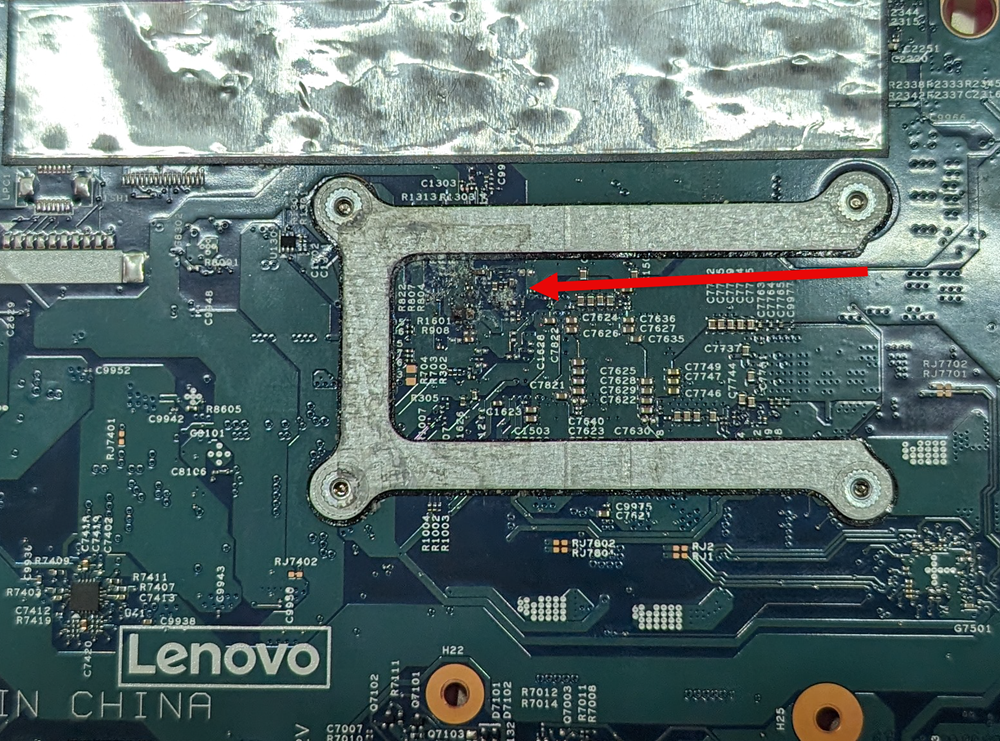
The IT Guys, just recently had a customer. She was having issues with her PC not charging anymore. We ended up ordering a brand-new battery and throwing it in for her. When we were done installing the battery, to our surprise the computer wouldn’t turn on anymore.
We were playing around with the motherboard for a while. Nothing that we did made any difference, if the laptop would turn itself back on.
We took the model number, of the laptop and ordered a replacement motherboard. After the motherboard arrived, we scheduled another appointment to install the board. We showed up and the customer stated, you are not going to believe this, it was working.
We asked if she wanted to try the other motherboard and she wanted to proceed. After removing the older motherboard. We discovered a very small piece of corrosion, on the back side of the motherboard. That was the issue the whole, time and was causing all the issues.
The customer would have chased that issue, for a while. If we would have ever swapped out the motherboard. Weird things can happen to motherboards, at the weirdest times.
Related Reading
- How to prolong the life, of your brand new NVMe SSD – related guidance from The IT Guys archive
- Windows 24H2 – The hidden Bitlocker Disk Encryption danger enabling by default, that no one is talking about – related guidance from The IT Guys archive
- VMWare Fusion 13 Pro or VMWare Workstation Pro 17.0 Are now FREE thanks to Broadcom – related guidance from The IT Guys archive
FAQ
Who is this guide for?
This article is written for regular home users and small businesses that want practical technology guidance without unnecessary jargon.
What should I check before following the steps?
Make sure the instructions match your device, account, software version, and business requirements. If something looks different, pause before guessing.
When should I ask for help?
If the device or account is important for work, contains sensitive data, or the change could affect backups, email, payments, or customer access, it is worth getting help first.