

Can old cell towers be hacked to gain access to your phone? The danger is real—but the phrase “hacked an old tower” usually describes the wrong attack. Our investigation found a documented ecosystem of fake cell towers, 2G downgrade attacks, portable SMS blasters, telecom-signaling abuse, compromised carrier systems, paid insiders, SIM swaps, commercial location-data markets, and spyware. Those threats do not all work the same way, and most do not require anyone to break into the steel tower you see beside the highway.
The most important finding is also the most reassuring: we found no credible evidence of a universal pay-to-click service that lets an ordinary buyer remotely “open” any phone through an old tower. Money can buy equipment, data, expertise, insider cooperation, or access somewhere in the telecom ecosystem—but every mechanism has conditions, limitations, and different defenses.
Research checked August 2, 2026. This is a lawful, defensive consumer warning. It intentionally omits radio settings, frequencies, signaling commands, subscriber identifiers, target locations, interception procedures, payloads, and evasion techniques.
The 30-second verdict
- Yes, rogue towers are real. NIST and CISA document fake base stations that impersonate legitimate cellular networks.
- Yes, older network technology matters. 2G lacks modern protections such as mutual authentication and can expose devices to downgrade-related risks.
- Yes, money can buy pieces of the ecosystem. Documented examples include commercially obtainable radio equipment, telecom-signaling access arrangements, paid carrier insiders, and location-data subscriptions.
- No, that does not mean someone hacked a real tower. Many incidents involve a fake tower, the carrier core, a SIM swap, a data broker, or malware on the handset.
- No, every technique does not provide full phone control. Some identify or locate a device; some affect calls or texts; some take over a phone number; spyware is the category most directly associated with broad endpoint control.
- Modern defenses help, but none is universal. End-to-end encrypted apps, disabling 2G where supported, Android network alerts, Apple Lockdown Mode for high-risk users, carrier account locks, and non-SMS multifactor authentication address different layers.
Can old cell towers be hacked? The accurate answer
A cellular site is not one single computer. The physical tower or rooftop mount may hold antenna panels and radios installed years apart. Baseband units, backhaul, management software, and the carrier’s core network may be upgraded separately. Multiple operators can share the same structure while running different equipment.
That means an old-looking tower might be carrying modern LTE or 5G. It also means a modern-looking phone can remain vulnerable to a nearby device pretending to be an older network. The age of the steel structure is not a security diagnosis.
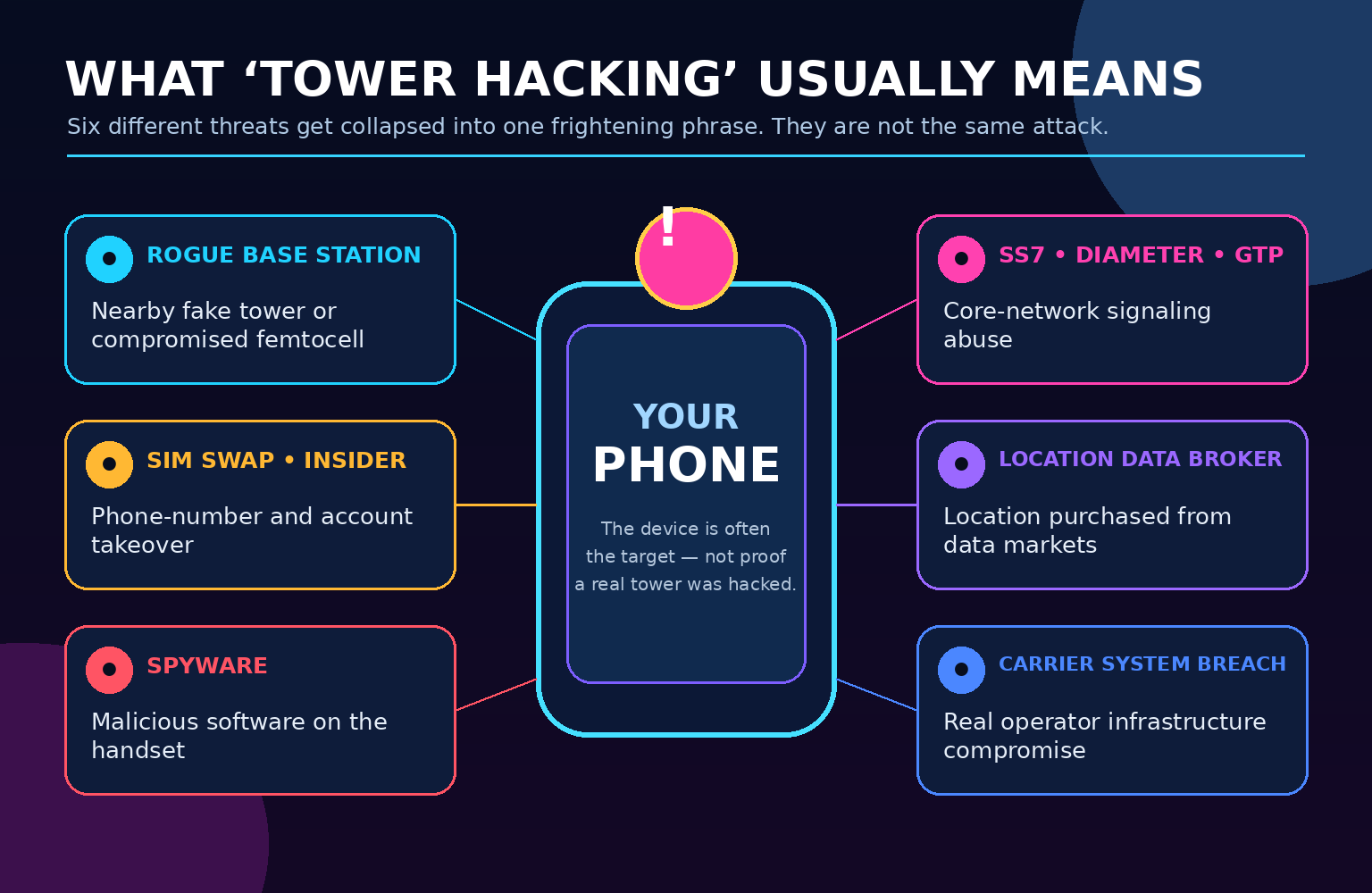
Threat #1: Rogue cell towers, IMSI catchers, and cell-site simulators
A rogue base station is a radio device that impersonates a legitimate carrier site. It may be called an IMSI catcher, fake base station, cell-site simulator, or—when discussing a well-known product family—a “Stingray.” CISA’s mobile threat catalog says an adversary could set up a rogue cellular base station to eavesdrop on or manipulate cellular-device communications; it also notes that a compromised femtocell can be used for the technique.
NIST explains why the threat is credible: hardware can be assembled from commercially available components, and compatible software has been publicly available. A nearby rogue station can broadcast as though it belongs to the victim’s carrier and attempt to attract the phone’s connection.
What a rogue base station may do:
- Collect a subscriber or device identity during connection procedures.
- Infer that a particular device is present near a home, office, hotel, protest, or event.
- Attempt to push a device toward a less secure network generation.
- Disrupt service or interfere with normal network attachment.
- Under certain radio, protocol, and encryption conditions, expose or manipulate calls, texts, or data.
Capabilities vary widely. A device that collects identifiers is not automatically intercepting message content. A lawful law-enforcement configuration may be intentionally restricted. A malicious station is not bound by agency policy, but it still faces technical limits imposed by the phone, network generation, application encryption, and carrier defenses.
Threat #2: The 2G downgrade problem
Second-generation GSM was designed for a different threat environment. NIST identifies two especially important weaknesses: the lack of mutual authentication and the use of cryptography that is now considered weak or broken. In plain English, a 2G phone authenticates to the network, but the network does not prove its identity to the phone the way newer systems do.
Phones historically retained 2G support for coverage and roaming. That backward compatibility can become an attack surface: a false base station may try to make a modern phone communicate using the older generation. Android’s security documentation calls 2G connectivity the most severe mobile-network security and privacy threat, while also warning that disabling it can affect roaming and emergency connectivity in some circumstances.
Critical distinction: retiring a carrier’s legitimate 2G network reduces ordinary legacy service, but it does not make a phone physically incapable of hearing a malicious device that transmits as a fake 2G network. Device-side 2G controls therefore still matter on supported hardware.
Threat #3: Portable “SMS blasters”
GSMA reports a newer criminal use of false base stations: portable SMS blasters. Its September 2025 warning described fake mobile base stations compact enough for a vehicle or backpack, capable of sending large numbers of scam texts to nearby phones. A May 2026 GSMA briefing says these devices can bypass normal network-side SMS filtering and deliver phishing messages directly to users.
That does not mean every suspicious text came from a nearby rogue radio; ordinary mass-texting, spoofing, compromised accounts, and legitimate marketing systems remain far more common explanations. The documented SMS-blaster activity cited by GSMA was concentrated in reported Asia-Pacific incidents. We did not find primary-source evidence showing the same prevalence in Port Saint Lucie, the Treasure Coast, or every U.S. market.
- Do not trust a text because the sender looks local.
- Do not use the link in an unexpected delivery, bank, toll, or account alert.
- Open the company’s known app or type its address yourself.
- Remember that a fake base station can bypass carrier filtering, but it cannot make a phishing page safe.
Threat #4: SS7, Diameter, and GTP signaling abuse
Some of the most alarming “tower hacking” stories are really about the hidden control networks connecting mobile operators. SS7 helps carriers route calls and texts, support roaming, and exchange subscriber information. Diameter and GTP perform related control and transport functions in newer mobile generations.
GSMA says SS7 was designed in an era when trust among a small number of operators was assumed. Its modern threat analysis says the protocol lacks the authentication and encryption expected today and can be abused to track locations, intercept messages, or reroute calls and texts. GSMA also identifies Global Title leasing as one way signaling access can spread beyond traditional national carriers.
ENISA has assessed telecom interconnection and signaling security as a medium-to-high risk area, covering SS7, Diameter, and the transition toward 5G. Operators counter these threats with signaling firewalls, filtering, roaming controls, anomaly detection, threat-intelligence sharing, and stricter interconnect governance.
This is remote telecom access—not a person standing beside an old tower. A signaling attacker generally needs a path into the carrier/interconnect ecosystem, whether through a rogue or compromised operator, leased resources, exposed infrastructure, or an insider. A website claiming it can locate any phone for a fee may simply be a scam.
Threat #5: A real carrier or femtocell compromise
Real telecommunications infrastructure can be compromised. In their November 2024 Salt Typhoon statement, CISA and the FBI said compromises at multiple telecommunications companies enabled theft of customer call-record data and access to private communications for a limited number of people—primarily those involved in government or political activity. The FCC later said state-sponsored actors had infiltrated at least eight U.S. communications companies. This was a serious carrier-infrastructure intrusion, not evidence that criminals were casually radio-hacking rusty towers.
CISA has since issued hardening and mobile-communications guidance for highly targeted people. Its consumer-relevant advice includes consistent use of end-to-end encrypted communications, current devices and software, strong account authentication, and carrier-account protections.
A compromised carrier system can be extremely serious, but it is not evidence that every legacy radio site is an easy target. The attacker’s capabilities depend on which systems were reached: a router, subscriber database, remote-management platform, lawful-intercept function, billing environment, or customer-support tool creates a different exposure.
A femtocell is a small carrier-connected base station once commonly used to improve indoor coverage. CISA explicitly notes that a compromised femtocell could support rogue-base-station behavior. Consumers should retire unsupported network extenders and use only carrier-approved, fully updated equipment.
Threat #6: SIM swaps and paid carrier insiders
A SIM swap moves a victim’s phone number to a device controlled by the attacker. That can redirect calls and texts, including one-time security codes. The attacker does not gain automatic control of the original handset, but the phone number can become a master key for email, financial, social-media, and cryptocurrency accounts that still rely on SMS recovery.
The “if they have money” part is documented here. In March 2024, the Justice Department reported that a former telecommunications-company manager pleaded guilty after using managerial credentials to move customer SIM numbers to devices controlled by another person. DOJ said the manager was paid in Bitcoin.
SIM-swap warning signs:
- Your phone abruptly loses cellular service—or allows only emergency/911 calls—while others nearby remain connected. The FCC calls this a typical first sign after a fraudulent SIM swap or port-out.
- You receive an unexpected SIM-change, eSIM-activation, or number-port notice.
- Your carrier password or account PIN no longer works.
- Password-reset or financial alerts arrive for actions you did not request.
Contact the carrier immediately through its official app, a known support number, or a store—not through a link in the alert.
Threat #7: Location data bought from carriers or advertising markets
Sometimes the frightening claim “someone paid to track a phone” is true while the tower-hacking explanation is false. In April 2024, the FCC fined AT&T, Sprint, T-Mobile, and Verizon nearly $200 million for illegally sharing access to customer location information. The FCC said access moved through aggregators and third-party location-service providers, often without valid customer consent or reasonable safeguards.
The advertising ecosystem creates a separate market. In a December 2024 enforcement action, the FTC alleged Mobilewalla collected data from real-time bidding exchanges and aggregators and sold sensitive location information. The complaint described more than 500 million unique advertising identifiers paired with precise location data during the relevant period.
This location may come from apps and advertising identifiers rather than cellular signaling. The defense is different: review app permissions, disable unnecessary precise/background location, reset advertising identifiers where appropriate, remove unused apps, and use operating-system privacy controls.
Threat #8: Spyware on the phone
Spyware is the category most likely to justify the phrase “access to the phone.” A malicious app, exploit, stalkerware installation, or mercenary-spyware chain can potentially reach messages, microphones, cameras, accounts, files, and location—depending on privileges and the exploit.
That is an endpoint compromise, not a tower compromise. It can happen through malicious links, unsafe app installation, physical access, stolen credentials, or sophisticated zero-click exploits. Disabling 2G will not remove spyware already on the device, and a VPN will not protect data after the compromised phone decrypts it.
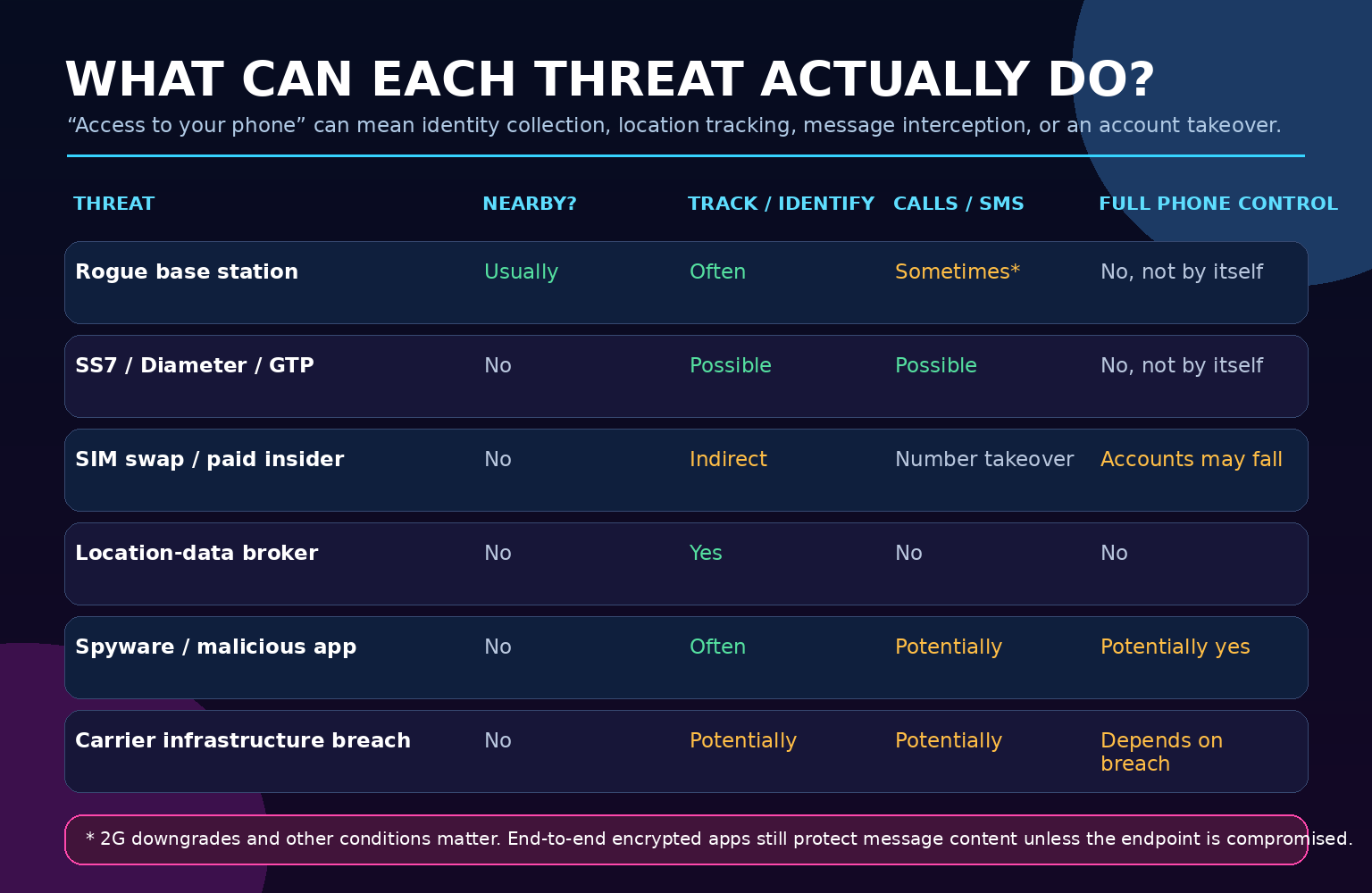
How money can buy access—and what it cannot buy
| What money may buy | Documented mechanism | What it does not prove |
|---|---|---|
| Portable radio equipment | Rogue base station or SMS blaster near targets | That a legitimate carrier tower was compromised |
| Telecom expertise or signaling access | SS7/Diameter/GTP abuse through an operator/interconnect path | Universal access to every subscriber on every carrier |
| A corrupt insider | SIM swap, account lookup, or abuse of internal tools | Control of the victim’s original operating system |
| A location-data subscription | Carrier-derived or app/advertising-derived location feeds | Call, message, camera, or microphone access |
| Commercial spyware | Endpoint exploitation or malicious installation | That any tower was involved |
| A fake “hacker service” | Upfront-fee fraud, fabricated dashboards, recycled breach data | Any access at all |
The U.S. 2G and 3G reality on August 2, 2026
Most U.S. legacy consumer networks have already been retired. AT&T shut down 2G in 2017. T-Mobile retired its older 3G UMTS network July 1, 2022. Verizon says its CDMA network was decommissioned at the start of January 2023 after its December 31, 2022 deadline.
One unusually timely fact makes this warning important today: T-Mobile’s official network-evolution page says its 2G GSM network is scheduled to be retired August 3, 2026—one day after this article’s research cutoff. We are therefore describing that retirement as scheduled, not completed. Coverage, roaming, MVNO dependencies, emergency calling, and individual device behavior can differ.
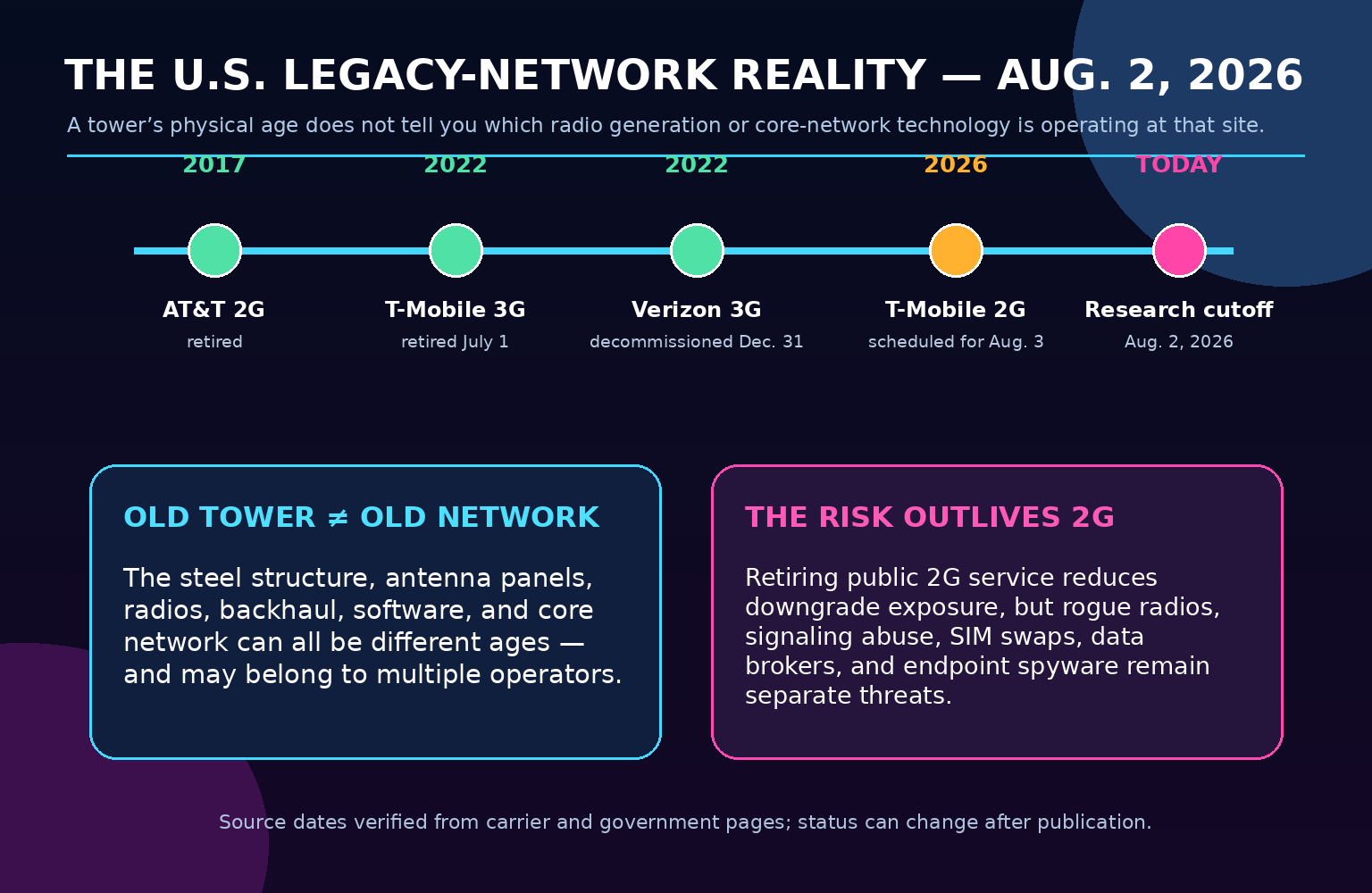
Retiring public 2G service narrows legitimate fallback paths, but it does not erase the other categories in this investigation. Rogue radios, signaling abuse, carrier compromises, SIM swaps, data brokers, and spyware remain independent concerns.
What an attacker might see—and what remains protected
| Data or activity | Potential exposure | Important limitation |
|---|---|---|
| Subscriber/device identity | Rogue base stations can collect identifiers under relevant procedures | Identity collection is not full content access |
| Approximate presence or location | Rogue station proximity, signaling abuse, carrier data, or app data | Precision, history, and reliability vary |
| Ordinary cellular calls and SMS | May be exposed through legacy downgrade, signaling abuse, SIM swap, or infrastructure compromise | Capability is not automatic and depends on conditions |
| Signal or WhatsApp content | Protected end to end while traveling between uncompromised endpoints | Metadata, backups, linked devices, recipient behavior, and compromised phones remain separate risks |
| Web and app traffic | Modern HTTPS/TLS protects content in transit | DNS/connection metadata and endpoint compromise can still reveal information |
| Camera, microphone, files | Generally requires endpoint compromise, permissions abuse, or physical access | A basic IMSI catcher does not automatically provide this access |
Warning signs: useful clues, not proof
- Unexpected 2G or EDGE fallback where LTE or 5G normally works.
- A supported Android alert that the mobile network is unencrypted or requested identifying information.
- Repeated service loss in one location that disappears after moving away.
- Unexplained restart or attachment problems after entering a specific area.
- Sudden total loss of service plus carrier-account notices, which may indicate a SIM swap or port-out rather than a rogue tower.
- Localized phishing texts that pressure nearby recipients to use a link.
All of these have innocent explanations: weak coverage, congestion, roaming, network maintenance, a damaged SIM, a carrier outage, battery optimization, or a device bug. Signal bars, a tower-map app, a field-test screen, or one strange text cannot prove surveillance.
How Android users can reduce the risk
- Install the latest Android and security updates. Modem firmware and carrier configuration matter in addition to the visible operating-system version.
- Turn off 2G if your device supports the control and you can tolerate the coverage tradeoff. On Pixel and some other devices, the option appears under the SIM or Mobile network security settings. Menu names vary by manufacturer and carrier.
- Check Android 16’s Mobile network security section. On supported hardware, it can expose a 2G control and notifications for an unencrypted cellular connection or certain identifier requests.
- Treat alerts as evidence to investigate—not a conviction. Android’s documentation makes clear that device/modem support and normal network behavior affect what is reported.
- Use Android Advanced Protection if you are a high-risk user and your supported device offers it. Google says its 2G Network Protection can prevent supported devices from connecting to less-secure 2G networks; review the coverage and feature tradeoffs before enabling any high-security mode.
Emergency-call caveat: Android documents that emergency calls may still use 2G even when ordinary 2G connectivity is disabled. Behavior depends on hardware, modem support, carrier, country, and available coverage. Never assume a security toggle guarantees emergency service.
How iPhone users can reduce the risk
- Install the newest supported iOS and carrier-settings updates.
- Use end-to-end encrypted apps for sensitive calls and messages.
- High-risk users can evaluate Lockdown Mode. Apple says it is optional, extreme protection intended for the very small number of people facing sophisticated targeted attacks.
- Understand what Lockdown Mode changes. Apple’s January 2026 support page says it turns off 2G and 3G cellular support on iPhone and iPad, while restricting attachments, websites, invitations, connections, and other features.
- Do not enable it casually without reading Apple’s guidance. Most consumers are not targets of attacks that justify the usability cost.
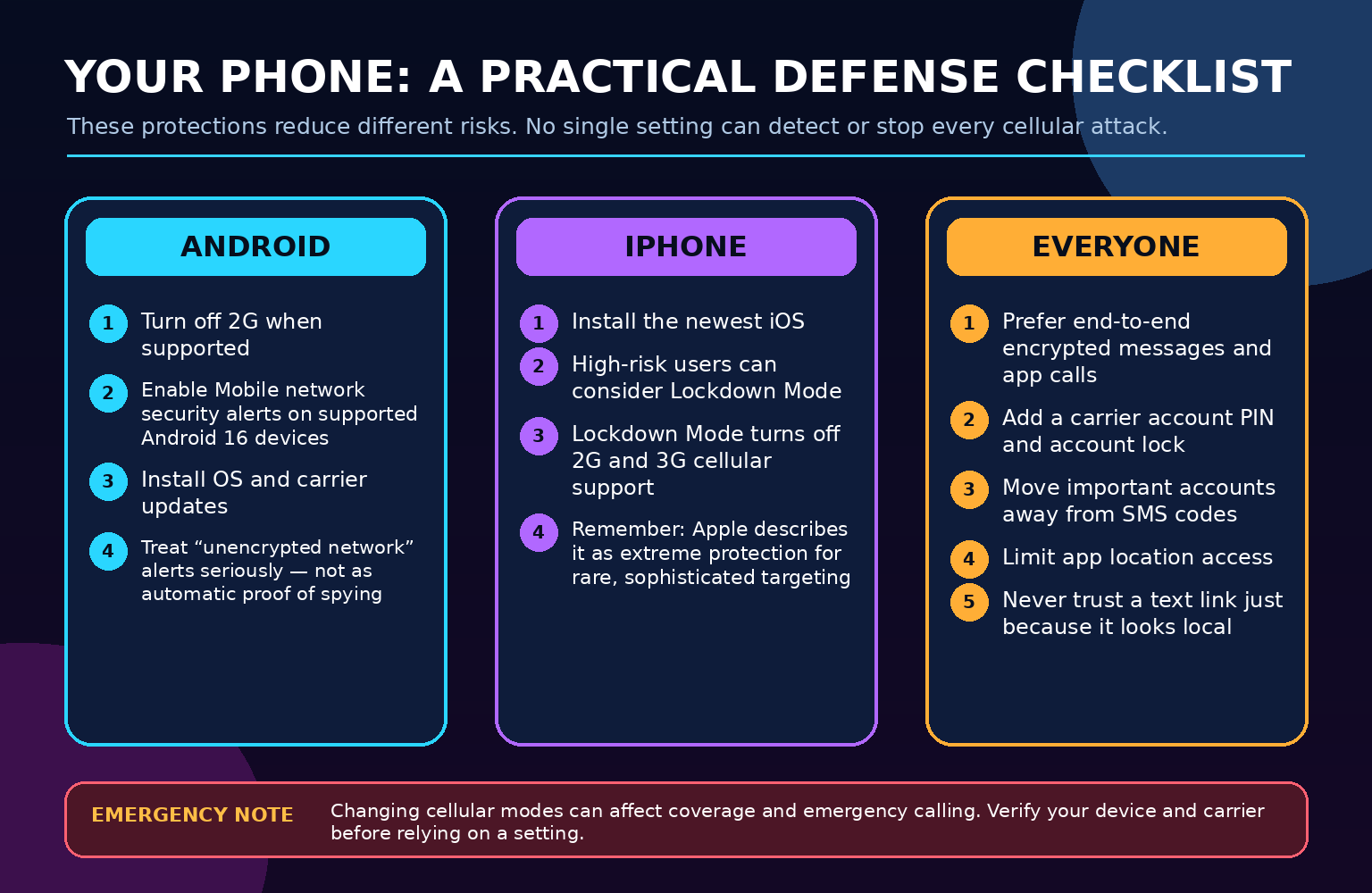
Protection every customer should use
- Prefer end-to-end encrypted messages and app calls for sensitive conversations. CISA recommends consistent use for highly targeted users.
- Add a unique carrier account PIN or password and enable an account/number lock where offered.
- Move critical accounts away from SMS-only authentication. Use a security key, passkey, or authenticator app when available.
- Install phone and app updates promptly.
- Review location permissions. Remove apps you no longer use; limit precise and background access.
- Use a strong device passcode and disable notification previews for sensitive apps if shoulder-surfing is a risk.
- Secure cloud and email accounts first. They are often the recovery path for everything else.
- Never provide verification codes to an incoming caller or text sender.
What a VPN does—and does not—protect
A reputable VPN encrypts IP traffic between your device and the VPN provider. It can reduce exposure on untrusted Wi-Fi and hide traffic content from the local access network when applications do not already use equivalent encryption.
A VPN does not hide the phone’s cellular identity from the carrier, prevent a SIM swap, protect ordinary cellular voice/SMS, stop a rogue radio from attempting a downgrade, prevent advertising apps from collecting location, or neutralize spyware on the handset. It is one layer—not a force field.
What to do if you believe your phone is being targeted
- Prioritize immediate safety. If you face stalking, domestic violence, or an imminent threat, use a trusted device and contact emergency services or a qualified support organization.
- Stop using suspicious links and ordinary SMS for sensitive coordination. Switch to a trusted Wi-Fi network and an updated end-to-end encrypted app on a device you have reason to trust.
- Contact the carrier. Ask whether there were SIM, eSIM, port-out, call-forwarding, account-recovery, or support-contact changes.
- Secure email, carrier, financial, and cloud accounts. Change passwords from a known-good device and revoke unknown sessions.
- Preserve evidence. Record dates, times, locations, screenshots, service indicators, and official account notices. Do not post IMSIs, IMEIs, phone numbers, or personal location trails publicly.
- Seek qualified mobile forensics for a serious case. Random “spy detector” apps can erase evidence, create false alarms, or expose more data.
- Report fraud. Use the carrier, the FCC Consumer Complaint Center, the FTC’s ReportFraud site, and law enforcement as appropriate.
Claims that should make you suspicious
- “We can access any phone on any carrier with only the number.”
- “Pay in cryptocurrency and watch the target live in five minutes.”
- “Our dashboard proves we hacked a nearby tower,” with no verifiable mechanism or case record.
- “Dial this secret code to know whether law enforcement is listening.”
- “A VPN makes IMSI catchers and SIM swaps impossible.”
- “Every old-looking tower is vulnerable.”
- “5G eliminates all location tracking and network interception.”
Those statements collapse complicated systems into a sales pitch. A legitimate investigator should be able to explain whether the allegation concerns the radio interface, telecom signaling, the carrier account, a location-data source, or the endpoint—without asking you to break the law or expose another person’s private identifiers.
For families and small businesses on the Treasure Coast
Residents and businesses in Port Saint Lucie, Jensen Beach, Fort Pierce, and Vero Beach should focus on the controls that stop the most common real-world consequences: account takeover, phishing, location over-sharing, unsupported devices, and unpatched phones.
- Inventory phones, tablets, alarm communicators, vehicle trackers, payment terminals, elevators, medical alert units, and IoT devices that depend on cellular service.
- Replace 2G/3G-dependent equipment rather than assuming it will roam indefinitely.
- Require carrier account PINs for every business line and limit who can authorize SIM changes.
- Use authenticator apps, passkeys, or security keys for administrators and financial accounts.
- Train employees that a text can be local, urgent, and still fraudulent.
- Keep a written carrier-escalation process for sudden multi-line service loss.
Frequently asked questions
Can someone really hack my phone through a cell tower?
Under some conditions, a rogue base station, signaling compromise, or carrier breach can expose identities, location, calls, texts, or network activity. But “through a tower” is too broad, and none of those automatically means full control of the phone’s camera, microphone, apps, and files.
Can an IMSI catcher read all my messages?
No. An IMSI catcher’s minimum capability is identity collection. Additional interception depends on the radio technology, downgrade success, encryption, carrier behavior, and device. Properly implemented end-to-end encrypted application content remains encrypted between uncompromised endpoints.
Does 5G stop fake cell towers?
5G adds stronger privacy and authentication mechanisms, including concealed subscriber identifiers, but implementation, fallback behavior, roaming, configuration, and adjacent systems still matter. It raises the bar; it does not make surveillance impossible.
Should I turn off 2G?
On a supported Android device, disabling 2G can reduce downgrade exposure. Before relying on it, understand that roaming, rural coverage, and emergency behavior vary. Apple’s current Lockdown Mode disables 2G and 3G, but Apple describes that mode as extreme protection for a small, highly targeted population.
Can a hacker locate me with only my phone number?
Not through an ordinary public lookup. Documented location threats require access to a telecom signaling path, carrier or data-broker information, an app/location account, spyware, or physical proximity with suitable radio equipment. Services promising instant location from a number alone are often scams.
Will Signal or WhatsApp protect me?
They protect personal message and call content with end-to-end encryption when both endpoints and linked devices are trustworthy. They do not prevent all metadata exposure, SIM swaps, notification previews, compromised backups, social engineering, or spyware on the phone.
Does a VPN block rogue towers?
No. A VPN protects IP traffic to the VPN service. It does not hide cellular identifiers, secure ordinary voice/SMS, stop signaling abuse, prevent SIM swaps, or clean an infected handset.
Can an app detect an IMSI catcher?
Some research tools and supported Android security notifications can flag suspicious network behavior, but consumer apps generally lack the modem-level visibility needed for certainty. False positives and false negatives are expected. No single app can prove a rogue tower is present.
Does an old physical tower mean my connection is unsafe?
No. The tower structure, radios, backhaul, software, and core-network path may all be different ages. Security depends on the active technology and configuration—not appearance.
What is the fastest thing I can do today?
Update the phone, add a carrier PIN and account lock, move important accounts away from SMS codes, review location permissions, and use end-to-end encrypted apps for sensitive communication. Supported Android users can also evaluate disabling 2G.
The bottom line
We cracked the case this way: older cellular technology does create real risk, and portable fake base stations plus telecom-signaling access are documented. Money can buy equipment, data, expertise, or insider cooperation. But the phrase “hack an old tower to access a phone” hides the mechanism and often exaggerates the result.
The right warning is not that every tower can be bought and hacked. It is that phones sit inside a larger ecosystem—radio, carrier, signaling, accounts, apps, data brokers, and the device itself. Protect each layer, question miraculous access claims, and respond quickly to unexplained carrier-account changes.
Primary sources and further reading
- NIST: Assessment of IMSI Catcher Threats
- NIST SP 800-187: Guide to LTE Security
- CISA: Rogue Cellular Base Station, T1467
- CISA: Mobile Communications Best Practice Guidance
- CISA and FBI: Joint Statement on PRC Targeting of Commercial Telecommunications
- FCC: Salt Typhoon Attack and FCC Response Fact Sheet
- Android: Disable 2G
- Android 16: Mobile network security
- Google Android Help: Advanced Protection and 2G Network Protection
- Apple: About Lockdown Mode
- GSMA: SMS Blaster Device Threat
- GSMA FS.67: SMS Blasters Briefing Paper
- GSMA T-ISAC: SS7 in a Modern Threat Landscape
- ENISA: Signalling Security in Telecom SS7/Diameter/5G
- FCC: Nearly $200 Million in Carrier Location-Data Fines
- FTC: Mobilewalla Location-Data Action
- DOJ: Paid Telecommunications Manager in SIM-Swap Scheme
- FTC: SIM Swap Scams—How to Protect Yourself
- FCC: Cell Phone Fraud
- T-Mobile: Network Evolution and Legacy Retirement Dates
- AT&T: 2017 Financial Review Discussing the 2G Shutdown
- Verizon: 3G CDMA Network Retirement
Editorial disclosure: the diagrams are original explanatory graphics created by The IT Guys from the cited public evidence. They are not screenshots of live interception, detected towers, private subscriber data, or an operational attack. We did not probe carriers, subscribers, signaling systems, active towers, or licensed spectrum.