


Mac security investigation • Updated August 17, 2026
AmnesiaStealer is a newly disclosed macOS information stealer that combines familiar password and browser theft with something more intrusive: an optional module that can launch a hidden copy of a Chromium browser profile and let an operator drive already authenticated web sessions from the infected Mac.
The bottom line
Jamf Threat Labs says it observed AmnesiaStealer in the wild behind a counterfeit GitHub-themed “Download for macOS” page. The page did not silently infect visitors. In the documented chain, a victim had to copy a supplied command into Terminal, run it and then enter the Mac login password into a convincing installer-style prompt.
Once running, the malware could collect the password, Keychain files, browser databases, Apple Notes, Telegram session data and selected documents. It also installed a root LaunchDaemon for persistence. A separately downloaded stream_module could copy a Chromium profile, run the legitimate browser invisibly and relay screenshots and input to an operator.
If you pasted the command or entered your Mac password, disconnect that Mac now. Use a different trusted device to revoke web sessions and begin account recovery.
What this report does—and does not say
“AmnesiaStealer” is the tracking name assigned by Jamf Threat Labs, based on an operator login page called “Amnesia Panel” and a matching configuration key. Jamf found earlier builds dating to at least April 2026, so newly disclosed is safer than claiming the malware was created this week. Its goals overlap with Atomic Stealer, MacSync and CrashStealer, but Jamf did not establish that AmnesiaStealer is merely a renamed version of one of those families.
What is AmnesiaStealer?
AmnesiaStealer is a multi-stage information stealer written primarily in Rust and aimed at macOS. Jamf researcher Thijs Xhaflaire published the detailed analysis on August 13. The analyzed main payload and browser-control module were universal Mach-O files, meaning they contained code for both Intel and Apple silicon Macs.
The observed chain had three functional stages:
- A shell-script loader downloaded a password-protected archive, unpacked a hidden Apple-looking executable in
/tmp, stripped quarantine metadata, applied an ad-hoc signature and launched it. - The main Rust stealer profiled the Mac, captured the login password and harvested local data. It also created persistence and polled its command server for tasks.
- An on-demand Rust streaming module cloned Chromium profile data and provided interactive hidden browser control through the Chrome DevTools Protocol, or CDP.
Jamf’s analysis is unusually useful because it distinguishes code that merely existed from behavior that actually worked in the lab. Several recycled attempts to bypass newer macOS privacy controls failed during testing on macOS 26. The core password theft, Keychain access, Chromium collection, root persistence and interactive browser stream remained serious without those bypasses.
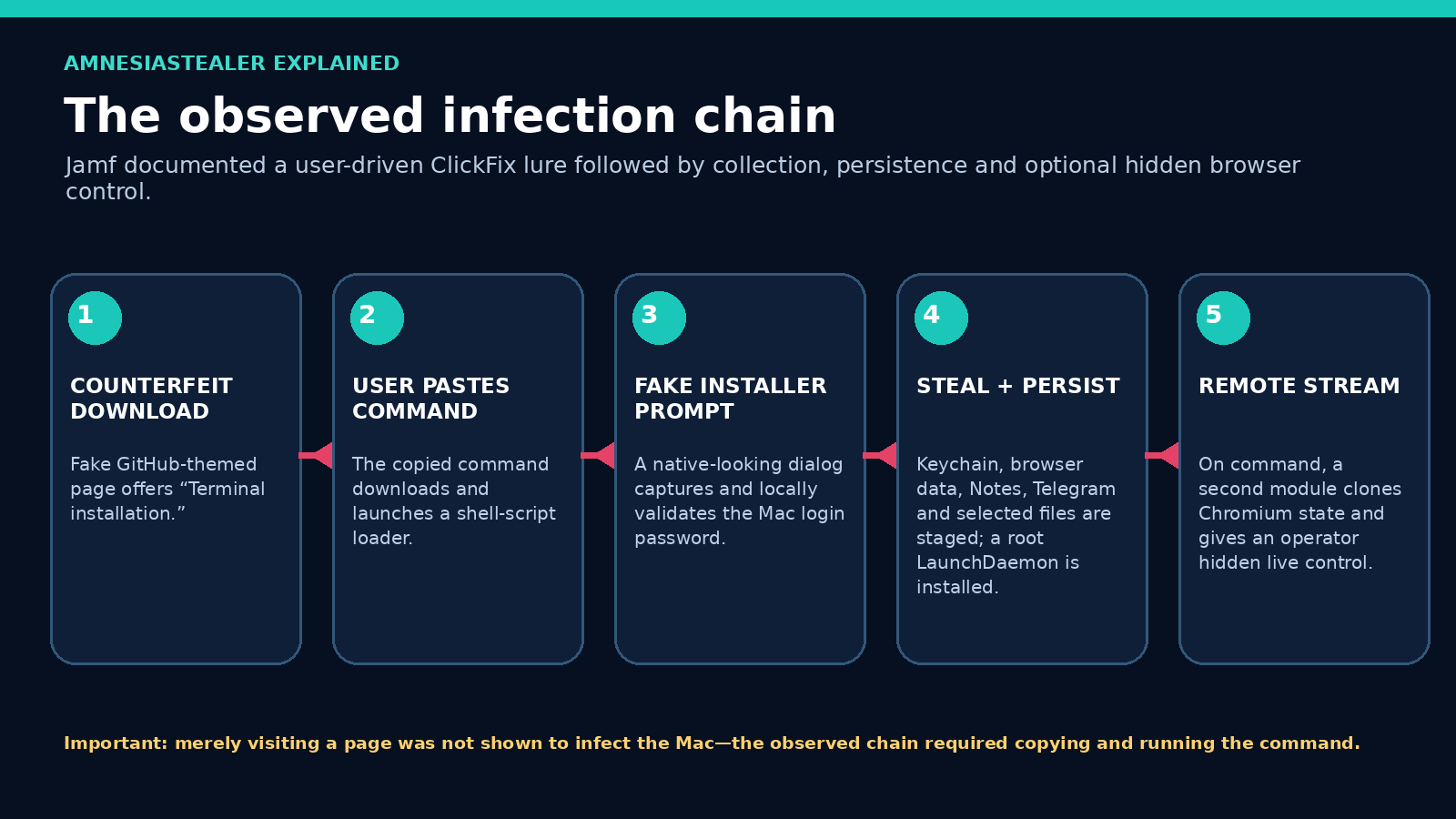
How the infection happens
1. A counterfeit GitHub-style page earns trust
The lure reproduced GitHub’s dark visual style, displayed a “Verified Publisher” badge and promised a macOS download. Instead of delivering an ordinary application, it presented “Terminal installation” instructions and a copy button. Jamf said the same visual template had previously appeared in campaigns distributing Atomic and MacSync, so the page design was not unique proof of this malware family.
2. ClickFix turns the user into the installer
This is a macOS version of the broader ClickFix social-engineering pattern: a website claims the visitor must copy and run a command to download, fix, verify or install something. The command fetched a short, quiet and self-deleting shell script. That script downloaded a password-protected ZIP and executed the contained Mach-O payload from a hidden-looking path.
The important defensive fact is simple: a legitimate download page should not need you to paste an unexplained encoded command into Terminal. The use of Terminal also shifts execution outside the normal drag-to-Applications and notarized-installer experience users expect.
3. A native-looking prompt asks for the real Mac password
After launch, the malware presented an AppKit dialog titled “Installer” and claimed it needed permission to make changes. Jamf observed the entered password being validated locally. An incorrect password caused the dialog to return, which made the prompt appear more legitimate and ensured the attacker did not receive a typo.
The validated password was then reused to unlock the login Keychain and perform privileged reads. Jamf also found the password written in cleartext to staging and to ~/.pwd. This is not a magical password-extraction exploit: the victim is tricked into supplying the credential after running the malware.
What can it steal?
| Area | Observed scope | Why it matters |
|---|---|---|
| Mac login password | Captured through a fake native installer prompt and validated locally. | Can unlock Keychain data, authorize privileged commands and compromise any account reusing that password. |
| Keychains | Login Keychain plus data-protection Keychain files were copied. | May expose saved passwords, certificates, secrets and browser encryption material. Some records remain encrypted, and Jamf said the purpose of two copied files was unclear. |
| Chromium profiles | Cookies, login databases, web data, history, bookmarks, local state, preferences and extensions from several profiles. | Can reveal credentials, browsing history, signed-in state, extension data and cloud-service access. |
| Apple Notes | The Notes database, companion files and some attachments. | Notes often contain personal data, recovery codes, customer details and informal password records. |
| Telegram | Specific Telegram Desktop session directories. | Stolen session material may put chats and contacts at risk; users should terminate unfamiliar active sessions. |
| Documents and images | Selected files from Desktop, Documents and Downloads, including text, PDF, document, key, wallet, CSV and image extensions. | Raises privacy, identity-theft, customer-data and business-confidentiality risks. |
| Crypto-wallet material | Browser extension settings, extension directories and IndexedDB were searched generically; wallet/key files were also among selected file types. | Wallet extensions and seed material may require urgent migration to a newly created wallet from a clean device. |
| Host profile | Hardware identifiers, macOS version, installed apps, public IP and geolocation details. | Lets the operator prioritize victims, tailor follow-up activity and understand the environment. |
Sixteen browsers collected from; seven browsers remotely controlled
These two numbers describe different components and should not be merged:
Stage 1: broad collection
Jamf said the stealer targeted 16 Chromium-family browsers. Its narrative named examples including Chrome, Brave, Arc and Microsoft Edge, but did not publish a clean 16-name list in the article text. We will not invent the unnamed entries.
Stage 2: live streaming
The demonstrated remote-control module supported seven: Google Chrome, Brave, Microsoft Edge, Arc, Opera, Vivaldi and Chromium.
Safari was targeted through separate cookie-collection logic. Jamf did not describe Safari as part of the demonstrated CDP live-control set.
How the live browser-session hijacking works
Conventional infostealers often copy cookies and browser databases, upload them and leave. AmnesiaStealer’s second act can keep the infected Mac in the loop as a remotely operated browser endpoint.
- The stream module copied selected files from the victim’s Chromium profile into a hidden profile directory under ~/.local/share/.stream/.
- It launched the legitimate installed Chromium browser in headless mode, pointed at the cloned profile. The victim’s normal visible browser was not used, so no obvious window had to appear.
- One WebSocket connected to an operator relay while another spoke to the local headless browser through CDP.
- In Jamf’s isolated lab, the operator received a roughly three-frame-per-second screencast and could issue navigation, keyboard, mouse, scrolling and tab commands.
- Jamf also observed plaintext cookie export through CDP. Because the running browser had already decrypted its own cookies, this route could sidestep at-rest cookie encryption.
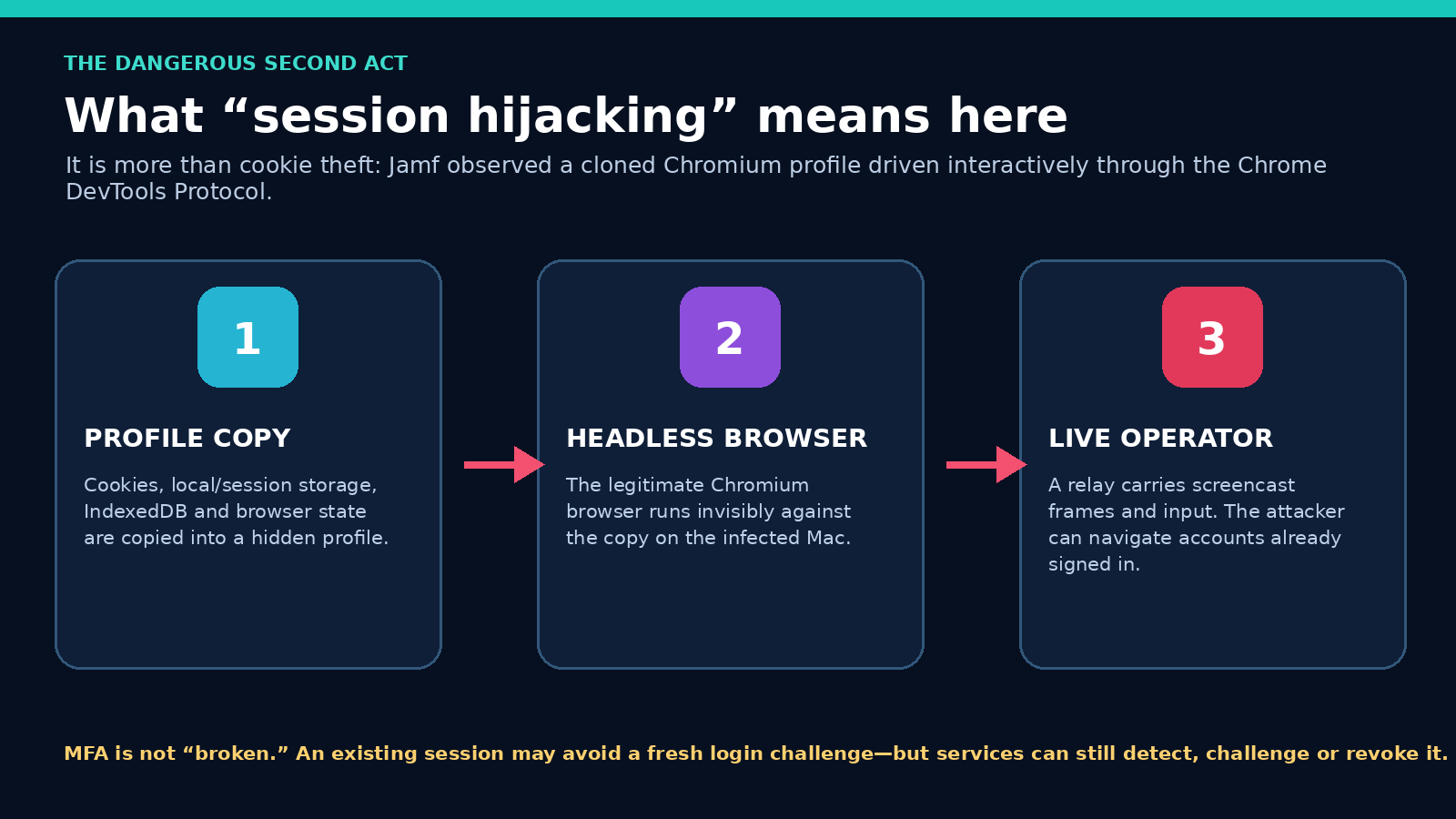
Does this “bypass MFA”?
Not in the universal sense. The malware does not break the mathematics of a passkey, authenticator app or security key. Instead, an already authenticated browser session may not ask for the original password and MFA challenge again on every page. That can let an attacker act with the session’s existing permissions.
Services can still notice risk, demand reauthentication, block sensitive actions or revoke the session. The right response is to terminate active sessions and tokens—not just change the password and assume every prior session disappeared.
What an attacker could do with an authenticated session
Jamf demonstrated the technical access mechanism in a controlled lab; it did not claim that every possible downstream crime below occurred in the observed campaign. The risk depends on which websites were signed in, what permissions the user had and whether the service requested reauthentication.
Email and identity
An open email or identity-provider session can expose messages, contacts and password-reset links. A criminal may try to create inbox rules, alter recovery details or use the account to reset other services. Business email compromise becomes especially dangerous when the signed-in user can approve payments or see customer correspondence.
Cloud and business portals
Authenticated Microsoft 365, Google Workspace, CRM, accounting, help-desk or remote-management sessions may reveal company data and administrative actions. Conditional access and device-compliance checks can reduce risk, but a browser running from the enrolled Mac may initially resemble the trusted endpoint.
Banking and commerce
A signed-in financial or retail session may expose statements, addresses and transaction history. Banks commonly demand extra verification for transfers or profile changes, so session access does not guarantee transaction approval. It still creates privacy, fraud and social-engineering risk.
Developer and infrastructure access
Browser sessions, Keychain records and collected files may contain cloud dashboards, code-hosting sessions, API tokens, SSH keys or deployment credentials. Organizations should rotate secrets by trust boundary and inspect audit logs rather than assuming a browser password reset covers everything.
Messaging and social accounts
Session data can expose conversations, impersonate the user or spread new lures to trusted contacts. Telegram was separately targeted at the desktop-session-file level, so users should review Telegram’s active sessions even if they did not use Telegram Web.
Cryptocurrency
Wallet-extension storage, documents and Notes may contain high-value wallet data. If a seed phrase or private key was accessible, the durable response is to create a new wallet on a clean device and move assets—not to keep using the old secret after changing an app password.
This is why recovery must be identity-centered as well as device-centered. Erasing the Mac can remove persistence, but it cannot pull back a stolen cookie, password, document or wallet secret. Conversely, changing passwords without cleaning the Mac can expose the replacement credentials to the still-running stealer.
What is known—and what remains unknown
| Supported by current evidence | Not established publicly |
|---|---|
| Jamf observed the campaign in the wild and analyzed both major Mach-O components. | No public victim count, geographic victim breakdown or confirmed financial-loss total was published. |
| The operator panel, builder-style configuration and earlier samples support treating this as an organized malware operation. | Jamf did not publicly attribute the operation to a named person, company, country or established criminal group. |
| The fake page and infrastructure were tied to the analyzed campaign, and the same lure template had appeared with other stealers. | The shared lure does not prove AmnesiaStealer, Atomic and MacSync have the same developer or operator. |
| Live browser control and plaintext CDP cookie export worked in Jamf’s isolated test. | There is no evidence that every infection received the streaming task or that every signed-in service accepted the cloned session without challenge. |
| Several collection and persistence behaviors worked on Jamf’s macOS 26 test system. | A complete minimum/maximum affected-version matrix was not published. |
| Some older privacy-control workarounds existed in the code. | Their presence does not prove they bypass current macOS protections by default; Jamf observed several fail. |
Which Macs and macOS versions are affected?
The analyzed binaries supported both Intel and Apple silicon. Jamf dynamically tested the campaign sample on macOS 26 and documented branches for earlier versions, including recycled logic related to an old Catalina-era TCC issue.
Jamf did not establish a trustworthy minimum affected macOS version. A universal version claim would go beyond the evidence. The practical exposure test is behavioral:
- Did the user visit the counterfeit page or a similar ClickFix lure?
- Did they paste and run an unexplained command in Terminal?
- Did a suspicious installer-like dialog ask for the Mac password?
- Did they grant Terminal, a browser or an unknown process Full Disk Access?
Keeping macOS current still matters. Apple describes three built-in layers—Gatekeeper and Notarization to prevent malicious launches, XProtect to block known malware and XProtect remediation after execution. But the observed campaign deliberately asked the user to execute a command and stripped quarantine metadata. Security controls are strongest when users do not override the trust boundary for an attacker.
What worked—and what failed—on macOS 26
Observed working behavior
- Password capture and validation
- Ordinary Keychain-file collection after obtaining the password
- Chromium database collection
- Root LaunchDaemon persistence
- Hidden Chromium control and CDP cookie export
Observed limits
- Several recycled TCC/APFS techniques failed by default
- Safari snapshot access required the responsible process to already have Full Disk Access
- The direct SQLite cookie re-encryption path failed in Jamf’s macOS 26 stream-module test
- The stream module waited idly without operator relay commands
The destructive Chrome Safe Storage fallback
Jamf found a version-gated fallback for macOS 26 and later. If browser-key recovery returned nothing, the malware could delete and recreate a browser Safe Storage Keychain entry with an attacker-known value. Jamf described the path as destructive: previously stored cookies and passwords protected by the old value could become unreadable, while future data protected under the replacement value would use a secret the operator already knew.
This was a fallback condition—not the normal path on every infection. For defenders, Jamf highlighted deletion and recreation of browser Safe Storage entries through the macOS security command-line tool as especially valuable telemetry because browsers ordinarily create those records through the Security framework rather than that command.
Persistence and evasion behavior
The main payload installed a root LaunchDaemon whose label impersonated Apple’s crash-reporting naming pattern: com.apple.ReportCrash.agent_<digits>. It used KeepAlive, RunAtLoad and SessionCreate, then polled for operator tasks.
Other concealment behavior included:
- password-protecting the delivery archive to frustrate automated inspection;
- placing the payload under a hidden Apple-looking filename in
/tmp; - stripping quarantine attributes and applying an ad-hoc signature;
- muting the Mac temporarily while Finder duplicated files;
- clearing shell history and removing temporary artifacts;
- running the browser copy headlessly so the user’s visible browser was untouched; and
- injecting a script intended to make the headless session look less like automation to websites.
The stream module had no separate persistence. It ran under the persistent main payload and exited when its relay disappeared.
Indicators of compromise
Indicators age quickly and should be combined with behavior, not treated as a perfect yes/no scanner. Jamf also warned that two Cloudflare IP addresses associated with the counterfeit site were shared infrastructure and should not be blocked indiscriminately.
| Type | Indicator | Context |
|---|---|---|
| Counterfeit site | github[.]aoitour[.]com | GitHub-themed ClickFix landing page. Defanged here for safety. |
| Infrastructure | allllowef[.]space shlyapadulina[.]space |
Delivery/C2 apex domains and earlier infrastructure reported by Jamf. |
| Stage 1 SHA-256 | de5748aac4a4d4cb48cf050652679e6bc49eda33d9ffaa0d280b578122fab55a | Analyzed universal Mach-O stealer. |
| Stage 2 SHA-256 | e853748ca8f9a5a9168263617409a9039ab09f4ffc7d860374c1e3b0b67b31a5 | Analyzed universal Mach-O stream module. |
| Runtime residue | ~/.pwd, ~/.chost, ~/.botid, ~/.local/share/.stream/ | Password, C2, bot identifier and streaming-profile residue reported in the analyzed chain. |
| Persistence | /Library/LaunchDaemons/com.apple.ReportCrash.agent_<digits>.plist | Root LaunchDaemon impersonating Apple crash reporting. |
| Temporary payload | /tmp/.com.apple.dt.<5–6 digits> | Randomized hidden-looking executable path. |
Behavioral detections for businesses
- Terminal or a shell downloading and piping remote content directly into a shell process.
xattrremoving quarantine metadata from an executable in/tmp.- An ad-hoc signed universal Mach-O launched from a hidden
/tmp/.com.apple.dt.*path. - Unexpected use of
security unlock-keychainor deletion/recreation of browser “Safe Storage” entries. - A newly created root LaunchDaemon mimicking
ReportCrash.agent_*. - Installed Chromium binaries launching headlessly with a remote debugging port and a profile under
~/.local/share/.stream/. - Outbound WebSocket traffic from an unexpected headless browser or unsigned Rust binary.
Do not interpret one generic event as proof. For example, developers legitimately use Terminal, browsers legitimately use Keychain, and security teams may use headless Chromium. The malicious pattern is the combination, timing, path, parent process and destination.
What to do if you ran the command
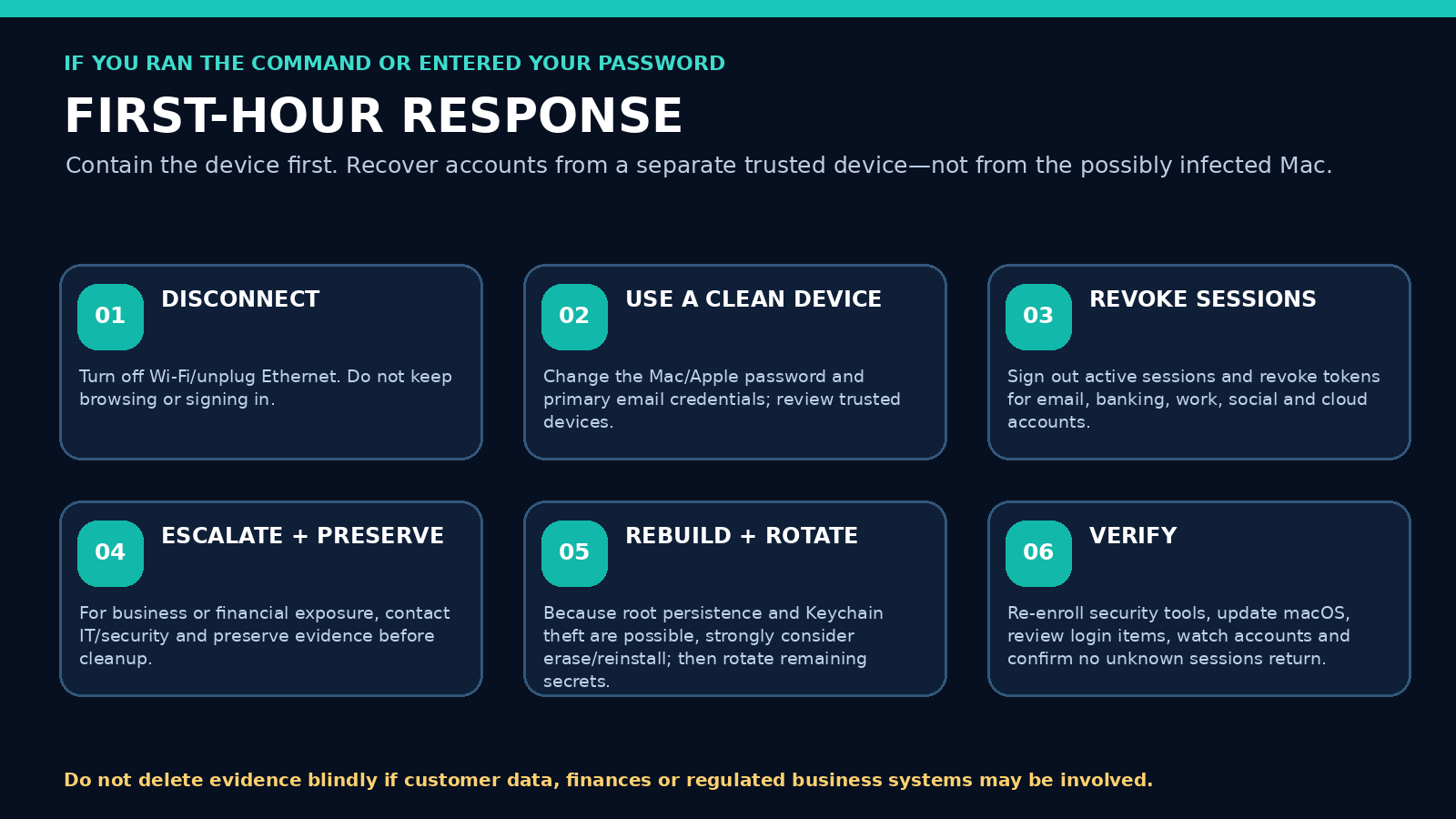
- Disconnect the Mac. Turn off Wi-Fi and Bluetooth, unplug Ethernet and disconnect external drives. Do not keep browsing, checking email or changing passwords on the potentially infected device. This interrupts active polling and browser streaming, though it does not undo data already stolen.
- Use a separate trusted device. Begin with the email account that resets other accounts, then the Apple Account, work identity, financial accounts and password manager. Change passwords that were stored in the Mac’s Keychain or browser and any account that reused the Mac login password.
- Terminate sessions, not just passwords. Use each provider’s security page to sign out active devices/sessions, revoke browser tokens and remove unrecognized devices. Apple advises reviewing devices at account.apple.com; Google provides a device-access review; and Microsoft offers a documented Sign out everywhere control that can take up to 24 hours and excludes Xbox consoles. Check that recovery email addresses, phone numbers and MFA methods remain yours.
- Protect financial and business accounts. Alert banks, payment processors, crypto exchanges and your employer’s IT/security team when relevant. For Microsoft 365 or Google Workspace, administrators should revoke sign-in sessions/tokens, inspect recent logins, OAuth grants, inbox rules and forwarding, and reset affected credentials from a known-clean admin workstation.
- Assume exposed secrets need rotation. Rotate browser-saved passwords, SSH keys, API tokens, cloud credentials, developer secrets and certificates that were accessible on the Mac. If cryptocurrency seed phrases or private keys may have been stored in Notes, documents, browser storage or wallet extensions, move assets to a newly generated wallet from a clean device; do not merely change an exchange password.
- Preserve evidence when consequences matter. If customer data, finances, regulated systems or employment accounts may be affected, do not blindly delete files before speaking to IT/security or an incident responder. Preserve timestamps, the exact page visited, the pasted command if safely available in a screenshot, security alerts and network/EDR logs.
- Strongly consider erase and reinstall. A correct password plus root LaunchDaemon persistence makes manual cleanup hard to trust. For credible infection, a full erase/reinstall is the safer endpoint. Apple provides official instructions to erase supported Macs and reinstall macOS. Restore documents selectively from a backup known to predate the infection; avoid restoring unknown executables, LaunchDaemons or the compromised browser profile wholesale.
- Verify after recovery. Update macOS, reinstall trusted apps from official sources, re-enroll endpoint protection, review Login Items & Extensions, confirm unfamiliar devices/sessions do not reappear and monitor financial and business accounts for at least several weeks.
If you only visited the page
Jamf’s observed chain required copying and executing a command. If you merely saw the page and closed it, infection through this documented path was not established. Still clear the download, update macOS and review browser extensions if anything unexpected occurred. If you ran any part of the command, treat it as a suspected compromise.
How to prevent this class of Mac attack
For individuals
- Never paste a command from a download page, ad, pop-up or unsolicited chat unless you understand every part and trust the publisher.
- Use Software Update and keep automatic security responses enabled.
- Install software from the App Store or the developer’s verified official site.
- Do not bypass Gatekeeper or strip quarantine attributes to make an unknown download run.
- Use unique passwords and phishing-resistant MFA such as passkeys or hardware security keys where available.
- Store recovery codes securely—not in an unprotected desktop file or casual note.
For businesses
- Train specifically against ClickFix language: “copy,” “paste into Terminal,” “verify,” and “enter your device password.”
- Use MDM/EDR to monitor LaunchDaemons, quarantine removal, shell download pipes, Keychain CLI access and headless-browser debugging.
- Limit local administrator rights and Full Disk Access grants.
- Apply DNS/web filtering to high-confidence campaign domains while avoiding blanket blocks on shared CDN IPs.
- Use conditional access, device compliance and token-revocation procedures.
- Maintain tested rebuild and credential-rotation playbooks.
Frequently asked questions
Is AmnesiaStealer the same as Atomic Stealer or AMOS?
No established evidence says they are the same family. Jamf said their objectives overlap and the same counterfeit-page template has appeared in Atomic and MacSync campaigns. AmnesiaStealer’s builder-driven configuration and separate browser-control stage are reasons Jamf tracks it independently.
Can it infect a Mac just by opening a website?
Not through the documented chain. The user had to copy and run a command in Terminal. Other threats can use different infection methods, so this should not be generalized to every macOS attack.
Does it control Safari?
Jamf documented Safari-cookie collection attempts, with important macOS and Full Disk Access limits. The demonstrated live-control module used CDP and supported seven Chromium-family browsers; Safari was not in that set.
Does changing my password stop it?
Not by itself. Existing sessions or tokens may remain active, other credentials may have been stolen and the Mac may retain root persistence. Revoke sessions from a clean device, rotate exposed secrets and rebuild the Mac when compromise is credible.
Will MFA protect me?
MFA remains important, especially phishing-resistant methods, but an already authenticated session may not ask for a new challenge on every action. Session revocation, device trust and reauthentication policies matter after infection.
Can antivirus remove AmnesiaStealer?
Apple’s XProtect and reputable endpoint-security tools may block or remediate known artifacts as signatures and detections mature. But because this campaign can steal credentials and establish root persistence, a clean scan does not reverse account theft or prove every session is safe. Recovery must include account and device actions.
Should I manually delete the listed files?
Not as the first or only response. Paths can change, deletion can destroy evidence and an active persistent process can recreate files. Isolate the Mac, involve IT/security when appropriate and prefer a trusted erase/reinstall for credible compromise.
Sources and further reading
Technical behavior in this report is grounded primarily in Jamf’s original analysis. Secondary reporting was used to cross-check the public framing and publication timeline. Recovery recommendations combine observed capabilities with official platform/account guidance and conservative incident-response practice.
- Jamf Threat Labs: AmnesiaStealer—multi-stage Rust macOS infostealer that hijacks Chromium browsers (August 13, 2026). Primary technical analysis, dynamic testing and indicators.
- BleepingComputer: New AmnesiaStealer macOS malware hijacks browser sessions via remote control (August 16, 2026).
- The Hacker News: AmnesiaStealer hijacks Chromium sessions (August 13, 2026).
- SecurityWeek: AmnesiaStealer macOS malware steals data, controls browser sessions (August 13, 2026).
- AppleInsider: Fake GitHub download targets Mac browsers and Keychain data (August 13, 2026).
- CSO Online: New macOS malware turns stolen browsers into attacker-controlled sessions (August 17, 2026).
- Gridinsoft: AmnesiaStealer browser-hijack overview and recovery framing.
- Apple Platform Security: Protecting against malware in macOS.
- Apple Support: Update macOS on Mac.
- Apple Support: Login Items & Extensions settings.
- Apple Support: If you think your Apple Account has been compromised.
- Apple Support: Erase your Mac and reset it to factory settings.
- Apple Support: How to reinstall macOS.
- Google Account Help: See devices with account access.
- Microsoft Support: How to sign out of your Microsoft account everywhere.
- Telegram: Active Sessions and Two-Step Verification.
Research status: This article reflects public information reviewed through August 17, 2026. Threat infrastructure, hashes and product detections can change quickly. No live malware was downloaded or executed for this report; technical claims about sample behavior are attributed to Jamf’s isolated analysis.