


The Hacker Diaries • Case File 011 • August 29, 2026
Five Critical WordPress Cases—and the Difference Between a Patch Alert and an Active Attack
Reporting cutoff: August 29, 2026 at 8:13:47 p.m. EDT / August 30, 2026 at 00:13:47 UTC. The Hacker News date gate found one qualifying August 29 editorial article. This casebook independently checked the underlying CVE records, disclosure research, patches, prerequisites, and CISA KEV status.
Tonight’s case board has five red pins, all clustered around WordPress. WPMU DEV Dashboard, Avada with Fusion Builder, TranslatePress, Pods, and GiveWP each received a critical disclosure. The consequences range from administrator-account takeover to server-side code execution. The useful question is not “Which scary score should I panic about?” It is “Do I run the affected component, does my configuration meet the prerequisite, am I on a fixed release, and is there evidence my site was touched?”
The rendered Hacker News homepage showed one genuine editorial item dated August 29, 2026: “Five Critical WordPress Plugin and Theme Flaws Enable Site Takeover or RCE.” The item was used as the discovery index, not as the sole evidence for the claims below.[1]
Tonight’s risk at a glance
Highest immediate priority
Internet-facing sites that actually run one of the five affected products and remain below the fixed line. Configuration prerequisites matter, but an inventory gap is not a mitigation.
Evidence state
All five are published critical vulnerabilities with vendor/researcher-backed fixes.[2][3][4][5][6][7][8][9][10][11] As of the cutoff, none of the five appeared in CISA’s live Known Exploited Vulnerabilities CSV, and the reviewed primary disclosures did not establish active exploitation in the wild.[7][8][9][10][11][12]
What not to do
Do not call these five “actively exploited” merely because exploitation is technically possible, a firewall rule exists, a proof was validated by a researcher, or a CVSS score is 9.8 or 10.0.
5 CVEs5 fixed lines0 CISA KEV matches at cutoff1 same-day editorial candidate
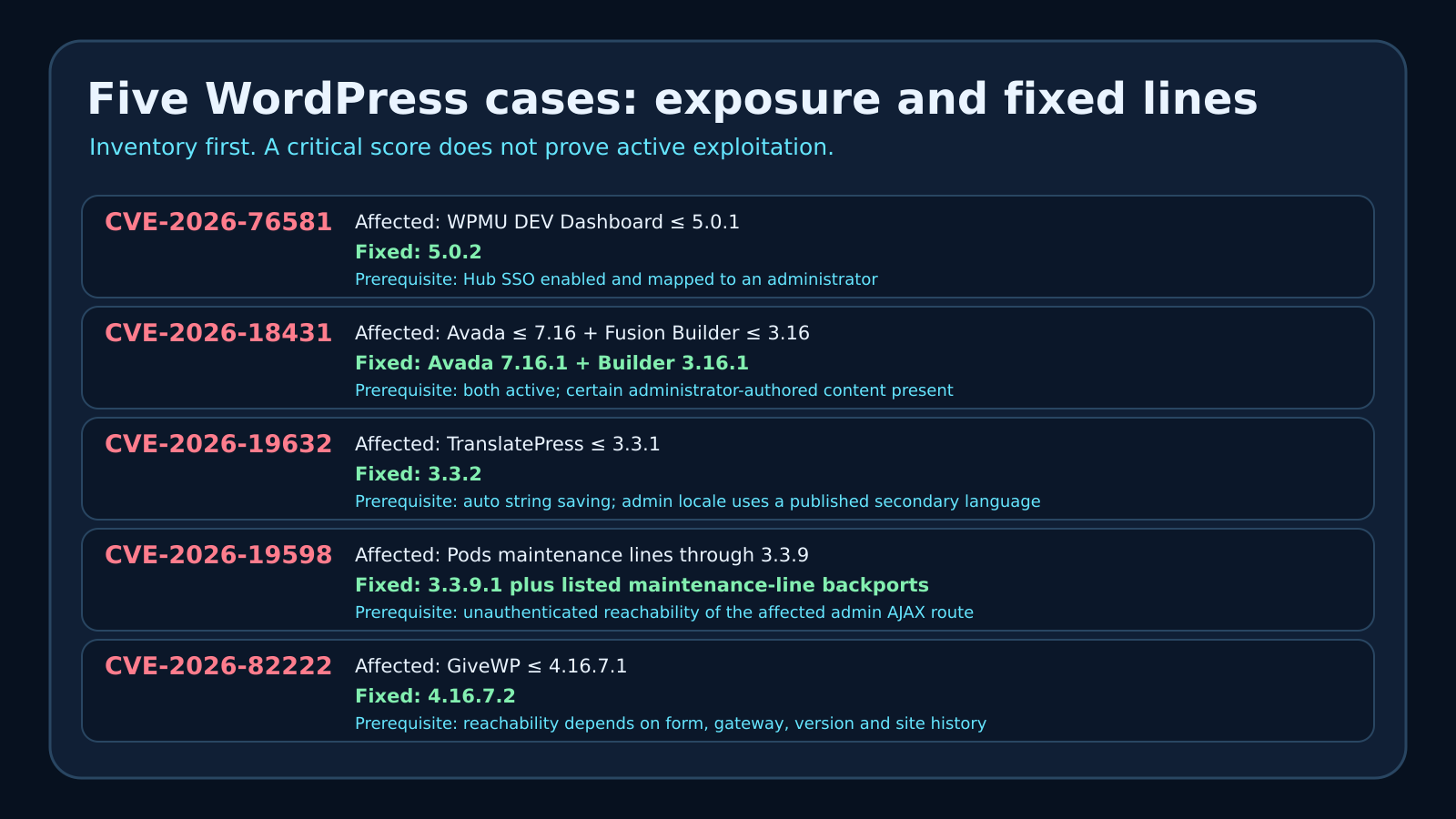
Case 1: WPMU DEV Dashboard—an SSO trust boundary breaks
What happened
Wordfence disclosed CVE-2026-76581, an authentication-bypass flaw in WPMU DEV Dashboard versions through 5.0.1. The CVE record says exploitation requires a site connected to WPMU DEV with Hub Single Sign-On enabled and mapped to an administrator; under those conditions, an unauthenticated party could obtain an authenticated administrator session.[2] Wordfence says it discovered the flaw on August 19, disclosed it that day, reviewed a pre-release fix on August 21, and saw version 5.0.2 released on August 24.[7]
Verified evidence and timeline
The important finding is a message-integrity failure across two SSO steps. The implementation constructed and checked cryptographic messages from inconsistent fields, creating a condition where a value signed in the first step could be accepted under a different interpretation in the second. That is enough detail for defenders to understand the category without turning this article into a replay recipe. Wordfence reports that its test of the patched build rejected the reported reuse path while a legitimate second-step response still worked.[7]
Who and what is exposed
A site is not in scope merely because WordPress is installed. The affected product must be WPMU DEV Dashboard 5.0.1 or earlier, the site must be connected to the Hub, Hub SSO must be enabled, and the mapped account must carry administrator authority for the worst documented outcome.[2] Sites that never installed the plugin, disconnected sites, sites without Hub SSO, and sites already on 5.0.2 do not match the disclosed vulnerable configuration.
What was observed in the wild
No confirmed in-the-wild exploitation was established in the primary materials reviewed for this edition. Wordfence’s reference to protection against “known exploitation techniques” describes a defensive rule and validated technique; it is not the same claim as confirmed customer compromise. The CVE was not present in CISA KEV at the cutoff.[7][12]
Why it matters to homes and small businesses
For a small company, an administrator session is not a cosmetic role. It can change content, users, plugins, themes, integrations, and often the business identity presented to customers. A hijacked site can become a phishing surface, a malware relay, or a source of fraudulent invoices. The local lesson for Port Saint Lucie, Jensen Beach, Fort Pierce, and Vero Beach businesses is simple: managed-site convenience features are privileged infrastructure. SSO should be inventoried and monitored like remote access, not treated as an invisible checkbox.
Immediate actions
- Verify the installed WPMU DEV Dashboard version from the server or authenticated plugin inventory; do not trust a cached dashboard screenshot.
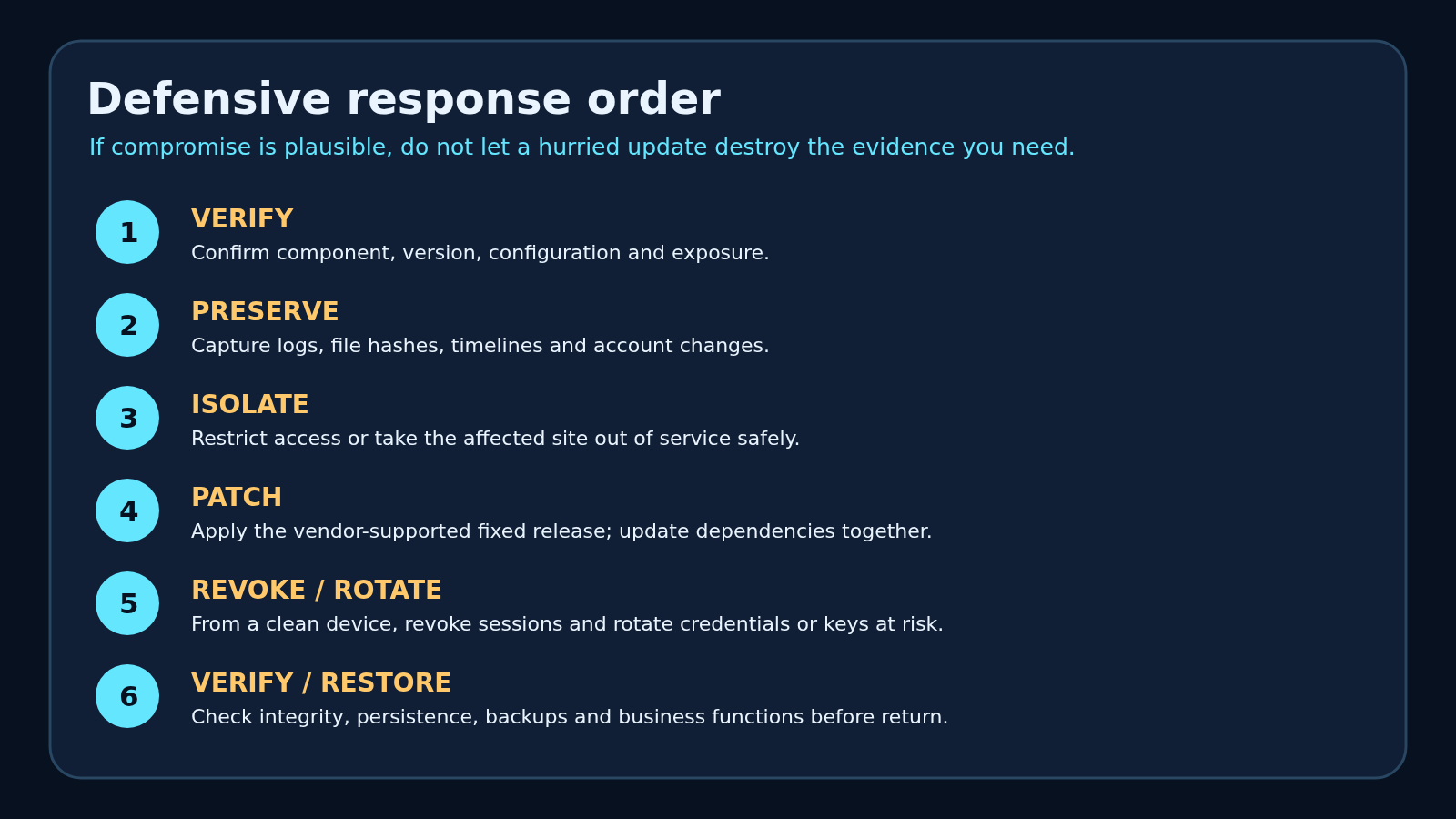
- Before any update or cleanup, preserve the current plugin package, configuration, administrator list, authentication and web logs, recent change history, and relevant file hashes. If suspicious access is plausible, isolate the administration surface and disable Hub SSO while preserving evidence.
- Move to 5.0.2 or later. If an immediate update is impossible, Wordfence recommends disabling Hub SSO until the patch is installed.[7]
- Review the preserved records for recent account creation, administrator changes, authentication anomalies, plugin/theme changes, and unexpected outbound connections; after remediation, verify file and database integrity before reopening.
Detection, recovery, good news, bad news, uncertainty
Detection: compare current administrators and recent changes with an approved baseline; inspect web, authentication, WordPress audit, and hosting control-panel logs. Recovery: isolate the site, preserve logs and file hashes, remove unauthorized access, patch from a clean administrative path, rotate exposed credentials from a clean device, and verify file/database integrity before reopening. Good news: a reviewed fixed release exists. Bad news: administrator access can create durable changes that survive a simple plugin update. Confidence: high for the affected and fixed versions; no confirmed exploitation claim is made.
Case 2: Avada plus Fusion Builder—a chain, not one magic bug
What happened
CVE-2026-18431 covers an arbitrary-file-write chain affecting Avada through 7.16 when Fusion Builder is installed and active through 3.16. The CVE record states that successful exploitation also requires certain administrator-authored content to be present; the documented consequence is attacker-controlled file creation that can progress to PHP execution and complete site compromise.[3]
Wordfence says it confirmed the chain on July 30, disclosed it to ThemeFusion on August 5, and saw patched Avada 7.16.1 and Fusion Builder 3.16.1 releases on August 25. Because Avada requires and ships with the builder, Wordfence recommends updating both together.[8]
What succeeded, what failed, and what remains unknown
The research significance is that several individually limited weaknesses crossed trust boundaries when combined. “Critical” here describes the resulting chain, not a claim that every Avada page can be compromised with one universal request. Both components, their affected versions, and specific administrator-authored content are part of the published prerequisite.[3] Wordfence’s public comments confirm testing against specific 7.15.6/3.15.6 and 7.16/3.16 pairs while noting limits in proving the exact historical introduction point. That uncertainty should remain attached to historical-range claims.[8]
What was observed in the wild
The reviewed primary disclosure establishes researcher discovery, reproduction, coordinated disclosure, firewall rules, and patches. It does not establish confirmed victim incidents. The CVE was not in CISA KEV at the cutoff.[8][12] A headline that says “zero-click RCE” may accurately communicate no required victim click, but it must not be silently rewritten as “zero-day attacks are underway.”
Small-business impact
Avada is a full website-building ecosystem, so the exposed asset may be a company’s storefront, booking page, forms, search visibility, and brand reputation at once. A compromised web server can also expose database credentials and application secrets stored in configuration files. That does not mean every adjacent service is automatically lost; it means the incident boundary must be investigated rather than guessed.
Immediate actions and verification
- Confirm both the Avada theme and Fusion/Avada Builder plugin versions. Updating only one half of the pair leaves the inventory question unresolved.
- Before any update or cleanup, preserve the current theme and plugin packages, web-server and PHP logs, WordPress audit data, file timestamps and hashes, database snapshots, and the administrator list. If compromise is plausible, isolate the site while preserving evidence.
- Update to Avada 7.16.1 and Builder 3.16.1 or later, subject to the live vendor changelog.[8]
- Use the preserved evidence to look for files created or modified outside an approved deployment, unexpected PHP in upload or cache locations, unfamiliar scheduled tasks, new privileged users, and altered plugin/theme files. These are review categories, not proof by themselves.
- After remediation, verify the site from a clean browser, confirm payment/form integrations, compare core/plugin/theme files with trusted packages, and monitor for recurring changes.
Good news: both components received coordinated fixed releases. Bad news: file-write-to-code-execution outcomes can leave persistence beyond the vulnerable theme. Confidence: high for the tested release pairs and fixed targets; lower for claims about the precise first vulnerable historical version; no active-exploitation claim is made.
Case 3: TranslatePress—a password-reset secret lands where visitors can ask for it
What happened
CVE-2026-19632 affects TranslatePress through 3.3.1. The CVE record describes exposure of an administrator password-reset URL, including its reset key and login parameters, from a translation dictionary. Exploitation requires automatic string saving and an administrator profile locale set to a published secondary language.[4]
Wordfence says the report arrived August 11, it disclosed the issue August 12, and the vendor released 3.3.2 on August 13. The research report says automatic string saving was the default and explains that the vulnerable condition caused a reset URL to be persisted as translatable content.[9]
Who is exposed—and who is not
All four pieces of scope matter: TranslatePress 3.3.1 or earlier; automatic string saving; a published secondary language; and an administrator whose profile locale uses that secondary language.[4] A site that uses TranslatePress only in its primary language, or an administrator whose profile locale does not match the secondary-language condition, does not match the documented route. That is not an excuse to leave old code installed. It is a reason to triage accurately while updating.
What was observed in the wild
The reviewed research establishes vulnerability validation and a defensive firewall rule. It did not establish confirmed customer exploitation, and the CVE was absent from CISA KEV at the cutoff.[9][12] A password-reset link disclosed during research is evidence of capability, not evidence that a particular organization was compromised.
Why it matters locally
Multilingual sites are common in tourism, healthcare, professional services, property management, and community organizations. A reset-link leak can bypass the strength of the existing password because the reset process exists specifically to replace it. Two-factor authentication can reduce the value of a stolen password or reset outcome, but it is defense in depth—not a substitute for removing the vulnerable code path.
Immediate actions, detection, and recovery
- Confirm whether automatic string saving was enabled, which secondary languages were published, which administrator profiles used those locales, and whether the site is on an affected release.
- Before any update, reset, session revocation, or cleanup, preserve password-reset, authentication and web logs; administrator/account state; plugin configuration and package; relevant file hashes; and a database snapshot. If suspicious access exists, isolate the administration surface while preserving evidence.
- Update TranslatePress to 3.3.2 or later.[9]
- Review the preserved records for password-reset requests, administrator password changes, successful logins, new sessions, new users, plugin/theme changes, and unexpected content edits. Then revoke sessions, reset affected credentials from a clean device, review recovery addresses, and verify integrity.
- Do not mass-reset every customer password unless evidence and scope justify it; unnecessary credential churn can create its own disruption and erase useful timelines.
Good news: the vendor shipped 3.3.2 quickly, and strong MFA can provide an additional barrier. Bad news: password-recovery tokens are highly sensitive even when accidentally stored as ordinary application data. Confidence: high for the prerequisite and fixed release; no confirmed in-the-wild exploitation claim is made.
Case 4: Pods—an error path logs “no” and then keeps walking
What happened
CVE-2026-19598 is an authorization-bypass vulnerability in Pods. The CVE record identifies affected branches across the 2.8, 2.9, 3.0, 3.1, 3.2, and 3.3 lines, culminating in 3.3.9 as affected. It describes an error-handling path where failed access checks can return rather than terminate, allowing unauthenticated access to privileged administrator methods and potential administrator takeover.[5]
Wordfence says the issue was reported August 10, disclosed August 12, and patched August 14. Fixed releases were 2.8.23.4, 2.9.19.4, 3.0.10.4, 3.1.4.2, 3.2.8.3, and 3.3.9.1. The disclosure also says the vendor coordinated with WordPress.org on forced updates for impacted sites.[10]
Why the failure mode matters
This case is a useful code-review lesson: detecting an authorization failure is not enough if execution continues. Logging an error can improve observability while still leaving the dangerous action reachable. Defenders do not need the request recipe to act. They need to know that an unauthenticated path could reach administrator-class operations, including user-account changes, on affected versions.
What was observed in the wild
The primary source says researchers validated the vulnerability and Wordfence deployed firewall protection. It does not report confirmed victim exploitation. The CVE was not in CISA KEV at the cutoff.[10][12] A WordPress.org forced update is a risk-reduction action; it is not evidence that every installation received the fix or that every old site is compromised.
Who is exposed
Sites running an affected Pods maintenance line require attention even if the plugin is not the visually dominant part of the website. Pods can define content types, fields, relationships, and administrative workflows. An account takeover or privileged method reach can therefore affect content, users, files, and custom data structures.
Immediate actions, detection, and recovery
- Verify the exact installed Pods branch and whether the site matches an affected release; do not assume a forced update completed.
- Before any update, account reset, or cleanup, preserve the plugin package and configuration, administrator/account state, web and PHP logs, relevant AJAX request history, file hashes, content-structure state, and a database snapshot. If account takeover is plausible, isolate the administration surface while preserving evidence.
- Move to the corresponding fixed maintenance release or a later supported release.[10]
- Review the preserved evidence for administrator password changes, user modifications, new privileged accounts, PHP errors, suspicious AJAX activity, unexpected file writes, and content-structure changes; then revoke sessions, harden accounts from a clean device, verify files/database state, and test custom Pods functionality before reopening.
Good news: fixes were backported across multiple maintenance lines, reducing pressure for a risky major-version jump during an incident. Bad news: authorization failures that reach multiple privileged methods can create a wider investigation than one changed password. Confidence: high for affected/fixed lines and the research timeline; no confirmed exploitation claim is made.
Case 5: GiveWP—unsafe object handling reaches server execution
What happened
CVE-2026-82222 affects GiveWP through 4.16.7.1 and is fixed in 4.16.7.2. The official CVE record classifies it as deserialization of untrusted data leading to object injection.[6] Patchstack’s disclosure says the chain could reach unauthenticated remote code execution by combining unsafe object handling, a donation workflow, and classes shipped with the plugin.[11]
Prerequisites and version nuance
Patchstack reports that 4.16.5.1 and earlier could be reachable on a default installation with a published donation form and active gateway. For 4.16.6 through 4.16.7.1, the route narrowed: site history, imported or restored forms, an older form representation, or use of the option-based editor could matter. The key defensive conclusion is not to improvise a vulnerable/non-vulnerable verdict from one visible form. Inventory the plugin version and upgrade to 4.16.7.2 or later.[11]
What the patch changed
Patchstack says 4.16.7.2 broke the chain at multiple layers: rejecting serialized name data before storage, restricting object creation during reads, hardening the callable path used in the chain, sanitizing metadata, and adding a migration to remove stored object payloads from several database locations.[11] That last point matters because an update that blocks new writes may not neutralize data already planted before the patch.
What remains unknown or separate
Patchstack notes that a separate registration behavior did not honor the site’s normal registration setting in the reviewed release. The disclosure distinguishes that access-control concern from the now-broken code-execution chain.[11] This article preserves that distinction: an unresolved account-creation behavior is not proof that 4.16.7.2 remains vulnerable to the same remote-code-execution outcome.
What was observed in the wild
The sources reviewed establish a researcher report on July 28, multiple patch attempts, the final 4.16.7.2 release on August 27, and public disclosure on August 28. They do not establish confirmed victim exploitation. The CVE was absent from CISA KEV at the cutoff.[11][12]
Why it matters to nonprofits and small organizations
Donation sites are attractive because they combine a public form, payment workflows, donor identities, email, and a trusted brand. Server-side code execution can threaten more than the donation plugin: it can alter the site, read configuration secrets available to the web process, tamper with donor-facing content, and establish persistence. Payment-card scope depends on the exact gateway architecture and evidence; do not announce card theft without proof.
Immediate actions, detection, and recovery
- Verify the installed GiveWP version, form/gateway configuration, site history, and whether the site matches an affected release.
- Before installing 4.16.7.2—whose migration removes stored object payloads—or performing any cleanup, preserve web/PHP logs, GiveWP and WordPress audit records, a database snapshot, file hashes, the current plugin package, user/registration state, and payment/email configuration. If compromise is plausible, isolate the donation workflow while preserving evidence.[11]
- Update GiveWP to 4.16.7.2 or later and verify the migration completed without errors.[11]
- Use the preserved evidence to review unexpected registrations, donor-account changes, qualified-responder findings in stored data, new PHP files, modified plugin files, outbound connections, scheduled jobs, and payment/email setting changes.
- From a clean device, revoke WordPress sessions and rotate secrets proven or reasonably suspected to be exposed. Restore only from a known-good point, patch before exposure, reconcile legitimate donations/forms, test the gateway in a controlled manner, and monitor for recurrence.
Good news: the patch uses defense in depth and includes cleanup of stored object payloads. Bad news: code execution can escape the boundaries of a single plugin. Confidence: high for affected/fixed versions and the Patchstack timeline; configuration reachability varies by version and site history; no confirmed exploitation claim is made.
The “in the wild” ledger
At the reporting cutoff, the defensible classification for all five cases was critical, patched vulnerability with publicly described researcher validation—not confirmed active exploitation.[2][3][4][5][6][7][8][9][10][11] None matched CISA’s live KEV CSV.[12] That status can change after publication. Site owners should recheck CISA, the vendor or researcher advisory, hosting-provider notices, and trusted incident-response telemetry rather than treating this article as a permanent exploitation-status oracle.
| Case | Correct label at cutoff | What would justify escalation |
|---|---|---|
| WPMU DEV Dashboard | Authentication bypass; patched; no confirmed attacks in reviewed sources[7][12] | Vendor/customer incident notice, KEV addition, or matching local compromise evidence |
| Avada + Builder | Researcher-demonstrated RCE chain; patched; no confirmed attacks in reviewed sources[8][12] | Verified incident reporting or matching local file/account changes |
| TranslatePress | Reset-link disclosure/account takeover; patched; no confirmed attacks in reviewed sources[9][12] | Verified reset-link abuse, suspicious resets/logins, or official exploitation notice |
| Pods | Authorization bypass/privilege escalation; patched; no confirmed attacks in reviewed sources[10][12] | Unauthorized privileged actions, account changes, or official incident evidence |
| GiveWP | Object injection to code execution; patched; no confirmed attacks in reviewed sources[11][12] | Matching persistence, malicious database objects, file changes, or official incident evidence |
Do this tonight
- Inventory first. Search every production, staging, archived, and forgotten WordPress instance for the five components. Include disabled plugins and inactive themes because old files still affect incident scope and future reactivation risk.
- Record and preserve the current state before updates. Capture plugin/theme packages and versions, configuration, administrator accounts, recent changes, relevant logs and file hashes, a database snapshot, backups, hosting platform, and business owner. If compromise is plausible, isolate safely while preserving evidence.
- Patch the exact dependency set. WPMU DEV Dashboard 5.0.2+; Avada 7.16.1+ with Builder 3.16.1+; TranslatePress 3.3.2+; the appropriate fixed Pods maintenance line; GiveWP 4.16.7.2+.[7][8][9][10][11]
- Investigate before declaring clean. Review the preserved evidence, revoke or rotate exposed access from a clean device, verify integrity and persistence, and document the recovery.
- Test business functions. Forms, donations, multilingual pages, custom fields, SSO, checkout, email, analytics and backups should be verified before normal service resumes.
Do this this week
- Adopt an owner-and-version inventory for every plugin, theme and externally reachable WordPress site.
- Remove abandoned components after a rollback-capable review; “inactive” is not the same as “gone.”
- Require MFA for administrators, minimize administrator count, and review recovery email addresses.
- Keep off-site, tested backups and rehearse a clean restore that patches before public exposure.
- Centralize audit, web, PHP, hosting and authentication logs long enough to investigate a delayed discovery.
- For local businesses without in-house WordPress administration, use a qualified provider to inventory, patch, validate and document—not merely click “update all.” The IT Guys’ live Small Business Services and Our Services pages explain available support; the links were resolved from live WordPress records.
FAQ
Does a CVSS 10.0 mean my website was hacked?
No. A CVSS score describes severity under defined conditions. It does not prove exposure, successful exploitation, or compromise. Confirm product, version, prerequisites, reachability, logs and integrity.
If automatic updates are enabled, can I stop checking?
No. Forced or automatic updates can fail because of filesystem permissions, disabled update paths, abandoned sites, hosting restrictions, conflicts or connectivity problems. Verify the installed version and the application’s behavior.
Should I patch before preserving evidence?
If there is no sign of compromise and the risk of delay is high, ordinary maintenance may proceed under your change process. If compromise is plausible, preserve the evidence and isolate safely before destructive cleanup. Emergency response should balance exposure reduction with the need to understand what happened.
Do I rotate every password and API key?
Rotate credentials and keys that evidence shows—or a defensible scope assessment suggests—were exposed. Do it from a clean device after preserving relevant evidence and revoking active sessions. Blind global rotation can create outages while missing persistence.
Are Wordfence or Patchstack firewall rules a substitute for updates?
No. They can provide defense in depth, but the durable goal is to remove the vulnerable code path with a supported fixed release and then verify integrity.
Why mention Florida when these are global vulnerabilities?
The incidents are global disclosures; this article does not claim local exploitation. The local framing turns the evidence into practical steps for homes, nonprofits and small businesses in Port Saint Lucie, Jensen Beach, Fort Pierce and Vero Beach.
Methodology and uncertainty
The inclusion date was August 29, 2026 in America/New_York. A first rendered homepage scan and an immediate pre-freeze rescan both found one qualifying same-day Hacker News editorial article. Sponsored cards, vendor promotions, webinars, lead-generation pages, and older dates were excluded. The qualifying article was read for subject discovery; its wording and structure were not used as this article’s template.
Each CVE was checked against the live CVE Services API record. The Wordfence and Patchstack research pages were opened as rendered pages, and affected/fixed versions, prerequisites and disclosure timelines were compared. CISA’s live KEV CSV was downloaded and searched for the five exact identifiers. “Not in KEV” means no exact match in that catalog at the cutoff; it is not proof that exploitation has never occurred. Likewise, absence of a confirmed incident from the reviewed sources is not proof of absence.
One independent BleepingComputer route for Avada and GiveWP was blocked by its anti-bot verification during this run. Search metadata identified the canonical pages, but blocked page text was not used to carry a consequential claim. Hacker News provided secondary context; primary records carry the affected-version and patch claims.
Direct sources
- Five Critical WordPress Plugin and Theme Flaws Enable Site Takeover or RCE — The Hacker News, published August 29, 2026 at 21:55 +05:30; discovery/context source.
- CVE-2026-76581 record — CVE Services API, Wordfence CNA record.
- CVE-2026-18431 record — CVE Services API, Wordfence CNA record.
- CVE-2026-19632 record — CVE Services API, Wordfence CNA record.
- CVE-2026-19598 record — CVE Services API, Wordfence CNA record.
- CVE-2026-82222 record — CVE Services API, Patchstack record.
- Wordfence Argus Finds Critical Authentication Bypass in WPMU DEV Dashboard Plugin — Wordfence, August 27, 2026.
- Wordfence Argus Finds Complex 6 Step Critical RCE in Avada Theme with 1 Million Sales — Wordfence, August 25, 2026.
- 400,000 WordPress Sites Affected by Account Takeover Vulnerability in TranslatePress WordPress Plugin — Wordfence, August 25, 2026.
- 100,000 WordPress Sites Affected by Privilege Escalation Vulnerability in Pods WordPress Plugin — Wordfence, August 21, 2026.
- Unauthenticated PHP Object Injection to Remote Code Execution on GiveWP — Patchstack, August 28, 2026.
- Known Exploited Vulnerabilities Catalog CSV — CISA, checked at the reporting cutoff.