

Nightly security casebook · August 21, 2026
The Hacker Diaries — Featuring Jennifer Hudsen: Case File No. 005
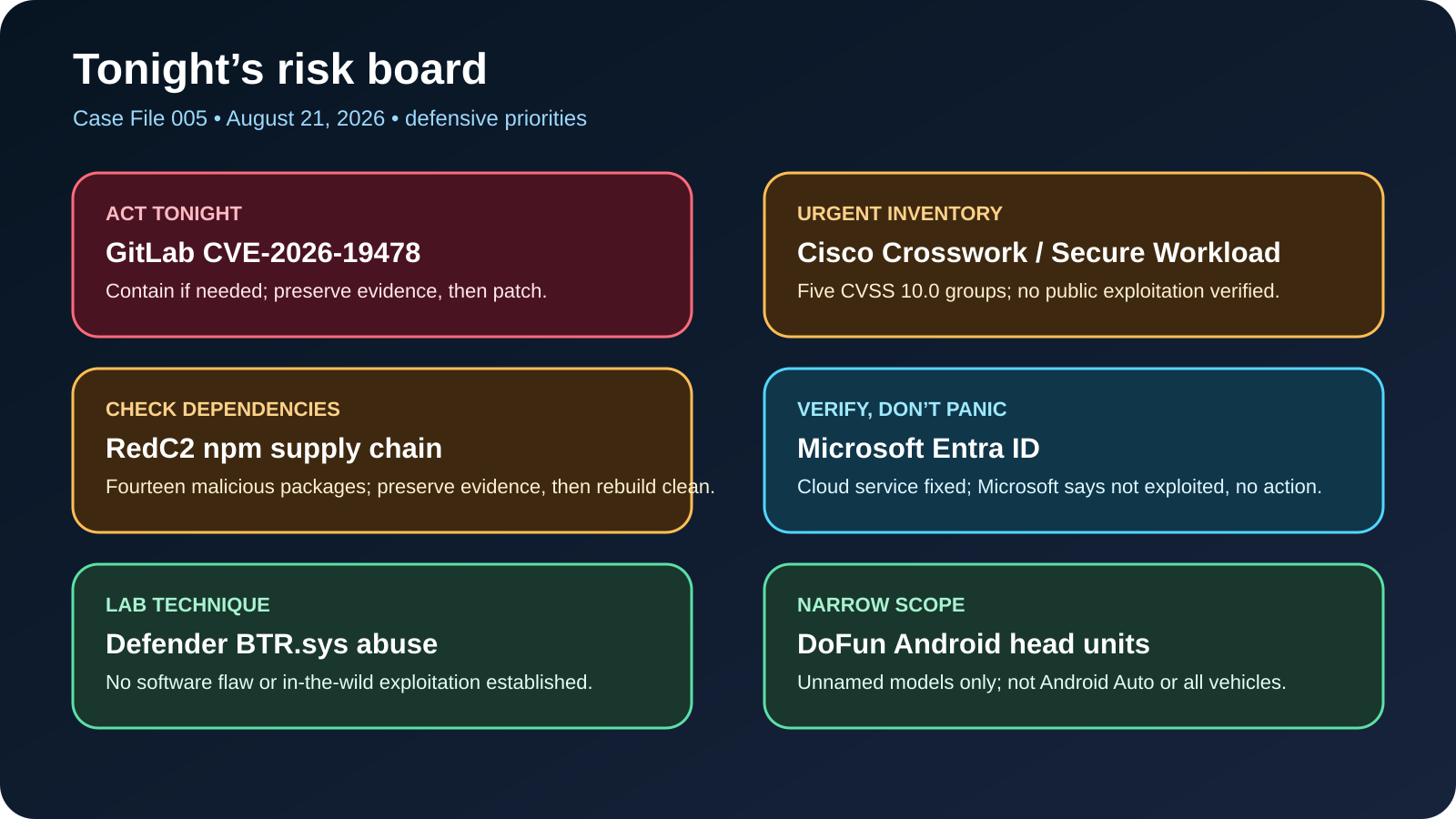
At closing time, six files were still glowing on the board: a dependency that hid a Linux backdoor behind useful date math; a Windows defense driver repurposed only after an intruder already held the keys; an aftermarket car display recruited into a proxy network; five maximum-severity Cisco vulnerability groups; a GitLab flaw drawing hostile traffic to honeypots; and a cloud identity flaw whose early “exploited” label had to be corrected. The numbers look loud. The predicates, timelines, and limits tell the truth.

The case board
The shortest useful reading is this: contain exposed self-managed GitLab when needed, preserve evidence, then patch; investigate exact RedC2 package exposure on Linux build systems as a possible host compromise; preserve relevant Cisco configuration and logs before upgrading named enterprise platforms; isolate only the narrow class of suspicious DoFun-powered head units; harden Windows privileged access rather than pretending BTR.sys is a remote zero-day; and record the Entra ID issue as Microsoft-fixed with no customer action. Six headlines, six different response contracts.
Tonight’s risk at a glance
| Subject | Exposure predicate | Observed in wild? | First decision |
|---|---|---|---|
| RedC2 npm cluster | Exact malicious package imported on Linux, directly or transitively | Malicious artifacts verified; victim count unknown | Preserve, isolate likely-executed hosts, rotate reachable secrets cleanly |
| BTR.sys | Attacker already has elevated administrator context and driver-loading right | No observed abuse in reviewed telemetry | Harden admin rights; investigate unexplained defense loss after reboot |
| DoFun head units | DoFun/TWCore firmware and updater path, plus network connectivity | Proxy module observed; prevalence undisclosed | Identify exact model/build, isolate network, seek trusted fixed firmware |
| Cisco hardening releases | Named Crosswork or Secure Workload product below fixed release | No public malicious use; no KEV listing at cutoff | Preserve supported configuration and relevant logs, then upgrade every required component and verify running versions |
| GitLab CVE-2026-19478 | Self-managed affected release with reachable GraphQL and public data/projects | watchTowr honeypot exploitation observed; no confirmed production victim | Contain if needed, preserve evidence, patch now, then verify repository and account integrity |
| Entra ID CVE-2026-69836 | Microsoft-hosted service only; vulnerable backend window undisclosed | Current official status No; not KEV | No customer action; record provider mitigation and reject phishing pretexts |
Subject 1Supply chainHigh priority if imported on Linux
The calendar kept perfect time while the backdoor slipped out
What happened
Fourteen npm package names offered mundane calendar, streak, and mapping calculations. The functions worked. That was part of the disguise. TrendAI Research found that each package also carried the same Linux native implant and arranged for its main module to launch that file when an application imported the dependency. The dangerous action did not depend on a familiar installation lifecycle script. A developer could test the advertised math, receive the right answer, and never see the second process leave by the side door.
Thirteen names had one identified malicious release, version 1.0.0. streak-metrics-math had two, 1.0.0 and 1.0.1. OpenSSF OSV records, credited to Amazon Inspector and in some cases GitHub’s malware advisory program, independently classified all 14 names as malicious and listed one common implant hash. TrendAI later connected that implant to RedShell, the Linux component of the RedC2 4.0 framework. The “AI-assisted” label belongs to an operator interface that can translate natural-language goals into framework commands. It does not mean the dependency loader independently reasoned its way into a machine.
| Exact package name | Malicious version(s) |
|---|---|
streak-metrics-math |
1.0.0, 1.0.1 |
kit-map-vim |
1.0.0 |
streak-map-cache |
1.0.0 |
streak-map-kit |
1.0.0 |
map-streak-kit |
1.0.0 |
streak-cache-map |
1.0.0 |
streak-calc-metrics |
1.0.0 |
streak-calc-math |
1.0.0 |
streak-math-abz |
1.0.0 |
streak-metricsaz |
1.0.0 |
streak-math-metrics |
1.0.0 |
streak-metricazbd |
1.0.0 |
streak-metricsazb |
1.0.0 |
streak-kit-map |
1.0.0 |
Verified evidence and timeline
The malicious releases appeared from July 29 through August 12. OSV records were published from July 30 through August 12, before TrendAI’s fuller August 20 report. That order provides useful corroboration: the package identities, versions, and shared artifact did not originate only in a late vendor narrative. At the August 21 cutoff, eight names resolved to npm security-holding packages and four had no live versions. Two names—streak-calc-math@1.0.0 and streak-math-metrics@1.0.0—still appeared as current in registry metadata even though OSV classified them as malicious. Registry state can change, so exact deny-lists matter more than assuming takedown has finished.
The npm downloads API returned 3,750 aggregate events across the 14 names for January 1 through August 21. That is not 3,750 infected people. Automated scanning, mirrors, repeated retrieval, researchers, and security-holding packages can all contribute. No reviewed source supplied a verified execution count, victim count, loss total, or geographic distribution.
Exposure
A lockfile, software bill of materials, cache, or deployed tree containing an exact package and version establishes exposure. Risk rises materially if a Linux developer workstation, CI runner, agency staging server, or automation host imported it, including through a transitive dependency. Windows or macOS presence does not match the documented Linux execution path, though source and build records should still be reviewed. A developer machine can be more valuable than a public server because it may hold source-control tokens, deployment credentials, SSH keys, cloud sessions, signing material, browser-stored secrets, and trusted access to customers.
Observed in the wild; success, failure, or unknown
The malicious package artifacts and their launch behavior are confirmed by independent artifact records. The implant’s capabilities include remote access, credential collection, file movement, persistence, and network pivoting. Capability is not outcome. A matching hash or lockfile is a triage fact; process and network evidence are needed to support execution; theft or lateral movement needs still more evidence. Takedown limited continued exposure, but deletion from npm does not clean cached packages, old containers, build artifacts, or a host on which the implant already persisted. Whether the operator used the AI interface in any victim intrusion remains unknown.
Local home and SMB relevance
Most households never build Node.js software and have low direct exposure. Treasure Coast web agencies, managed service providers, SaaS shops, freelancers, schools with coding labs, and businesses running self-hosted JavaScript automation have meaningful risk. No local victim is alleged. The local question is simply whether an exact dependency crossed a Linux build boundary that also held valuable credentials.
Immediate actions
- Search repositories, lockfiles, SBOMs, CI caches, images, and deployed dependency trees for all 14 exact names and versions without importing or executing them.
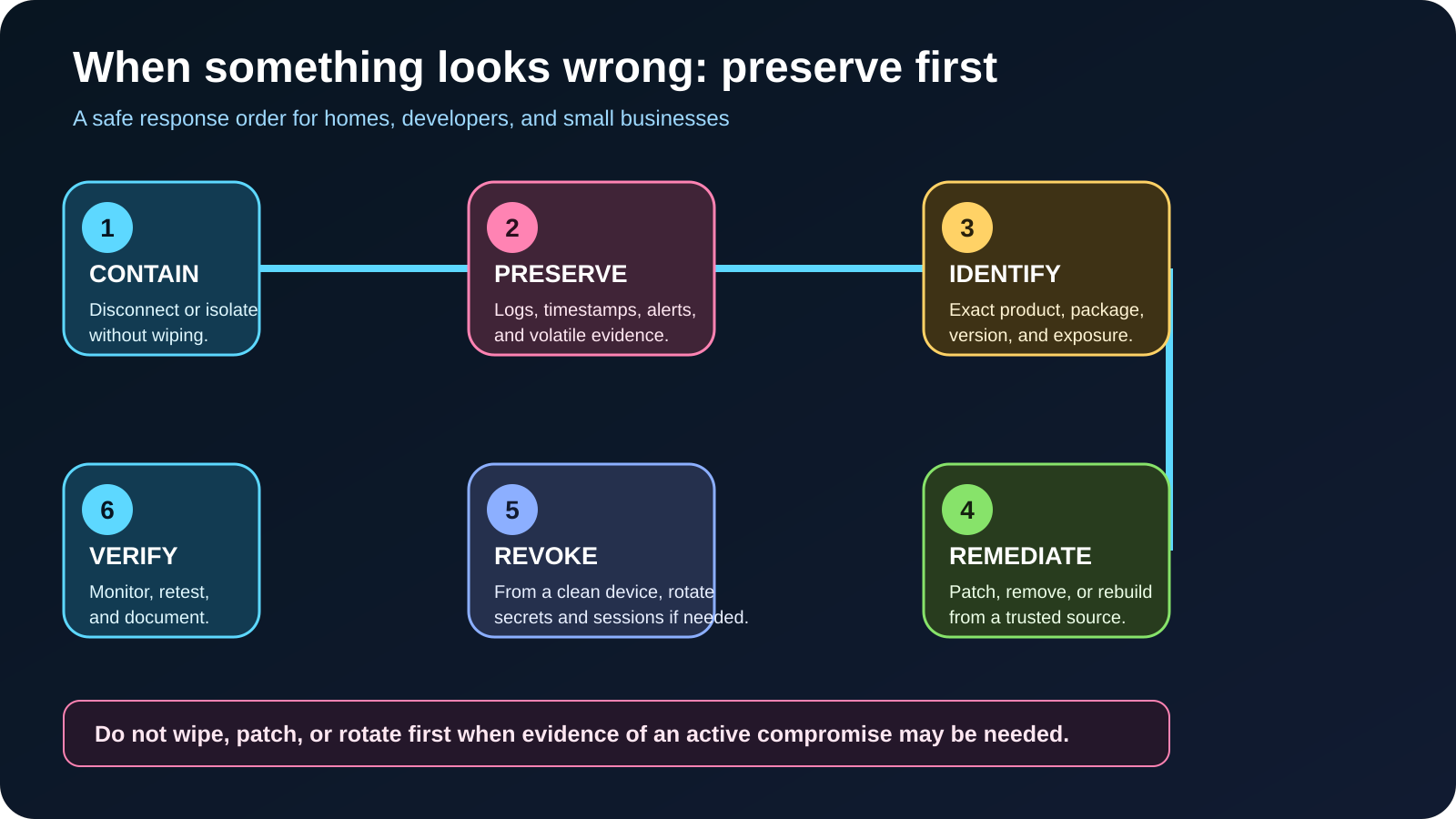
- Identify Linux systems that built or tested matching projects during the relevant window. Preserve package-manager, endpoint, shell, process, CI, and network records before cleanup.
- If import or execution is plausible, isolate the host while preserving evidence. Review every source-control, cloud, deployment, email, browser, and customer credential it could reach.
- Remove the dependency only after evidence capture, regenerate reviewed lockfiles, and rebuild in a known-clean environment. Do not redeploy old artifacts.
Detection and verification
Defenders should compare files to the published common SHA-256, look for unexpected executables beneath affected package paths, correlate detached child processes with Node activity, review suspicious permission changes and user-level persistence, and examine connections to the infrastructure published by the primary researcher. Do not contact or probe attacker systems. Verification means establishing whether the exact package was present, whether the import path ran on Linux, what process followed, and which credentials were available—not merely finding a package name in a historical branch.
Recovery and escalation
If execution is supported, treat the system as potentially fully compromised. Engage qualified incident response when the host held production, customer, signing, or administrative access. Rotate credentials from a clean device, revoke old keys and tokens, rebuild confirmed-compromised systems from trusted media, restore only reviewed source and data, and confirm that revoked credentials fail. Deleting node_modules is containment theater if persistence escaped the package directory.
Good news, bad news, confidence
Good news: exact names, versions, and a common artifact make focused inventory possible, while registry and advisory intervention reduced availability. Bad news: import-time execution sidesteps the comfort of --ignore-scripts, and build identities often hold broad secrets. Confidence: high for the 14-package artifact set and launch behavior; medium-high for RedShell/RedC2 family attribution; unknown for victims, losses, and operator use of the AI interface.
Direct sources
Subject 2Laboratory techniquePost-compromise
The guard’s own boot key, borrowed after the burglary
What happened
Check Point Research reverse-engineered BTR.sys, Microsoft Defender’s Boot-Time Removal driver, and demonstrated “BTR Reforged.” Defender temporarily deploys this Microsoft-signed component when cleanup must finish during reboot, including removal of a locked resource. In the laboratory, the driver’s intended privileged file and registry operations could be repurposed to alter protected security resources during an early-boot interval before Defender’s main user-mode service was fully running.
The crucial sentence is what this is not. It is not a new remote Windows zero-day, not a path from a standard user to administrator, and not memory-corruption exploitation. An attacker must already control an elevated administrator context with the sensitive SeLoadDriverPrivilege right and be able to stage the driver/reboot conditions. Calling it “Defender lets anyone delete security software” would erase the prerequisite that decides the case.
Verified evidence and timeline
Check Point published on August 20 after testing builds from Windows 7 build 7601 through a fully updated Windows 11 25H2 installation as of July 2026. That is the researcher’s successful test range, not a Microsoft-issued list proving every edition, architecture, and image is affected. The researcher says MSRC did not consider the finding eligible for immediate servicing because administrative privilege was already required. No separate Microsoft advisory or CVE for this 2026 technique was found.
BTR.sys also appeared in the history of CVE-2021-24092, a separate privilege-escalation flaw patched in 2021. That old CVE must not be recycled as an identifier for the 2026 feature-abuse technique. Microsoft’s recommended vulnerable-driver blocklist remains useful against risky third-party drivers, but Check Point warns it is not a direct remedy here because BTR.sys is a Microsoft component used by Defender itself.
Exposure
Exposure is a chain: compatible Defender engine, existing elevated administrative compromise, effective driver-loading rights, and a useful boot or loading context. The presence of Windows Defender is not evidence that the technique ran. A home PC behind a router is not remotely exposed merely because the driver exists. The meaningful control boundary is privileged access: standing local administrator membership, credential theft, remote-management abuse, and weak separation between daily work and elevated administration.
Observed in the wild; success, failure, or unknown
Check Point reported no evidence of real-world abuse across its collected samples and telemetry. The technique succeeded in the researchers’ test environment, including a demonstration against a current Windows 11 25H2 system. The absence of observed abuse is a bounded vendor negative, not permanent proof. The public record does not provide a campaign, actor, victim count, or field incident. MSRC’s decision, as reported by Check Point, is not a statement that the behavior has no security value; it reflects the already-admin prerequisite.
Local home and SMB relevance
For households, keep Windows and Defender current, avoid doing normal work in an elevated administrator session, and investigate unexpected protection failure after reboot. For SMBs, the lesson is stronger: remove standing local-admin access, use unique admin credentials, separate management accounts, retain endpoint logs centrally, and keep tested recovery media. No Florida business is named, and no consumer needs to block or delete BTR.sys.
Immediate actions
- Inventory local administrators and assignments of “Load and unload device drivers.” Remove rights not required for a documented role.
- Use separate daily and administrative identities, just-in-time elevation where available, phishing-resistant MFA for remote administration, and controls over reboot-capable management tools.
- Validate that Defender tamper alerts and driver-load telemetry reach a system an already-compromised endpoint cannot erase.
- Do not add a blind block against BTR.sys; test any application-control change against legitimate Defender remediation.
Detection and verification
Context matters more than signature. Watch for a Defender remediation driver created or loaded by an unexpected process, unusual boot-service staging, brief driver/service registration, and deletion of security binaries or configuration soon after boot. Check Point describes additional correlations involving transient logging, registry changes, alternate data streams, and driver lineage. A single artifact can also appear during legitimate cleanup, so detections should join process ancestry, timing, file effects, and Defender operational events before declaring abuse.
Recovery and escalation
If endpoint protection was neutralized after an unexplained privileged driver load, preserve disk, registry, boot, and centralized telemetry; isolate the endpoint; determine how administrator control was obtained; rotate exposed secrets from a clean system; and rebuild if trust cannot be re-established. Reinstalling Defender addresses damage to the guard, not the intruder who already held administrator control. Escalate when domain, remote-management, backup, or security-console credentials were accessible.
Good news, bad news, confidence
Good news: the technique requires prior high privilege, has no reported wild campaign, and creates behavior defenders can correlate. Bad news: a trusted signature is not a safe-behavior guarantee, and the standard vulnerable-driver story does not fit. Confidence: high for the laboratory result and privilege prerequisite; medium for the researcher-relayed MSRC disposition; low for prevalence because no wild abuse was observed.
Direct sources
Subject 3Android head unitObserved proxy enrollment
The invisible passenger was in the updater, not the steering wheel
What happened
Kaspersky documented malware delivered through firmware/update infrastructure used by DoFun-developed Android automotive head units. The narrow noun matters. This is not Google’s Android Auto phone-projection product, not every Android Automotive OS vehicle, and not evidence that cars generally can be remotely steered. DoFun firmware included a privileged system application called TWCore that received update instructions and could install APKs. Kaspersky telemetry found an unseen no-interface dropper in that updater’s cache and says TWCore performed the installation in every case it observed.
The chain led through additional loaders to a modular third stage. Kaspersky observed operators deploy a reverse-proxy component associated with the MoYu/BADBOX ecosystem. The implant also had WebView, JavaScript, HTTP, clipboard, deep-link, and module-execution capabilities that could support hidden advertising or click fraud. The publication-safe distinction is that proxy enrollment was observed, while ad fraud on those specific head units is supported as capability and assessed purpose, not measured transaction evidence.
Verified evidence and timeline
Published update paths contained dates in November 2024, June 2025, and June 2026. Those dates establish artifacts at dated locations, not continuous compromise or infection totals. Kaspersky says it discovered the activity in June 2026 and published August 21. Separately, Nokia Deepfield examined live MoYu “zhima” infrastructure in July using an Android TV/IPTV chain. Nokia’s recovered module naming, class, loader location, and module hash overlapped Kaspersky’s evidence. That independently corroborates the proxy module and infrastructure family, but it does not measure DoFun head-unit prevalence.
Kaspersky says DoFun reported fixing the security issues after notification. No public DoFun advisory, affected model table, fixed firmware versions, deployment coverage, or independent validation was located. DoFun marketing claims about millions of users and ecosystem partners cannot be converted into exposure estimates.
Exposure
The defensible predicate is a DoFun-powered head unit containing the TWCore updater path, with a firmware/build in the undisclosed affected window and network connectivity through a SIM, Wi-Fi, or hotspot. Kaspersky did not publish vehicle brands, exact models, geographies, an infection denominator, or first/last telemetry timestamps. Merely seeing “Android Auto” on a dashboard proves nothing. The first useful task is to identify head-unit manufacturer, seller, model, Android build, firmware, and the presence/version of com.tw.core.
Observed in the wild; success, failure, or unknown
Kaspersky’s telemetry supports real delivery through TWCore and observed use of the proxy module. The report provides multiple artifact hashes and attributes the activity to MoYu with high confidence based on code and infrastructure overlaps. No reviewed source shows entry into CAN-bus, braking, steering, powertrain, or another safety-critical vehicle domain. No victim count, data-consumption total, click-fraud revenue, affected-model count, or road-safety event is known. The updater fix is vendor-reported through Kaspersky; rollout success is unknown.
Local home and SMB relevance
Risk is highest for consumers, installers, used-car dealers, delivery businesses, and small fleets operating low-cost DoFun-powered aftermarket displays that regularly connect to data. A proxy node can consume a data plan, abuse the owner’s public IP, damage network reputation, encounter local-network resources, and create support cost. That is serious without inventing a crash scenario. Local installers should be able to name the supplier, signing model, fixed build, and rollback policy for units they sell.
Immediate actions
- Record the seller, manufacturer, exact model, serial, Android build, firmware, update history, and TWCore package/version. Photograph screens before changing state.
- If the unit is suspicious, disconnect Wi-Fi/hotspot access and disable or remove its data SIM when safe and supported. Segment fleet infotainment from business devices.
- Ask the vendor or seller for an exact affected-model statement, fixed signed-firmware version, installation procedure, and evidence the update channel is secured.
- Do not download unofficial firmware or execute malware samples. If no trustworthy support path exists, replace or keep the unit offline.
Detection and verification
Inspect installed-application lists for TWCore and unexpected no-interface applications, review router, DNS, firewall, or mobile-data history for unexplained periodic traffic, and compare only against the defanged indicators supplied by the primary research. An indicator hit is a triage lead, and absence does not clear a unit because infrastructure rotates. Verification requires matching model/build/updater context plus installation or network evidence. Do not probe attacker infrastructure.
Recovery and escalation
A factory reset may fail if the privileged updater or update channel can redeliver the implant. Recovery needs a vendor-confirmed, signed fixed image and a trustworthy installation process. After reflashing, follow vendor reset instructions, reconnect on a monitored network, verify the running build, and confirm suspicious traffic does not recur. Escalate for fleet-wide exposure, repeated reinfection, business-network access, unexplained data charges, or unavailable trustworthy firmware.
Good news, bad news, confidence
Good news: the known scope is narrow, DoFun reportedly fixed the enabling issues, and no safety-domain compromise was demonstrated. Bad news: a privileged updater can survive ordinary app-level cleanup, while affected models and rollout coverage remain undisclosed. Confidence: high for the observed delivery chain and proxy module; high for the boundary that Android Auto is not the finding; medium for MoYu attribution; unknown for scale and fixed-firmware coverage.
Direct sources
Subject 4Enterprise platformsFive CVSS 10 groups
Nine labels on the cabinet, five alarms at maximum
What happened
Cisco issued August hardening releases for Crosswork platforms and Secure Workload Software. Together the advisories assign nine CVE identifiers, five with maximum CVSS 3.1 scores of 10.0. The arithmetic needs a label: Cisco grouped multiple internally found issues by highest-level weakness class and assigned one CVE to each group. These are nine vulnerability groups, not necessarily nine single, independently described bugs.
Crosswork carries four groups: three scored 10.0 and one 9.9. Secure Workload carries five: two at 10.0, one 9.9, one 9.6, and one 7.5. Cisco says the findings came from internal security testing that combined existing processes with frontier AI models. That describes the discovery process, not an “AI attack,” and Cisco intentionally withheld exploit-level detail.
Verified evidence and timeline
Both advisories were first published August 19. On August 21 Cisco revised the Crosswork advisory to add Workflow Manager, which means an inventory made from the first version can be incomplete. Crosswork Data Gateway, Network Controller, and Planning 7.2.1 and earlier must move to 7.2.1-SP; Workflow Manager 2.1.1 and earlier must move to 2.1.1-SP. Cisco says scope applies regardless of configuration.
Secure Workload 3.10 and earlier must move to 3.10.9.1; version 4.0 must move to 4.0.4.16. Cluster, Agent, and Connector all require remediation. Cisco upgraded the Cluster component for SaaS, but SaaS customers remain responsible for Agents and Connectors. No workaround exists for either advisory. At the cutoff, none of the nine IDs appeared in CISA KEV, and NVD still showed them awaiting analysis with Cisco CNA scoring.
Exposure
Exposure requires an exact named product below its fixed release. Ordinary Cisco routers, switches, firewalls, phones, and collaboration products are not automatically affected. The top vectors describe network reachability, low complexity, no required privilege or user interaction, but a CVSS vector does not prove that every management plane is reachable from the public internet. Still, five maximum scores and no workaround justify urgent change control once the product predicate matches.
Observed in the wild; success, failure, or unknown
Cisco PSIRT said it was unaware of public announcements or malicious use. No checked CVE was in KEV. Those dated negative signals are reassuring, not a warranty. There is no public victim, campaign, exploit chain, or product-specific IOC set in the advisories. The updates exist and define remediation; the success question belongs to whether every running node, agent, and connector actually reaches the fixed release. A ticket marked complete while a stale DR node or SaaS agent remains old is a failed rollout.
Local home and SMB relevance
Home relevance is effectively none unless someone operates an enterprise lab. Most small businesses do not own Crosswork or Secure Workload. The likely local path is through an MSP, telecom provider, data center, enterprise customer, or acquired environment. Search contracts and configuration databases for exact product names before sounding a generic Cisco alarm. If the names are absent, document the check and leave unrelated equipment alone.
Immediate actions
- Inventory exact product, running release, node/cluster role, maintenance owner, management-plane reachability, and every lab, DR, or acquired instance. Include Workflow Manager.
- Before remediation, preserve supported configuration plus management, authentication, application, and database logs needed to reconstruct the pre-change state.
- Validate compatibility, then schedule 7.2.1-SP or 2.1.1-SP for matching Crosswork products.
- For Secure Workload, track Cluster, Agent, and Connector as separate rollout objects; move to 3.10.9.1 or 4.0.4.16 as appropriate.
- Use segmentation and access controls as defense in depth while upgrading, not as a substitute, because Cisco supplies no workaround.
Detection and verification
Preserve and review management, authentication, application, and database logs around the change window. Look for unexplained administrative actions, failed or bypass-like authentication, unusual file changes, service crashes, and unexpected credential use. These are generic triage signals, not unique indicators. Verify the actually running version on every node and component, test normal workflows, reconcile the inventory after maintenance, and monitor availability and authentication behavior.
Recovery and escalation
If logs suggest unauthorized changes, preserve them before broad cleanup, isolate the management plane as operationally safe, review credentials and persistence from a clean administrative workstation, and engage Cisco support or incident response. A fixed build closes identified paths; it does not prove earlier integrity. Escalate when high-value network control, segmentation policy, credentials, or multiple managed customers could be affected.
Good news, bad news, confidence
Good news: first fixed releases and customer/SaaS responsibilities are explicit, and Cisco reports no malicious use. Bad news: there is no workaround, product scope changed after first publication, and five groups carry maximum scores. Confidence: high for vendor scope and fixed releases; medium for absence of public exploitation because it is a dated vendor and catalog signal; limited independent exploit assessment because the groups intentionally lack detailed paths.
Direct sources
Subject 5Active on honeypotsPatch tonight
Two days from patch note to footsteps at the decoy door
What happened
GitLab released fixes for CVE-2026-19478 on August 17. The critical code-injection flaw affects self-managed Community and Enterprise editions and, under certain conditions, lets an unauthenticated user use the GraphQL interface to modify or delete public projects and user data. GitLab scores it 9.4, with network reachability, low complexity, no privileges, and no user interaction.
watchTowr said it reproduced the flaw quickly from the advisory and patch, then reported hostile exploitation reaching its honeypot network. That supports an active-exploitation classification with a hard boundary: public evidence is sensor telemetry attributed to watchTowr. No named production victim, successful destructive incident, actor, campaign size, or exploitation count was published in the reviewed record.
Verified evidence and timeline
GitLab published minimum fixed versions on August 17: 18.11.11, 19.0.8, 19.1.6, and 19.2.4. Affected ranges are 18.2 through 18.11.10, 19.0 through 19.0.7, 19.1 through 19.1.5, and 19.2 through 19.2.3. GitLab recommends the newest patch on a supported branch. GitLab.com and GitLab Dedicated were already patched, so customers of those hosted offerings were told no action was required.
watchTowr posted reproduction on August 18; CSO updated on August 19 to report watchTowr’s honeypot observation. As of CISA catalog version 2026.08.21, the CVE was not in KEV. An NVD/CISA SSVC “none” entry dated August 17 predates the August 19 telemetry and cannot negate it. KEV status often trails new evidence and is not the only patch trigger.
Exposure
An organization is exposed when it operates self-managed GitLab CE/EE in an affected range, an attacker can reach the GraphQL interface, and public projects or relevant public user data exist. Internet reachability makes the case urgent; internal reachability still matters where untrusted users or compromised systems can access it. GitLab’s “under certain conditions” wording is not publicly expanded, so undocumented assumptions should not be treated as compensating controls.
Observed in the wild; success, failure, or unknown
watchTowr observed exploitation against its honeypot estate. That proves hostile activity reached research sensors. It does not prove a production customer’s repository was changed. The vendor-confirmed outcome is unauthorized modification or deletion of public projects and user data; watchTowr’s practical analysis includes repository rewriting, merge-record manipulation, maintainer bans, and project deletion. No unique campaign attribution, payload set, victim denominator, or confirmed data-loss event was public. The flaw is not in KEV at cutoff, but response should follow the newer observation.
Local home and SMB relevance
Ordinary households are unlikely to self-host GitLab. Local developers, agencies, manufacturers, engineering firms, schools, and MSPs may. A single exposed service can undermine source history, release trust, and recovery time. The issue does not affect every website using Git, every local Git client, GitHub, or the already-patched GitLab hosted services. No Treasure Coast victim is identified.
Immediate actions
- Contain exposed instances when continuing harm is plausible, then preserve reverse-proxy, WAF, GitLab application, audit, repository, backup, package/image provenance, and process-timing evidence before cleanup or patching.
- Find secondary nodes, old containers, forgotten test systems, disaster-recovery sites, and independently managed business-unit instances.
- Upgrade every affected self-managed instance to the latest patch on its supported branch. Confirm the running application reports the fixed version.
- If patching is delayed, temporarily restrict unauthenticated GraphQL reachability or public repository access, test essential integrations, and keep the fix scheduled.
Detection and verification
Review GraphQL activity for the researcher-published probe pattern, abnormal unauthenticated request volume, unexpected project deletion, rewritten references, merge-record anomalies, maintainer status changes, protected-branch changes, and unexplained audit events. A request match is evidence of probing or attempted exploitation, not automatic proof of a changed project. Verify integrity against independent developer clones, known-good backups, signed tags, release artifacts, and change-control records rather than trusting the same potentially affected service as its own witness.
Recovery and escalation
Patching does not undo malicious changes. Restore only verified repositories, tags, users, merge records, and settings. If CI/CD definitions, release artifacts, runner tokens, deploy keys, or secrets may have changed or been reached, disable affected automation, rotate credentials from a clean system, and rebuild releases from trusted source. Escalate for confirmed modifications, uncertain repository history, compromised releases, or missing evidence needed to establish integrity.
Good news, bad news, confidence
Good news: fixes cover all supported branches, hosted GitLab services were already patched, and integrity can be cross-checked against independent clones and backups. Bad news: hostile traffic followed quickly, public project state may be altered, and KEV had not yet caught up. Confidence: high for vendor scope and fixes; medium-high for active honeypot exploitation because it rests on watchTowr telemetry relayed publicly; unknown for production victims and campaign scale.
Direct sources
Subject 6Cloud-fixedCorrection: exploited No
The red stamp was wrong; the cloud door was already repaired
What happened
Microsoft disclosed CVE-2026-69836, a CVSS 10.0 remote-code-execution flaw involving deserialization of untrusted data in Microsoft Entra ID. The score describes maximum potential technical impact in the vulnerable service. The product record tags it as an exclusively hosted service. It is not a Windows endpoint flaw, an on-premises Active Directory patch, or an Entra Connect update.
Microsoft says it fully mitigated the issue in its cloud service and that customers have no action to take. There is no KB package, downloadable fix, or customer-side version list. The transparent CVE record exists even though the affected component was provider-operated.
Verified evidence and timeline
MSRC version 1.0 was released August 20 at 14:00 UTC. Early coverage on August 21 repeated an official indication that the flaw had reportedly been exploited while also noting cloud mitigation and no customer action. MSRC version 1.1 then corrected the exploited field to No, stating that the vulnerability was not exploited in the wild and that the change was informational. The live fields also say not publicly disclosed and exploitation less likely.
At the August 21 cutoff, the CVE was absent from CISA KEV. CISA enrichment classified exploitation as none, automatable as yes, and technical impact as total. Microsoft has not published the vulnerable backend component, tenant class, version, exposure window, indicator set, or customer impact. The corrected first-party record controls the current classification.
Exposure
The vulnerable product was the Microsoft-operated Entra ID cloud service during an undisclosed window. Every Microsoft account, Windows device, Microsoft 365 tenant, Entra-branded product, and local Active Directory server should not be painted as a vulnerable endpoint. Because Microsoft supplies no customer-version predicate and sets customer action to false, customers cannot meaningfully scan for or install a CVE-specific patch.
Observed in the wild; success, failure, or unknown
Current official status is No exploitation in the wild. The earlier Yes was an error that propagated into reporting and was corrected. No KEV listing, victim, actor, incident, or public proof of exploitation is in the reviewed evidence. “No” is the authoritative current assessment, not metaphysical proof that every observer has perfect telemetry. The success is provider-side mitigation; the unknowns are the exact backend defect, exposure interval, and reason the status field was initially wrong.
Local home and SMB relevance
Consumers do not need to patch Windows, reset a Microsoft password, or pay for a repair because of this CVE. Small businesses do not need to modify Entra, Entra Connect, or on-premises Active Directory merely because of the headline. The immediate local risk is social engineering: a fake help-desk message can reuse “critical Entra 10.0” as a pretext for urgent login, consent, payment, or remote access.
Immediate actions
- Record the CVE as provider-remediated, current exploitation status No, customer action not required, and no KEV listing at the dated cutoff.
- Do not purchase or perform a local “CVE-2026-69836 patch,” mass password reset, endpoint rebuild, or speculative tenant reconfiguration.
- Warn staff that Microsoft has not asked them to sign in through an emailed fix link. Verify any tenant-specific notice through the authenticated administration portal.
- Continue normal identity hygiene—passkeys or MFA, least privilege, review of risky sign-ins and privileged changes—without mislabeling normal monitoring as a CVE-specific hunt.
Detection and verification
Microsoft published no unique indicators or customer hunting guidance, so inventing an IOC list would be irresponsible. Administrators may continue routine review of risky sign-ins, role assignments, app registrations, consent grants, and service principals. Those events are valuable generally but cannot be called signs of CVE-2026-69836. Verification is documentary: preserve the live MSRC record and revision note, confirm customerActionRequired is false, and watch for a future first-party change or tenant-specific message.
Recovery and escalation
No CVE-specific recovery is required. If an organization sees an actual identity incident, respond to the evidence—revoke sessions, protect privileged roles, preserve audit logs, review applications and consent, and contact Microsoft support—without claiming this flaw caused it. Escalate if Microsoft sends an authenticated tenant notice, changes customer action, or if independent evidence establishes compromise. A phishing victim should follow ordinary account-compromise recovery from a clean device.
Good news, bad news, confidence
Good news: Microsoft says the cloud service was fully mitigated and customers need do nothing; official and government enrichment now agree on no exploitation. Bad news: a maximum score and an erroneous exploited flag generated confusion, while technical details remain sparse. Confidence: high for current status, hosted scope, and no-customer-action instruction; low for undocumented component and exposure-window details.
Direct sources
Prioritized checklist: tonight and this week
Do tonight
- GitLab: identify every self-managed instance, contain if needed, preserve evidence, patch affected branches, and verify repository/account integrity. Do not wait for KEV.
- RedC2: search for all 14 exact npm names and versions without importing them. If import is plausible, contain while preserving package, process, CI, endpoint, and network evidence; then rotate reachable secrets from a clean system and rebuild clean.
- DoFun head units: disconnect only suspicious, in-scope units from data networks and record model/build/update evidence. Do not generalize to Android Auto.
- Entra: tell the help desk no customer patch is required and the exploited status is No, reducing the chance that phishing uses the headline.
Do this week
- Cisco: inventory Crosswork and Secure Workload, including Workflow Manager, every node, Agent, and Connector; preserve supported configuration and relevant logs before scheduling fixed releases, then verify running state.
- Windows: remove standing local-admin and driver-loading rights where not required; test correlated telemetry around early-boot security changes.
- Build systems: require lockfile review, package-deny controls, least-privilege CI identities, short-lived tokens, and rebuild procedures that do not trust old artifacts.
- Vehicle/fleet vendors: demand exact affected models, signed fixed builds, rollout evidence, and an offline or replacement path for unsupported head units.
- Evidence: rehearse collection of web, CI, endpoint, identity, repository, and network logs before disruptive cleanup.
Need help matching a real device, server, or account to these predicates? Start at The IT Guys, review available services, or use the verified contact page. These canonical internal links were taken from the site’s previously verified WordPress discovery records; no unverified article-to-article links were invented.
FAQ
Are all six subjects actively exploited?
No. GitLab has watchTowr-reported honeypot exploitation. RedC2 has confirmed malicious packages and implant behavior but no verified victim denominator. The head-unit campaign has observed proxy deployment. Cisco reported no malicious use, BTR.sys is laboratory post-compromise research with no observed abuse, and Entra’s corrected official status is No.
Does a RedC2 package in a lockfile prove compromise?
No. It proves exposure. Import on Linux raises the likelihood of execution; matching process, file, persistence, or network evidence strengthens the compromise assessment. Preserve evidence before removing dependencies.
Does npm’s 3,750 downloads figure mean 3,750 victims?
No. It is aggregate registry activity across 14 names and a broad date range. It can include scanners, repeats, mirrors, researchers, and security-holding releases. No verified victim count was published.
Should Windows users delete BTR.sys?
No. It is a legitimate Defender remediation component. The demonstrated abuse requires pre-existing elevated administrator control and driver-loading rights. Blind blocking could interfere with legitimate remediation.
Is every car with Android Auto affected?
No. The research is limited to DoFun-developed Android head-unit firmware and its TWCore update path. Android Auto phone projection, Android Automotive OS broadly, and safety-critical vehicle systems were not established as affected.
Why patch GitLab if it is not in CISA KEV?
Because newer watchTowr honeypot telemetry indicates hostile exploitation, the flaw is unauthenticated and critical, and fixes are available. KEV is a curated catalog, not a real-time guarantee that every newly exploited issue is already listed.
Do Entra customers need to reset passwords?
Not because of CVE-2026-69836. Microsoft says it fully mitigated the hosted service and customer action is not required. Respond to any real account incident on its evidence, and treat urgent CVE-themed login requests as potential phishing.
Are five Cisco CVSS 10 scores evidence of five breaches?
No. They are maximum severity scores for grouped weakness classes. Cisco reported no malicious use, and none was in KEV at cutoff. Named products still require urgent upgrades because there is no workaround.
Methodology, evidence boundaries, and disclosure
This case file was assembled from six verified research packets frozen on August 21, 2026 and their adjacent JSON citation/source ledgers. The controlling evidence included primary vendor and project advisories, CVE Program and NVD records, CISA KEV snapshots, OpenSSF OSV malicious-package entries, live npm metadata and download APIs, and named security-research publications. The Hacker News pages were treated as discovery and chronology aids, not copied as prose or used to replace stronger primary sources. Every section above was rewritten from the underlying briefs in a new structure and voice.
Evidence classes were kept separate. “Observed on a honeypot” is not “confirmed production victim.” “Malicious package artifact” is not “3,750 infections.” “Capability” is not “successful theft.” “Laboratory technique” is not “vulnerability” or “campaign.” “No KEV listing” is a dated catalog fact, not proof that exploitation cannot exist. “CVSS 10.0” is a severity model, not a breach count. “Provider fixed” means the cloud operator remediated its service; it does not justify selling customers a nonexistent endpoint patch.
The article intentionally omits payloads, exploit recipes, attacker-server details, malware execution steps, and unnecessary operational indicators. Defensive teams should use the linked primary sources, authorized tools, and qualified incident responders. Indicators were described by category rather than reproduced where doing so would add offensive utility. No sample was downloaded or executed during the source research.
Local relevance is based on common household and SMB technologies around Port St. Lucie, Jensen Beach, Fort Pierce, Vero Beach, and the wider Treasure Coast. It is not a claim that a local resident, business, agency, vehicle, or server was compromised. Product and registry state can change after cutoff, so administrators must recheck live vendor advisories before acting.
Jennifer Hudsen is an AI persona and writer, not a human witness or incident responder. AI synthesis can compress a large evidence ledger, but it may miss context and requires human review. Confidence labels reflect the frozen sources, their independence, their denominators, and explicit unknowns—not an AI estimate detached from evidence.