


Microsoft is taking the final step in removing WMIC, a decades-old Windows command-line utility that administrators used—and malware repeatedly abused. Starting with an August 2026 Release Preview update for Windows 11 versions 24H2 and 25H2, Microsoft says WMIC is no longer included and can no longer be restored as a Feature on Demand. Most home users are unlikely to notice. Businesses with old scripts, installers or monitoring tools need to check them now.
What Microsoft has confirmed
WMIC is being removed
Microsoft’s August 14, 2026 Release Preview notes say Windows 11 24H2 and 25H2 no longer include the utility and its optional-feature package is going away.
WMI itself remains
The supported Windows Management Instrumentation platform, providers and management data are not being removed. The retiring component is the legacy wmic.exe interface.
Not every PC changes at once
The current notice is for Release Preview and lists the change under gradual rollout. Microsoft has not said that every ordinary Windows 11 PC lost WMIC on August Patch Tuesday.
wmic dependencies and replace them before the change reaches all managed PCs.What exactly is WMIC?
WMIC stands for Windows Management Instrumentation Command-line. The executable, wmic.exe, offered a text-based doorway into Windows Management Instrumentation. From Command Prompt, an administrator could ask Windows about hardware, BIOS information, installed software, operating-system details, running processes, services and many other management classes.
That made WMIC convenient. It was built into Windows, worked from old batch files and could return useful information without installing another program. It also inherited a difficult legacy: terse syntax, inconsistent output, localization problems, limited object handling and decades of scripts that assumed specific text formatting.
wmic.exe
The old command-line executable and, in the latest transition stage, the package that previously let administrators add it back.
WMI and CIM management
The underlying management infrastructure, WMI providers and supported access paths—including PowerShell’s CIM cmdlets—continue to work.
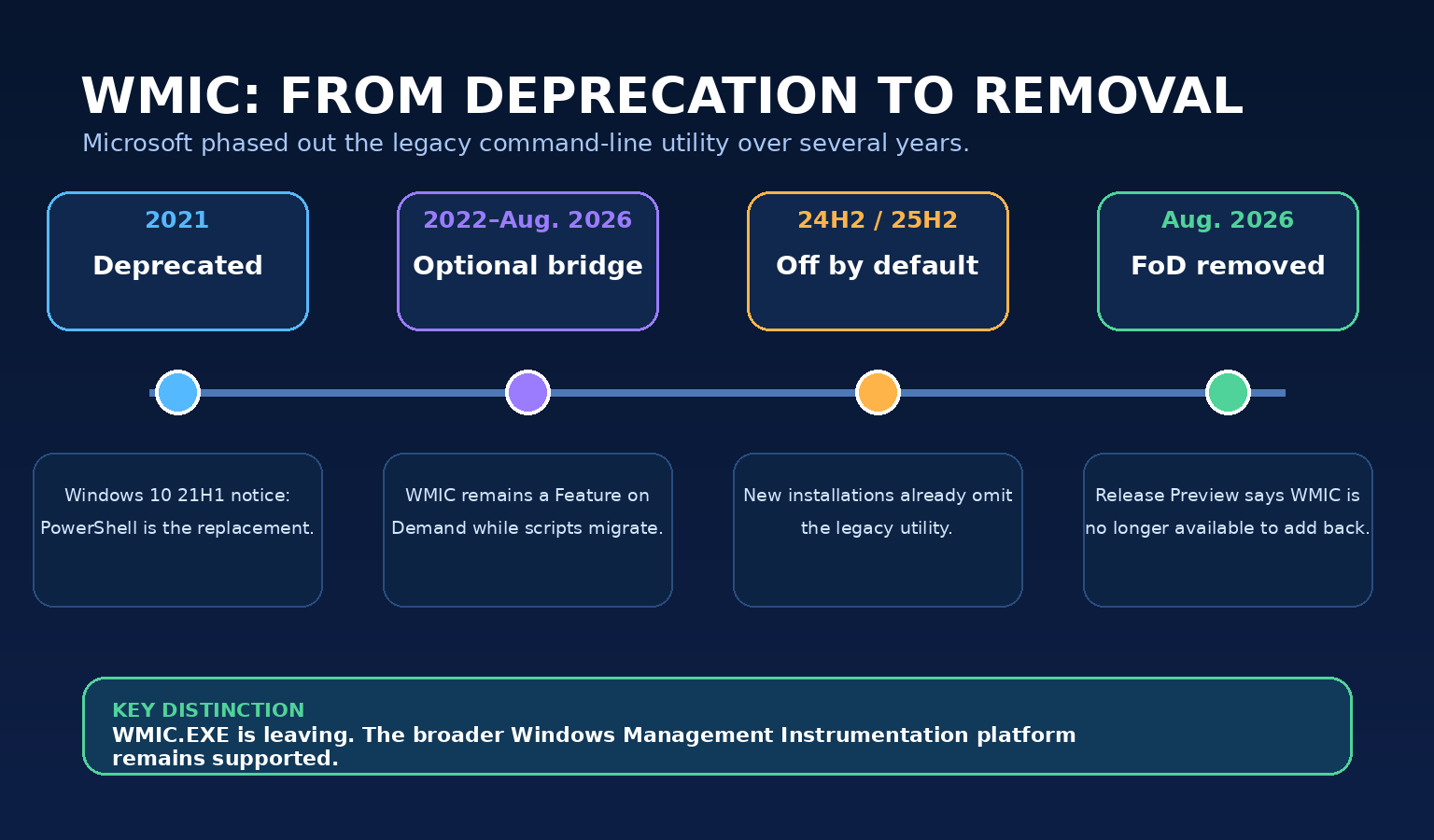
The removal timeline, without the headline confusion
| Stage | What Microsoft said or did | What it meant |
|---|---|---|
| Windows 10 21H1 (2021) | Microsoft formally listed the WMIC utility as deprecated and identified Windows PowerShell for WMI as its successor. | WMIC still worked, but customers were warned not to build new dependencies on it. |
| Windows 11 transition (from 2022) | WMIC was packaged as a Feature on Demand. | Microsoft could omit or disable it by default while providing a temporary add-back path for organizations still migrating. |
| 2024 transition guidance | Microsoft described reinstalling the FoD as a temporary solution while organizations moved to PowerShell or another supported tool. | The optional feature was a compatibility bridge—not a promise that WMIC would remain indefinitely. |
| Windows 11 25H2 preview (August 2025) | Microsoft listed WMIC among the feature removals in Windows 11 25H2. | New installations and newer deployment media were increasingly likely to omit it. |
| Release Preview, August 14, 2026 | Builds 26100.9267 and 26200.9267 (KB5120998) say 24H2/25H2 no longer include WMIC and it is no longer available as a FoD. | The old “just add it back” escape hatch is closing. The entry is under gradual rollout, so timing can vary by device. |
Some reports describe this as an August 2026 Patch Tuesday removal. That is too broad based on the evidence available when this article was published. Microsoft’s current canonical notice is dated August 14 and belongs to the Release Preview Channel. It describes separate gradual and normal rollout phases. The safe conclusion is that final removal is entering rollout for 24H2 and 25H2—not that every retail PC changed on August 11.
Why attackers liked WMIC
WMIC is a classic example of a “living off the land” tool: a legitimate, Microsoft-signed program already present on the computer that an attacker can misuse after gaining access. Because defenders expect Windows tools to exist, malicious use can blend into routine administration more easily than an unfamiliar executable.
MITRE ATT&CK tracks WMI abuse as technique T1047. Its catalog documents criminal and state-linked groups using WMI or wmic.exe for execution, system discovery, remote activity, ransomware deployment and recovery sabotage. Microsoft also documented the Astaroth information-stealing campaign abusing WMIC’s formatting behavior to download and execute script content as part of a chain composed entirely of legitimate system tools.
Learning about the victim
Malware has queried operating-system, processor, security-product and network information to decide what to do next or whether the machine is worth attacking.
Launching commands
Attackers have used WMI interfaces to start programs locally or remotely, sometimes avoiding the need to place a new administration utility on disk.
Reaching other computers
MITRE reports that INC ransomware can use wmic.exe to spread across multiple endpoints after a network is compromised.
Deleting shadow copies
Avaddon, BlackCat, LockBit 2.0 and other ransomware families have used WMIC/WMI paths to remove Volume Shadow Copies, making local recovery harder.
wmic.exe is absent.What replaces WMIC?
For new automation, Microsoft’s PowerShell documentation recommends the CIM cmdlets. CIM stands for Common Information Model. Cmdlets such as Get-CimInstance, Invoke-CimMethod, New-CimSession and Set-CimInstance expose management data as structured PowerShell objects instead of fragile columns of plain text.
PowerShell’s older WMI-specific cmdlets, such as Get-WmiObject, are themselves deprecated and are unavailable in PowerShell 6 and later. That means a migration from WMIC should usually target the CIM cmdlets rather than simply moving to another legacy interface.
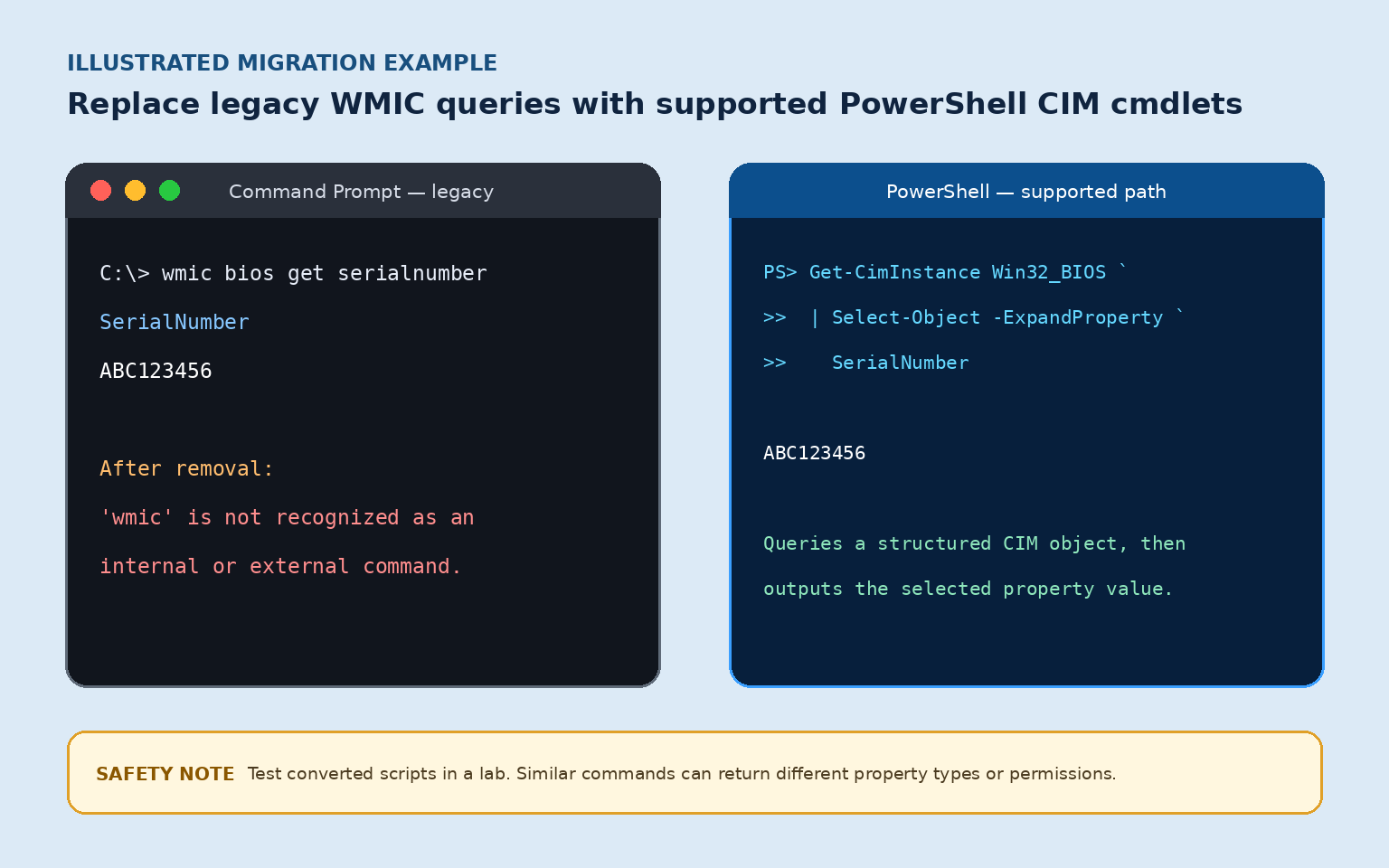
| Legacy intent | Supported PowerShell direction | Why it is better |
|---|---|---|
| Read BIOS details | Get-CimInstance -ClassName Win32_BIOS | Returns an object whose properties can be selected, filtered and exported reliably. |
| Read operating-system details | Get-CimInstance -ClassName Win32_OperatingSystem | Avoids parsing localized text columns. |
| Read processor details | Get-CimInstance -ClassName Win32_Processor | Supports explicit property selection and predictable pipelines. |
| Call a management method | Invoke-CimMethod after validating the target class and method | Makes method parameters and returned data visible as PowerShell objects. |
| Manage remote systems | Use authenticated CIM sessions and your organization’s approved remoting controls | Centralizes session configuration and is easier to audit than scattered legacy command strings. |
There is no trustworthy universal “search and replace” that converts every WMIC command. WMIC aliases sometimes renamed properties, reformatted values or invoked methods with syntax unlike PowerShell. A replacement must be tested against the same Windows editions, permissions, remote targets and expected output consumed by the next step in the workflow.
Who is most likely to notice?
Little or no visible impact
Normal applications, gaming, browsing, printing and Windows Update do not require a person to type WMIC. Its disappearance is usually invisible unless an old utility quietly calls it.
Old batch files may fail
A personal hardware-inventory or serial-number script can start returning “wmic is not recognized.” Rewrite it with supported PowerShell commands.
Legacy vendor tools need checking
Older login scripts, software installers, remote-support packages, inventory agents and line-of-business tools may shell out to wmic.exe.
Fleet-wide dependencies matter
Imaging task sequences, Group Policy scripts, scheduled tasks, help-desk runbooks and deployment systems should be inventoried before broad update approval.
What customers should do now
- Keep Windows security updates enabled. Do not block routine updates merely to preserve an obsolete administration command. If a business dependency exists, fix the dependency through a controlled testing process.
- Ask the software vendor first. If an application or installer fails with a WMIC error, install the vendor’s current supported version. Avoid downloading replacement copies of
wmic.exefrom third-party websites. - Inventory scripts and task sequences. Search source repositories, shared script folders, scheduled tasks, deployment packages and documentation for references to
wmicorwmic.exe. - Convert read-only queries first. Map the underlying WMI class and required properties to
Get-CimInstance. Preserve the exact output contract expected by downstream tools. - Test on representative Windows 11 24H2 and 25H2 devices. Include standard-user and administrator contexts, 32-bit and 64-bit launch paths where relevant, remote scenarios and machines with different language settings.
- Monitor failures and suspicious use. During transition, organizations should alert on unexpected
wmic.exeprocess launches and investigate legacy automation that suddenly fails after servicing. - Remove temporary exceptions. If your organization previously enabled the WMIC FoD to buy migration time, document that exception and close it. Microsoft’s latest rollout removes the add-back path.
A safe inventory example for administrators
The following read-only PowerShell example searches common script types under a folder you choose. It does not modify files. Run it only against directories you are authorized to inspect, and expect large trees to take time.
Get-ChildItem -Path 'C:\Your-Script-Repository' -Recurse -File `
  -Include *.bat,*.cmd,*.ps1,*.vbs |
  Select-String -Pattern '\bwmic(?:\.exe)?\b' -CaseSensitive:$false
That is only a starting point. Compiled applications can invoke WMIC without exposing the string in a script folder. Endpoint telemetry, application testing and vendor confirmation are needed for complete coverage.
What if “wmic is not recognized” appears?
That message normally means the executable is missing, disabled or no longer installed. In 2024, Microsoft documented installing the WMIC Feature on Demand as a temporary bridge. The August 2026 Release Preview notice now says that FoD is no longer available. On a system that has received the final-removal change, the correct response is to update the script or application—not hunt for an unofficial download.
If the message appears inside business software, capture the exact application name, version, time and task that failed, then contact the vendor or your IT provider. Do not paste random replacement commands from the internet into an elevated terminal.
Security teams: detection still matters
Organizations should not immediately discard every detection involving WMIC. During a staggered rollout, some endpoints may retain it while others do not. Unexpected process creation involving wmic.exe, especially with remote-node, process-creation, encoded-script or shadow-copy behavior, remains worthy of investigation.
After WMIC disappears, shift detection toward the behavior: unusual WMI provider activity, remote process creation, suspicious PowerShell or CIM sessions, recovery tampering, security-product changes and lateral movement. Blocking only a filename is a brittle defense; attackers routinely substitute another interpreter or management interface.
Frequently asked questions
Did Microsoft remove all of WMI?
No. Microsoft says the change affects only the WMIC command-line utility. The broader Windows Management Instrumentation platform remains supported.
Is WMIC already gone from every Windows 11 computer?
No responsible source supports that claim as of August 17, 2026. New 24H2/25H2 installations already omitted it by default, and Microsoft’s August 14 Release Preview notes begin the stage where the FoD is also unavailable. The change is listed under gradual rollout, so device timing varies.
Does Windows 10 lose WMIC too?
Microsoft’s current August 2026 notice specifically names Windows 11 versions 24H2 and 25H2. WMIC has long been deprecated on Windows 10, but this article does not assume the same package-removal schedule for every supported Windows 10 or Windows Server release.
Can I download WMIC from another website?
Do not. A third-party executable advertised as a missing Windows component is an avoidable malware risk and can also create unsupported system files. Update the dependent software or convert the task to a supported management interface.
Will removing WMIC stop ransomware?
No. It removes one frequently abused tool and can break older malicious scripts, which is useful. Ransomware operators can use other utilities and WMI interfaces, so backups, endpoint protection, least privilege, patching and monitoring remain essential.
Should I replace WMIC with Get-WmiObject?
For new development, Microsoft recommends CIM cmdlets. The older PowerShell WMI cmdlets are deprecated and are not available in PowerShell 6 and later.
Do I need PowerShell 7?
No for basic CIM migration. Windows PowerShell 5.1 includes the CimCmdlets module on supported Windows systems. PowerShell 7 can also use CIM cmdlets, but organizations should test modules and remoting behavior in their supported environment.
The IT Guys’ recommendation
For households, accept the change as quiet Windows hardening and keep your computer updated. For businesses, treat it as a compatibility deadline. An old script that has worked for ten years can still be business-critical, and discovering it during a failed deployment is more expensive than finding it in a controlled inventory today.
If you depend on older Windows automation, document what each script does, migrate to supported CIM cmdlets or a vendor-supported management tool, test the result and monitor the first production rollout. Do not keep legacy components alive simply because replacing them feels inconvenient.
For a broader look at the current Windows release, see our Windows 11 25H2 guide. For this month’s security context, our August 2026 Patch Tuesday guide separates released fixes from later preview changes.
Sources and further reading
- Microsoft Learn: Windows 11 Insider Release Preview Build 26100.9267/26200.9267 (KB5120998) — released and last updated August 14, 2026; primary source for the current rollout wording.
- Microsoft Learn: Deprecated features in the Windows client — primary lifecycle source; WMIC’s original deprecation announcement is tied to Windows 10 21H1.
- Microsoft Windows IT Pro Blog: “How to install WMIC Feature on Demand on Windows 11” — published July 11, 2024; documents the temporary FoD bridge and migration direction.
- Windows Insider Blog: Releasing Windows 11, version 25H2 to the Release Preview Channel — August 29, 2025; names WMIC among 25H2 feature removals.
- Microsoft Learn: WMI command-line (WMIC) utility reference — definition and legacy command reference.
- Microsoft Learn: Working with WMI—PowerShell 101 — explains WMI versus CIM and recommends CIM cmdlets for new development.
- MITRE ATT&CK T1047: Windows Management Instrumentation — adversary behavior, software/group examples, mitigations and detection guidance.
- Microsoft Security Blog: Dismantling a fileless Astaroth campaign — July 8, 2019; first-party example of WMIC abuse.
- BleepingComputer: Microsoft starts killing off WMIC in Windows — February 10, 2022; historical independent reporting on early removal and abuse.
Reporting cutoff: August 17, 2026. The current Microsoft notice is Release Preview documentation and describes a gradual rollout. Article visuals are original explanatory artwork by The IT Guys; the terminal comparison is an illustration, not a Microsoft product screenshot.